Participant
May 6, 2010
Question

What is wrong with my code?

  • May 6, 2010
  • 1 reply
  • 540 views

I should start by saying, I am not a cold fusion expert. I put together a little dynamic admin for some friends for their bead shop.

However, our host recently switched servers and now several of my UPDATE pages are not working.

I get the error:

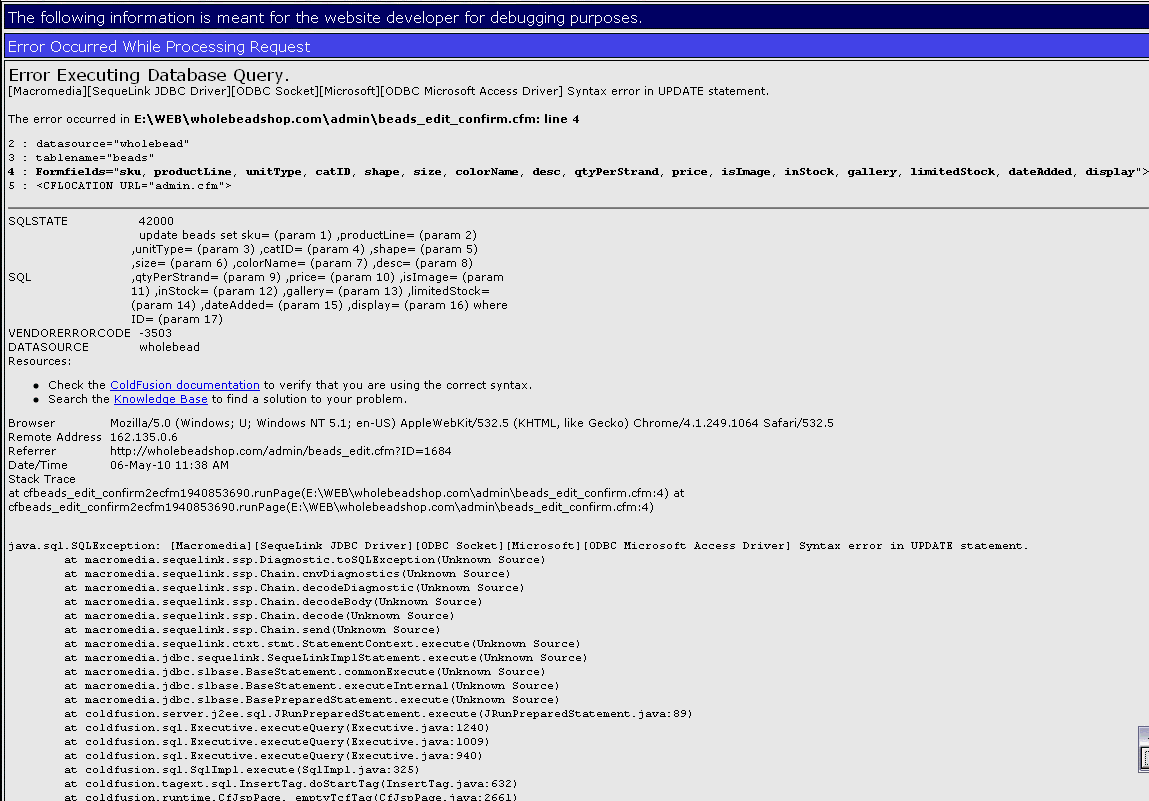
Error Executing Database Query.

[Macromedia][SequeLink JDBC Driver][ODBC Socket][Microsoft][ODBC Microsoft Access Driver] Syntax error in UPDATE statement.
The error occurred in E:\WEB\wholebeadshop.com\admin\beads_edit_confirm.cfm: line 4
2 : datasource="wholebead"
3 : tablename="beads"
4 : Formfields="sku, productLine, unitType, catID, shape, size, colorName, desc, qtyPerStrand, price, isImage, inStock, gallery, limitedStock, dateAdded, display">
5 : <CFLOCATION URL="admin.cfm">

I have scoured over the code, I see no discrepancies. I have matched all fields from the EDIT page to the UPDATE page. I have also tested my other update pages they work fine.

My take is, this page has worked fine for years and suddenly doesn't. I do not know what version of CF their host is running, but I have to think this is related to some kind of syntax change.

Any ideas? Thanks.

    This topic has been closed for replies.

    1 reply

    Inspiring
    May 6, 2010

    DESC is a reserved word in MS Access.

    Can I recommend you use <cfquery> rather than <cfinsert> and <cfupdate> to do your queries: you get a lot more flexibility in the SQL that is sent to the DB if you roll-your-own.

    Also, is there any scope for you to stop using MS Access?  It's not fit for purpose for production environments, as it's only a desktop app, not a server app.

    --

    Adam

    Participant
    May 6, 2010

    Thanks Mark.

    Forgive me for sounding ignorant, but is Desc a newly reserved Access term? Just weird it's worked for so long and now doesn't. Would changing the field name (and of course relevant code) make a difference?

    Lastly, no, no issue with migrated from Access. This was setup close to 10 years ago, ha! Maybe I will consult our host about migrating, but I'd like to get this resolved first.

    Inspiring
    May 6, 2010
    Thanks Mark.

    I think it was Adam that responded ;-)

    Forgive me for sounding ignorant, but is Desc a newly reserved Access term? Just weird it's worked for so long and now doesn't. Would changing the field name (and of course relevant code) make a difference?

    Yes, changing the field name would resolve the problem. Assuming you do not select another reserved word.  As far as it being newly reserved word, I highly doubt it.  DESC is a reserved word in most all databases. It is a keyword used for sorting in an ORDER BY clause. ie Sort in DESC[ending] or ASC[ending] order.

    That said, it is possible the new server is using a different database driver, which may have a slightly different set of reserved words.  IIRC, that was true of the CF8 "Microsoft Access" versus "Microsoft Access Unicode" driver. I am not clear on exactly why. Just that a few queries that worked with one driver, caused a syntax error with the other, due to different reserved words.  Though DESC is such a fundamental keyword. I would be very suprised if it was not a reserved in most all drivers/databases.