
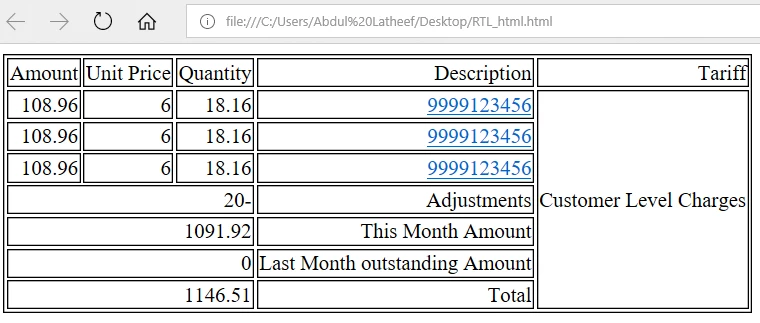
While generating PDF in ColdFusion Rowspan is not working properly for RTL direction (ex: Arabic)
I have a table structure in HTML where I have to use rowspan and RTL(Right To Left) direction. But while converting this HTML to PDF rowspan is not working as expected. Assuming this is a bug in ColdFusion where an HTML with rowsapn and RTL direction is not working correctly.
Note that this is working fine for LTR (Left To Right) direction (ex: English Characters). But I need to use RTL direction since Arabic characters need to be displayed in PDF.
Sample Code :
<cfdocument format="PDF" filename="C:\test.pdf" overwrite="true">
<!DOCTYPE html>
<html>
<head>
<style>
table, th, td {
border: 1px solid black;
}
table#mainTable {direction:rtl;}
</style>
</head>
<body>
<cfoutput>
<table id="mainTable">
<tr>
<td>Tariff</td>
<td>Description</td>
<td>Quantity</td>
<td>Unit Price</td>
<td>Amount</td>
</tr>
<tr>
<td rowspan="7" >Customer Level Charges</td>
<td>9999123456</td>
<td>18.16</td>
<td>6</td>
<td>108.96</td>
</tr>
<tr>
<td>9999123456</td>
<td>18.16</td>
<td>6</td>
<td>108.96</td>
</tr>
<tr>
<td>9999123456</td>
<td>18.16</td>
<td>6</td>
<td>108.96</td>
</tr>
<tr>
<td>Adjustments</td>
<td colspan="4">-20</td>
</tr>
<tr>
<td>This Month Amount</td>
<td colspan="4">1091.92</td>
</tr>
<tr>
<td>Last Month outstanding Amount</td>
<td colspan="4">0</td>
</tr>
<tr>
<td>Total</td>
<td colspan="4">1146.51</td>
</tr>
</table>
</cfoutput>
</body>
</html>
</cfdocument>
Expected Result
It should work as how it is working in Browser, screen shot attached.


 AdChoices