Inspiring
May 17, 2014
Answered

Why don't my jQuery scripts execute in my templates?

  • May 17, 2014
  • 1 reply
  • 1434 views

Hi,


I am trying to use JQuery in my cfm code for an input form.


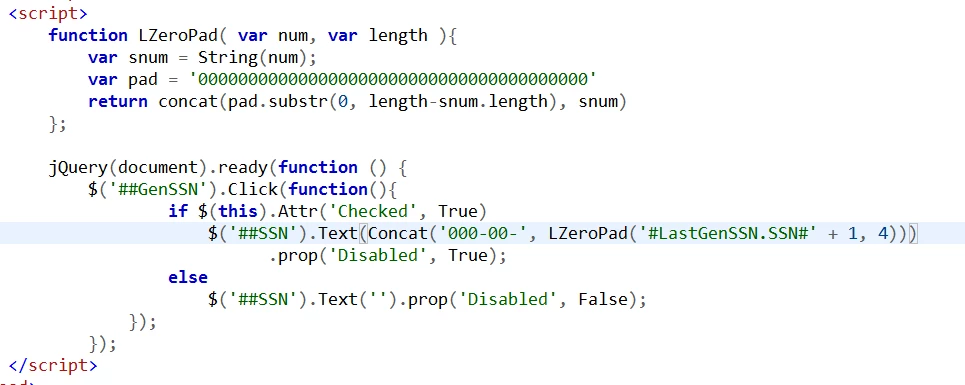
JQuery Code:


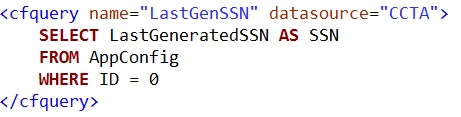
CFQuery:

Input Object code:


The object is to generate a pseudo SSN based on the last digit used stored in a database table row if the checkbox is checked.

The output looks like this:


It doesn't seem to do anything to check and uncheck the box but throws no errors.  Running the debuggers doesn't seem to even step into the jquery code.????  This isn't the first time I have tried to use JQuery selectors without success in my cf code...

HELP!

Thanks,

Nathan Manning

    This topic has been closed for replies.
    Correct answer BKBK

    I thought I did have it enabled in CF Admin.

    I admit that I am a novice at JavaScript, C/C++/C## are my native languages. I forget that JavaScript is not strongly typed... Of course it is not, it is interpreted.

    Thanks, I will work on it. I had checked my parentheses with the pair matching, but I will export it to Notepad++ where I can see it better.


    As Tribule says, there are a lot of mistakes. You should have seen at least some.

    For example, Javascript is case-sensitive, and Concat, True, False, Click, Checked, Disabled, Text, and Attr should be in lower case. Furthermore, the functions, String() and concat, are incorrectly used here. LastGenSSN.SSN is a ColdFusion variable, yet it is used in Javascript. Even allowing for that, '#LastGenSSN.SSN#' + 1 attempts to add a string to a number. Elsewhere, the function val() should take the place of text().

    Putting the corrections together:

    <cfset lastGenSSN = LastGenSSN.SSN><!--- Coldfusion variable --->

    <script>

    function LZeroPad(num, len){

    var snum = num.toString();

    var pad = '000000000000000000000000000000000000000';

    return pad.substr(0, len - snum.length).concat(snum);

    };

    $(document).ready(function () {

        alert("In jQuery");

        $('#GenSSN').click(function (){

            alert("In Click function");

            if (this.checked){

                 /* Conversion from Coldfusion variable to Javascript variable*/

                <cfoutput>#toScript(lastGenSSN, "jsSSN")#</cfoutput>

                $('#SSN').val('000-00-'.concat(LZeroPad(jsSSN+1, 4)));

                $('#SSN').prop('disabled', true);

                alert("Processed True");

            }

            else {

                $('#SSN').val('');

                $('#SSN').prop('disabled', false);

                alert("processed false");

            }

        });

    });

    </script>

    1 reply

    Legend
    May 17, 2014

    As you know, ColdFusion serves out HTML to the web browser and does not know anything about jQuery. jQuery is JavaScript, and runs client-side in this case. Have you established that the jQuery click event is being captured? If you place an alert() in the code, can you see it when you click the GenSSN button? I also assume you have JavaScript debugging enabled - are there any errors? I notice too that you use ## - is your JavaScript inside a <cfoutput> tag? Otherwise, just a single # should be used to place the CF values inside your script.

    Inspiring
    May 17, 2014

    I removed the extra hashes, and place alerts all through the script. No Joy, no alerts.