
Participant
August 11, 2016
Answered

Windows could not start CF2016 application service on local computer.

  • August 11, 2016
  • 1 reply
  • 1168 views

Hello,

After a fresh CF2016 installation all CF services are running fine, but after I've updated the "Java and JVM" it's asking for restart the CF services, but when I do I'm getting the below error. Please help to let me know the fix for the below.
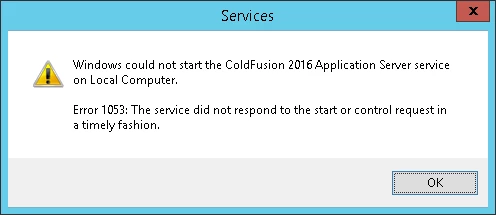
Thanks in advance.

Java and JVM

This topic has been closed for replies.
Correct answer carl type3

What did you update the jvm settings to? This error usually always occurs after these changes if the changes you made are incorrect.

Did you make a backup of the jvm config before changing it? If not see if you can see a jvm.bak backup in the coldfusion cfusion/bin folder and revert it.


+1

Ditto for roll back JVM settings. If you did JVM changes in CFadmin then the previous settings would be in cfusion\bin\jvm.bak. One can rename jvm.config to something else then rename jvm.bak to jvm.config, kill CF and try start CF.

1 reply

Legend
August 11, 2016

Hi,

Perhaps either coldfusion-error or coldfusion-out log in ColdFusion2016\cfusion\logs will provide a clue.

Also suggest open CMD prompt as administrator then CD to ColdFusion2016\cfusion\bin and run cfstart. Any errors?

HTH, Carl.

Participant
August 11, 2016

No errors on both \cfusion\logs and if we run from cmd prompt as administrator, after this err we can see the status as "starting".

Please let me know an solution to fix this issue asap.

Inspiring
August 11, 2016

What did you update the jvm settings to? This error usually always occurs after these changes if the changes you made are incorrect.

Did you make a backup of the jvm config before changing it? If not see if you can see a jvm.bak backup in the coldfusion cfusion/bin folder and revert it.