Inspiring
February 4, 2022
Answered

Your client-side CFML code has encountered an initialization error.

  • February 4, 2022
  • 2 replies
  • 426 views

Your client-side CFML code has encountered an initialization error. The required plugins cannot be loaded successfully within the timeout period.


i am facing this issue and not sure as to how i can fix this issue. i am using coldfusion 2021 standard edition and i am trying to access device camera using following code:


<html>
<head>
<title>camera camera. aa aa.</title>
<script type="text/javascript">
function src_to_img(img_id,data_to_write)
{
document.getElementById(img_id).src=data_to_write;
}
</script>

</head>
<body>

<cfclientsettings enableDeviceAPI=true>

<cfclient>

<cffunction access="public" name="getpiccam" returntype="void" verifyclient="Yes">
<cfset opt = cfclient.camera.getOptions()>
<cfset response = cfclient.camera.getPicture(opt,true)>

<cfset response ='data&colon;image/jpeg;base64,'+ response>
<cfset src_to_img("myimg", response)>
</cffunction>

</cfclient>

<button style="width:100;height:50" onclick="invokeCFClientFunction('getpiccam',null,null)">Get a picture
</button>

<img style = "width:200; height:100;" id = "myimg"></img>


</body>
</html>


Attched is the error i get in browser console.

 

    This topic has been closed for replies.
    Correct answer BKBK

    OK. Let's compare notes.

    When I launch the following code as the page cfclientTest.cfm, I get no errors.

    <html>
    <head>
    <title>camera camera. aa aa.</title>
    <script type="text/javascript">
    	function src_to_img(img_id,data_to_write)
    	{
    		document.getElementById(img_id).src=data_to_write;
    	}
    </script>
    
    </head>
    <body>
    
    <cfclientsettings enableDeviceAPI=true>
    
    <cfclient>
    
    	<cffunction access="public" name="getpiccam" returntype="void" verifyclient="Yes">
    		<cfset opt = cfclient.camera.getOptions()>
    		<cfset response = cfclient.camera.getPicture(opt,true)>
    		
    		<cfset response ='data;image/jpeg;base64,'+ response>
    		<cfset src_to_img("myimg", response)>
    	
    	</cffunction>
    
    </cfclient>
    
    <button style="width:100;height:50" onclick="invokeCFClientFunction('getpiccam',null)">Get a picture
    </button>
    
    <img style = "width:200; height:100;" id = "myimg"></img>
    
    </body>
    </html>


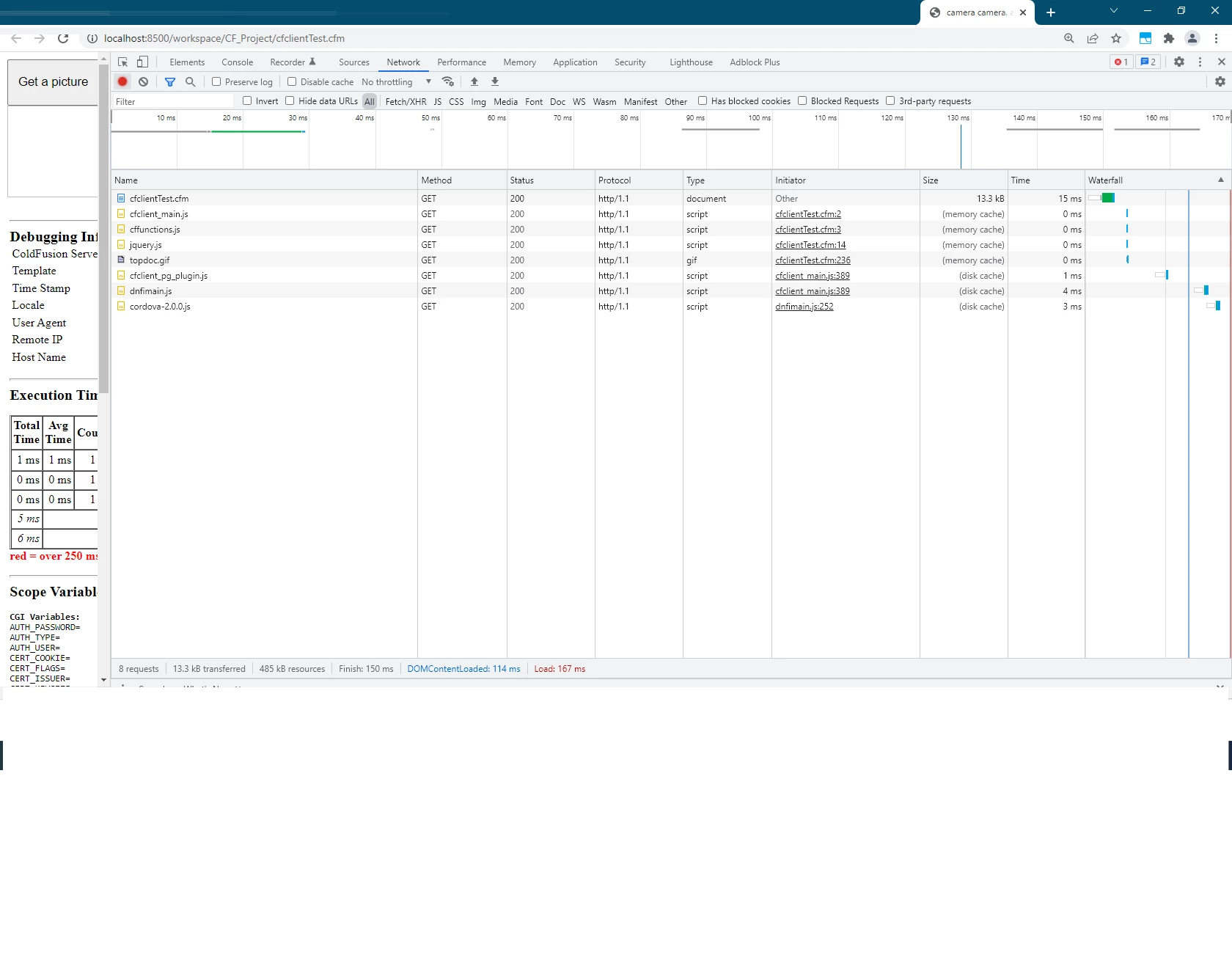
    When I press F12 (Developer Tools) on the Chrome browser, I see the following:


    Going forward, I may have found the cause of the error:

    • In your setup, ColdFusion fails to load the cfclient package within 10 seconds.

    To see this, launch your CFM page and press Ctrl-u (to display the page source). You will see that the source contains the following line:


    setTimeout(function(){if(!cfclient.isCFClientReady()) throw "Your client-side CFML code has encountered an initialization error. The required plugins cannot be loaded successfully within the timeout period.";},10000);


    I am on ColdFusion 2021 Developer Edition. I wonder whether the error is occurring in your setup because you are on ColdFusion 2021 Standard Edition. 


    Alternatively, I also wondered if the following might help:


    <cfclientsettings enableDeviceAPI=true deviceTimeOut="30" />


    in place of


    <cfclientsettings enableDeviceAPI=true>


    with the idea of giving ColdFusion enough time to load the cfclient plugin. For more on this, see https://helpx.adobe.com/coldfusion/cfml-reference/coldfusion-tags/tags-c/cfclientsettings.html 

    2 replies

    Inspiring
    February 7, 2022

    can someone help me on above issue. would be glad if someone can share the working code to invoke camera or get information from device GPS or any other device periphral.


    I have tried all CF codes available on the internet and nothing works. 

    BKBK
    Community Expert
    Community Expert
    February 13, 2022

    Hi @Rana-Umair ,

    I honestly don't know the cause of the initialization error. However, when I compare your code with the code in the documentation on cfclient-camera-getpicture I see one difference:


    Your code:

    onclick="invokeCFClientFunction('getpiccam',null,null)"


    The code in the documentation:

    onclick="invokeCFClientFunction('getpiccam',null)"


    Inspiring
    February 17, 2022

    Hi @BKBK ,


    Thankyou for your reply. I have tried both 

    onclick="invokeCFClientFunction('getpiccam',null,null)"

    AND

    onclick="invokeCFClientFunction('getpiccam',null)"

    Unfortunately, both of above doesnt work.


    Community Expert
    February 4, 2022

    Don't do this. Don't do this!


    If you can write code that will activate someone's camera, that's a security violation. You are not supposed to be able to do this! It's a bad thing, whether CF lets you do it or not. Imagine if someone else wrote code that accessed your camera from a generic web app. Would you like that? (Hopefully, no!)


    If you really have to do this - maybe you're building the next version of Microsoft Teams or Zoom or whatever - you need to make it clear to the user that you'll be doing this, and you'll need to prompt them to allow access first, and finally you'll need to wrap your CFCLIENT block with CFTRY/CFCATCH.


    Dave Watts, Eidolon LLC

    Dave Watts, Eidolon LLC
    Inspiring
    February 4, 2022
    I am only trying to learn as to how can i access the device camera. My question is very simple and i am looking forward for the help.

    I hope that explains my question.

    Thanks

    Get Outlook for Android