


Participating Frequently
July 17, 2018
Question

Abobe Bridge CC2018 color difference between 'essentials' and 'filmstip' view & Photoshop

  • July 17, 2018
  • 1 reply
  • 1099 views

Hi Forums.

Apologies for double posting, but I realized my first post was to a thread that's already been 'correctly answered'.

And this problem does not directly relate to the original posters issue.

This is a separate (but somewhat related) issue with Bridge CC 2018 color.

Thanks for your patience

Peter

--------------

I realize that bridge caches it's thumbnails as sRGB. However on my iMac (2017 OS 10.13.5) Bridge CC 2018 is not matching color to an sRGB Photoshop CC 2018 image. Furthermore, on my iMac, the thumbnail views in Bridge's "essentials" mode  and "filmstrip" mode are a different color from each other. And neither of them matches Photoshop's color.

The screen grab below illustrates.
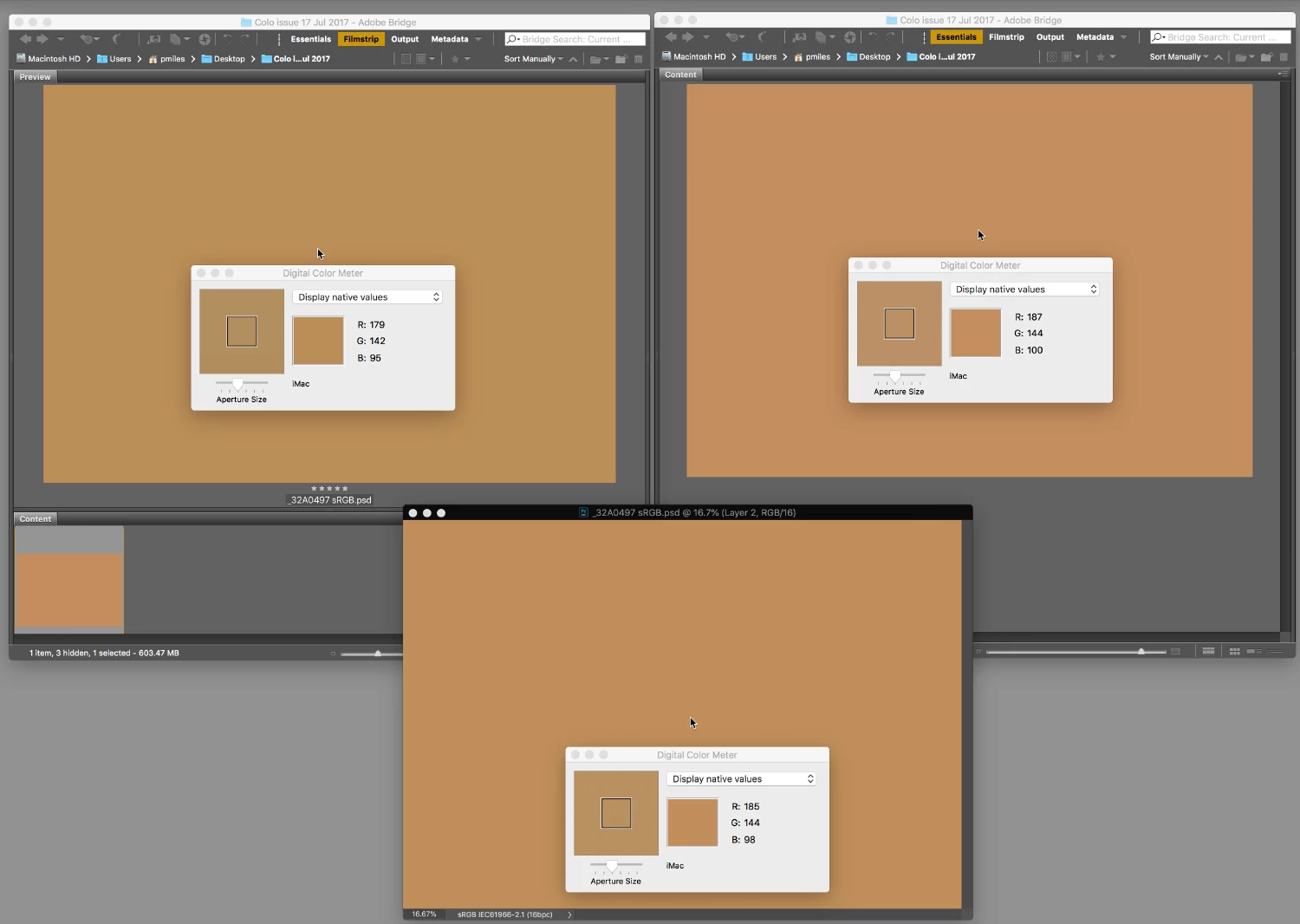
Can you try what i did and see if you get the same results.

1: Create an sRGB Photoshop canvas and flood it with RGB (193,143,90)

2: Save it  to a folder.

3: Create 2 Bridge windows and point them both at this folder.

     put one in essentials view and on in filmstrip view.

4: For the moment, change your custom monitor profile back to the factory  'iMac' profile

     so there is no argument about broken display profiles. (try your custom display profile afterward)

5: Launch Macintosh HD/Applications/Utilities/Digital Color Meter. Put it in "Display native values"

Compare the Native monitor RGB values being used to display of the yellow tone in the three windows. (the Photoshop window and the 2 Bridge windows)

If the color management is correctly doing it's thing, the RGB numbers being sent to the display should be the same. It's the same color. To me they LOOK different.

On my iMac the Native monitor RGB values are different. Quite significantly. I get similar discrepancies on my MacBook Pro too.

Maybe on your computer they all look and measure the same. Can someone else try this and let me know what you find.

Thanks

Peter


    This topic has been closed for replies.

    1 reply

    D Fosse
    Community Expert
    Community Expert
    July 17, 2018

    It doesn't happen here. All three are absolutely identical, down to the last digit. This is Windows, so I just used my normal display profile and converted to sRGB for this screenshot::

    To be clear, you won't see the original RGB values in a screenshot. The numbers will be converted to the display profile, so if that profile isn't already assigned it should be. But the original numbers should return when converting the screenshot back to sRGB.

    Participating Frequently
    July 17, 2018

    Hi D Fosse.

    Thanks for checking that your side and the screen shot too. Very interesting.

    Glad to see the colors are matching on your PC Platform.

    Hmm... I did some further tests

    We have a lab of 31 color managed iMacs next door running Mac OS10.13.1.

    Running the same test the 3 windows color match both visually and by the screen RGB numbers.

    Also one of my staff colleges Macbook Pro laptop is running 10.13.3.

    Running the same test again on his laptop the 3 windows color match both visually and by the screen RGB numbers (almost).

    So it appears no problem with Mac 10.13.1 or 10.13.3

    But I'm AM getting a problem on both my MacBook Pro and iMac that are running 10.13.5.

    That could be a co-incidence, or maybe there is something not quite right with OS 10.13.5

    Can someone else running Mac OS 10.13.5 try this test out and let me know what you find ?

    Thanks

    Peter


    Participating Frequently
    July 18, 2018

    I had Our IT technician check this with his iMac on OS 10.13.5 . He was not able to replicate the problem I was seeing.

    Dual monitors.

    I realised that the machines I have problems with are both running dual monitors ( Eizo's running off thunderbolt to displayport cables). All the other machines I've tried and don't see problems with are just running the single built in iMac/Macbook Pro display .

    Unplugging the second display fixes problem

    When I unplug the second monitor on my dual monitor station and relaunch Photoshop and bridge, I  stop seeing the large color differences between the 3 windows.

    Photoshop updates not fixing the problem

    I also ran and installed the latest Adobe CC2018 updates (I thought I was up to date.) But this has not fixed the problem either. Not running a second monitor is not a long term solution for me.

    Can you help?

    If any one is out there with Mac dual monitor set up running OS 10.13.x can you please try this test and let me know what you find? (And maybe if you are a PC user running dual monitors could you run this test to confirm that this is a Mac only issue)

    Thanks for your time

    Peter