Known Participant
May 10, 2020
Answered

Access profile list via script

  • May 10, 2020
  • 2 replies
  • 3702 views

Hello,


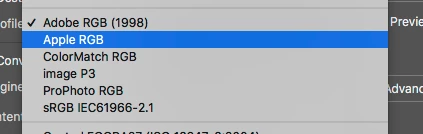
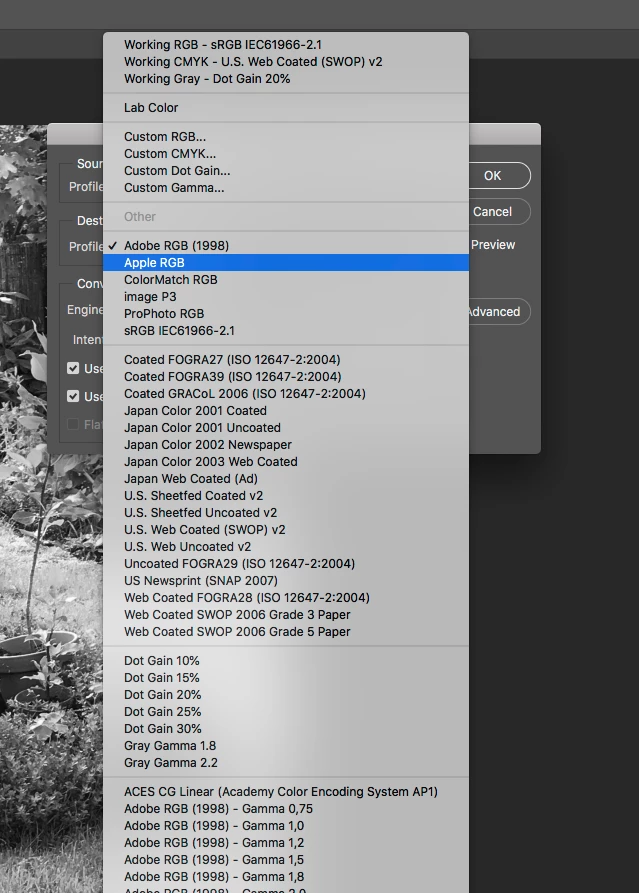
I'm trying to allow users to access the profiles on their machine via a selection box - how can I do this? The same one that's in the 'convert to profile' option in Photoshop. Please see attached screenshot - I can't find this anywhere!


Thanks!
This topic has been closed for replies.
Correct answer r-bin
Only this can be obtained.


The rest should be read from icc(m) files from folders where Photoshop is looking for them.

And not only in folders
Win: C:/Windows/System32/ spool/drivers/color
Mac: Library/ColorSync/Profiles
 
It's complicated )
 

2 replies

r-binCorrect answer
Legend
May 11, 2020
Only this can be obtained.


The rest should be read from icc(m) files from folders where Photoshop is looking for them.

And not only in folders
Win: C:/Windows/System32/ spool/drivers/color
Mac: Library/ColorSync/Profiles
 
It's complicated )
 
NB, colourmanagement
Community Expert
Community Expert
May 11, 2020

Hi,


When the users acccess the (output) ICC  profile list (as in your screenshot) is it the convert to profile command you're planning using in the next step?

Do you definitely want them to see the prfoile list within Photoshop and be able to choose one?


If it's not for convert to profile - what would you like to happen once they choose the profile from the "selection box"? 

It's easier for us to help you if we know all about what you are attempting to do? 


thanks

neil barstow, colourmanagement.net :: adobe forum volunteer

[please do not use the reply button on a message in the thread, only use the one at the top of the page, to maintain chronological order]

Known Participant
May 11, 2020

Basically I'm working on making a simple image processor based on what I need to change - I need to be able to select the profile for a folder of images, and then convert them.


My processor mockop is below, roughly based on Paul-Riggot's processor