


Participant
April 29, 2019
Answered

Adobe suit displays colors way too dark but exports correctly

  • April 29, 2019
  • 1 reply
  • 841 views

Hello,

My colors in all adobe programs display way too dark. However it exports the proper color. It worked properly before but after an update it changed. Its driving me up the wall and I can't figure it out, I would love some help.

Here is an example of what I mean. (Happens with all documents it even affects white)

(Top left face is vector, bottom left is png, right is right color png.)

Here are my current color profile settings.
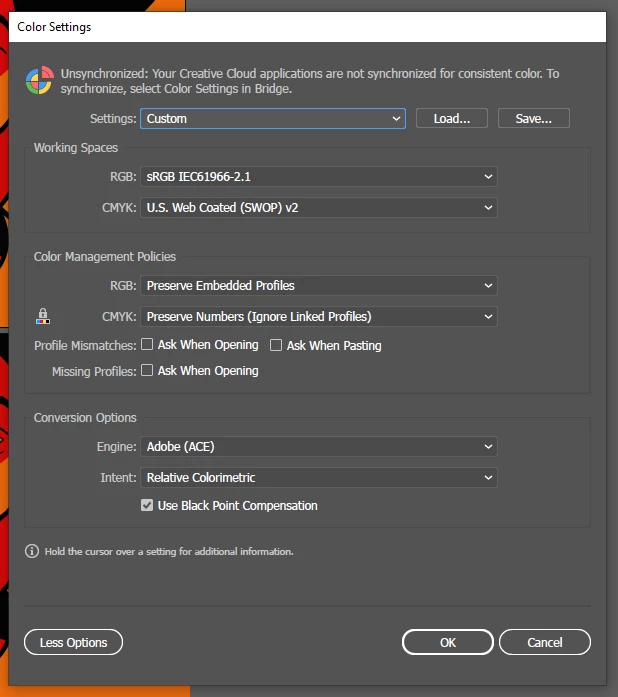
I'm really not sure what has gone wrong. I've tried reinstalling but that doesn't seem to work.

    This topic has been closed for replies.
    Correct answer D Fosse

    That*s a defective monitor profile. Windows "Photos" doesn't support color management at all, and is unaffected by a bad profile.

    Are you using a calibrator to make your profiles? If so, rerun it. If not, you have probably received a bad manufacturer profile, distributed through Windows Update. That happens a lot - Samsung, Dell, Acer, Asus and some others are notorious for this. They just can't get it right.

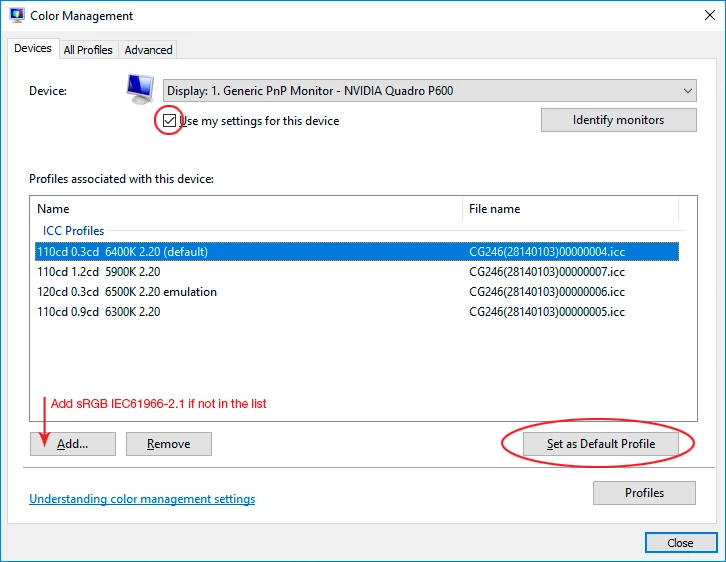
    If you don't have a calibrator, use sRGB IEC61966-2.1 until you do. Replace the profile here, and relaunch all applications when done. they need to load the new profile at startup:

    1 reply

    D Fosse
    Community Expert
    D FosseCommunity ExpertCorrect answer
    Community Expert
    April 30, 2019

    That*s a defective monitor profile. Windows "Photos" doesn't support color management at all, and is unaffected by a bad profile.

    Are you using a calibrator to make your profiles? If so, rerun it. If not, you have probably received a bad manufacturer profile, distributed through Windows Update. That happens a lot - Samsung, Dell, Acer, Asus and some others are notorious for this. They just can't get it right.

    If you don't have a calibrator, use sRGB IEC61966-2.1 until you do. Replace the profile here, and relaunch all applications when done. they need to load the new profile at startup:

    dalermsAuthor
    Participant
    April 30, 2019

    I just wanted to thank you for taking your time and helping me, this has been driving me crazy for about a week and you have no idea how much you improved my week. Truly, thank you.