


Colors in Illustrator appear different to colors in pantone color manager
Hello everyone,
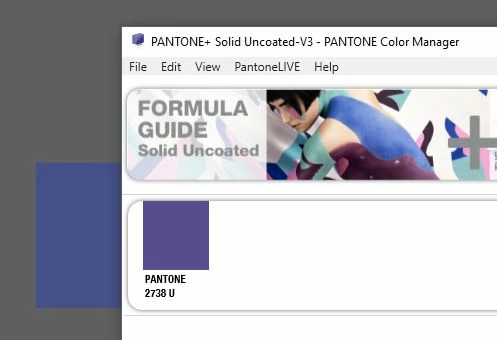
So I purchased a pantone solid coated, uncoated book. I've used one of those colors in Adobe illustrator but it appears very different from the one in the book (much lighter.. less saturated.. etc).. I downloaded the "pantone color manager" and to my surprise when I look up that color in the color manager, it appears to be much closer to the actual color in the book. I also looked up the color by it's code on the pantone website and it also looks off (exactly like the one I'm seeing in Ai).
The screenshot below shows how the color is appearing in Ai (on the left) and how it's appearing in the pantone color manager (right). ! !
It's a very annoying problem as it makes me work with colors that are far from what I want my final output to look like. Is this a color management (ICC profile) problem? Because I'm not exactly an expert in that area.
Thank you !
 AdChoices