Known Participant
August 4, 2025
Answered

Compatibility from Colorgate .icc color profile and illustrator

  • August 4, 2025
  • 1 reply
  • 847 views

Hello everyone, I want to add an .icc color profile to the list of available color profiles. I have installed the .icc file in Windows C:\Windows\System32\spool\drivers\color, restarted Illustrator but my .icc does not appear in the list. can anyone help me?

    Correct answer NB, colourmanagement

    Ok, so I have to set Colorgate Profile here, right?
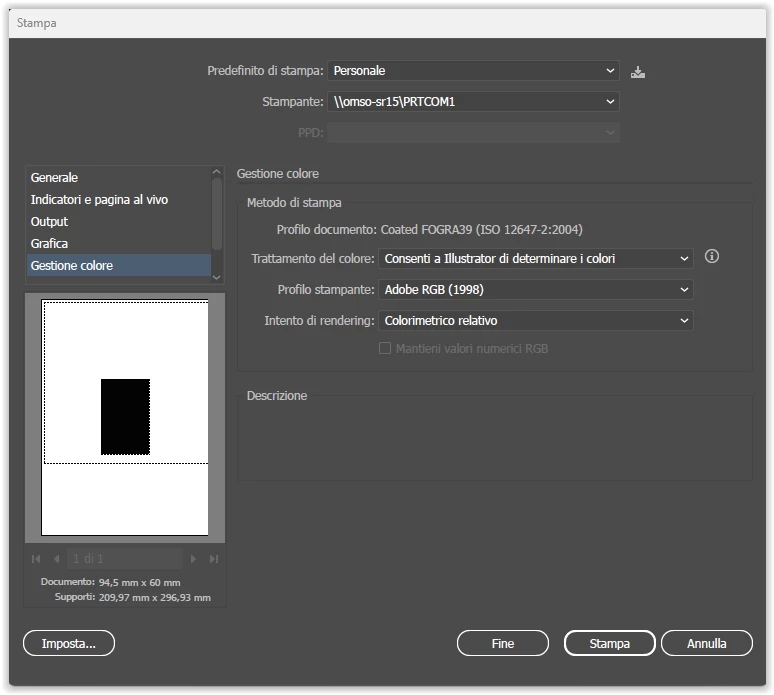


    @mm90280672If the Colorgate Profile you have isn't showing up in Adobe apps it could have differing internal and external names,

    that seems to be quite common practice with some makers of icc profiles for some inexplicable reason. All irt does is confuse users and generate support events!


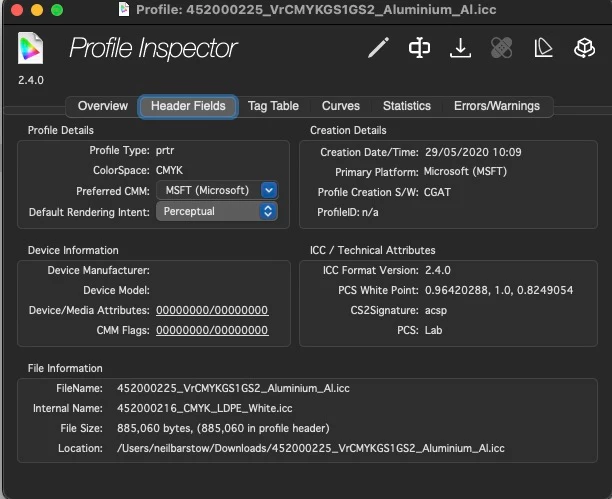
    I'm afraid I don't know how to check that on Windows. but I did download your profile and check in Colorthink 4 - and indeed the internal name differs, so in applications you'd want to look for the internal name (see below, under "internal name" it's actually quite different) to the filesystem name:
    I'd expect your Colorgate RIP to deal with all this icc conversion anyway but that’s a different matter


    I hope this helps

    neil barstow colourmanagement - adobe forum volunteer,

    colourmanagement consultant & co-author of 'getting colour right'

    See my free articles on colourmanagement online

    Help others by clicking "Correct Answer" if the question is answered.

    Found the answer elsewhere? Share it here. "Upvote" is for useful posts



    1 reply

    Participating Frequently
    August 4, 2025

    To use it as a working profile, I think you just need to go to Adobe > Color > Profiles and drop it in there.  Spool>Drivers I think feeds the profile elsewhere, possibly for output

    MTS - Innovating the Print & Color Management Industry
    Known Participant
    August 5, 2025

    I tryed, but no it doesn't work!

    I tryed both this configurations:

    C:\Program Files\Common Files\Adobe\Color\Profiles

    and

    C:\Users\manicardi\AppData\Roaming\Adobe\Color\Settings

    Participating Frequently
    August 5, 2025

    Maybe we have to use Adobe Bridge to feed it to the other applications. Or, it's simply not meant to be used as a working space. What is the profile exactly? I'm not super familiar with Colorgate. Also, let me know what you're trying to accomplish with the color profile.


    I'm going to look into using Bridge to supply the profile, and i'll get back to you. Hopefully with an answer.

    MTS - Innovating the Print & Color Management Industry


