
Participant
May 5, 2009
Question

Conversion formulas from RGB to CMYK

  • May 5, 2009
  • 3 replies
  • 65679 views

Hi,

I've been writing a Colour swatch tool (in excel! hell yeah!) which allows me to pick a bunch of colours, generate complimentary colours from them, blend between 2 colours in a set number of steps and a whole bunch of other cool stuff, and then output this as a photoshop or illustrator swatch file.

As part of this tool I want to be able to covert the rgb values to cmyk. There is very little information on this on the web and what there is is fairly inaccurate.

For example,

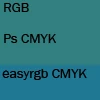
RGB:50,128,128

Converts to CMYK 61,0,0,50 (%) using the formula found at easyrgb.com (this formula is the most prevalent one on the web/web forums)

Photoshop converts these RGB values as CMYK: 80,33,48,8 (%)

While these two colour values are *similar* the ones generated by the easyrgb formulas are nowhere near the photoshop values.

See? stupid useless formulas. (I am aware of the differences and overlap of the two gamuts)
Whilst I know that the conversion done in photoshop is done using ICC templates, and that often these conversions are device dependant, there must be a more realiable way of converting from one colour space to another using good old reliable cold hard maths.

Does anyone know what that might be? you guys at Adobe: I AM LOOKING AT YOU.

Hope you guys can help,

~silvery~

For reference I have included and commented the easyrgb formulas:

First: RGB -> CMY

C = 1 - ( R / 255 )
M = 1 - ( G / 255 )
Y = 1 - ( B / 255 )

Second: CMY -> CMYK

var_K = 1

Initally sets var_K as 1, although this is dependant on variables below

if ( C < var_K )   var_K = C
if ( M < var_K )   var_K = M
if ( Y < var_K )   var_K = Y

This bit finds the smallest value from the CMY range and sets this value as var_K


if ( var_K == 1 ) { //Black
    C = 0
    M = 0
    Y = 0
}

If var_K (the value that K is calculated from) is 1, then all the CMY values are reset to 0


else {
    C
= ( C - var_K ) / ( 1 - var_K )
    M = ( M - var_K ) / ( 1 - var_K )
    Y = ( Y - var_K ) / ( 1 - var_K )

If the value of var_K is anything other than 1 then use the smallest value from the CMY range


}
K = var_K

The value of K as filtered out from the conditions above

    3 replies

    Participating Frequently
    July 31, 2025

    In the print world, we call what you're doing 'rendering intent' or a rendering intent formula. In particular a photographic or perceptual rending intent. How will an output profile handle colors that are out of the CMYK color space. If we don't have rendering intent, the out of gamut colors simple don't print at all. If we use a colorimetric rendering intent, colors out of the gamut are brought to the inside of the nearest edge of the gamut, and in many cases, pile on top of each other. 12 shades of blue may print exactly the same with this intent selected. a proper perceptual intent will not only bring colors into the CMYK space, but reallocate every WITHIN the color space to ensure a nice even stepping of every color being printed.

    MTS - Innovating the Print &amp; Color Management Industry
    NB, colourmanagement
    Community Expert
    Community Expert
    August 5, 2025

    @Biggs47  Actually it's worth pointing out here that Perceptual Rendering isn't as sophisticated as many think. I'll give some detail-


    It seems to be a common misconception that Perceptual rendering does not clip.

    Actually it can clip - because it does not actually scale the entire input colour space into the destination space, on the outbound side of the PCS (Profile Conversion Space), it scales a preset gamut "volume" that the profile software manufacturer expected to contain usable data (sometimes this scaling is adjustable in profile making software , as you may be aware).

    If a Perceptual conversion did in practice scale the whole of, say, the massive Pro Photo colour space into a printer colour space then the image saturation overall would be very severely scaled and it's not. 


    I was taught the above by 'Mr. Photoshop' Thomas Knoll and my friend Steve Upton at Chromix (who understands ICC profiles in ways I couldn’t even dream of). I'm told that Knoll actually came up with Black Point Compensation in Relative Colormetric conversions because he really didn't like Perceptual rendering.


    Back in 2001, early in my Colourmanagement journey, Thomas Knoll, the originator of Adobe Photoshop generously wrote to me:

    "Neil,

    You seem to have discovered how much of a kludge "perceptual" rendering really is with the current ICC profile model,

    it would seem so.


    The standard description of perceptual intent: "smoothly compresses the entire gamut of the source profile into the gamut output profile without clipping" is absolute b***s***.  I

    t does not work this way.

    It is impossible to make it work this way with the current ICC profile model. As we observed - it is an unreliable option for saturated images.


    The basic problem is that source profile and the destination profile are completely independent.  All the source profile does is tell the CMM how to convert source device colors to the PCS space (basically Lab space).  The source profile has no idea what the destination profile is going to be."


    Given that - this is what I generally teach:

    In practice Perceptual Rendering is often less useful than it may appear it might be from the standard description of it’s features. The actual situation with a Perceptual Rendering is a little less ideal than it may at first seem because

    1: Mapping is NOT of the entire source space to the destination space.

      This means that clipping can result.

    2: Conversion might result in un-needed compression of less saturated images

    3: Generally, it seems that the Perceptual calculation is “centre” weighted, so that near saturated tones may suffer concatenation as they sometimes do in Relative Colorimetric conversions .


    I hope this helps

    neil barstow colourmanagement - adobe forum volunteer,

    colourmanagement consultant & co-author of 'getting colour right'

    See my free articles on colourmanagement online

    Help others by clicking "Correct Answer" if the question is answered.

    Found the answer elsewhere? Share it here. "Upvote" is for useful posts

    Royi A
    Inspiring
    November 6, 2015

    Hi,

    Did you manage to get something which converts from sRGB to SWOP CMYK?

    Nothing too accurate, just the ballpark without getting into the whole ICC mess.

    Legend
    December 3, 2015

    sRGB is defined by its ICC profile. So is SWOP CMYK. Just use an ICM to convert. CMYK profiles and many RGB profiles are defined as look up tables - colour conversions for particular values, with linear or quadratic interpolation to find the value in between. So there is no formula (except in the sense that every algorithm is a formula).

    In fact, a typical profile contains multiple look up tables, for two way conversions and different rendering intents. Rendering intents are crucial; there is no single "right" conversion without also specifying the rendering intent.

    Of course, you can convert a table of values to build your own lookup for interpolation. Hard to see any advantage.

    Royi A
    Inspiring
    December 3, 2015

    Hi,

    How about the conversion in an unmanaged system?

    Then what would be the conversion?

    Thank You.

    Known Participant
    May 16, 2009

    Silvery,

    A set of color numbers expressed as RGB or CMYK mean nothing "UNLESS" a profile is attached.  The profile establishes the boundaries of the RB or CMYK gamut.  RGB and CMYK are "device dependent", meaning that you can get different colors with the same set of numbers.

    For example, 240R/25G/30B is definitely a Red, but exactly what color red?  If you send that color to your inkjet printer, you will see red all right, but the precise color of red depends on the inkset, printer, resolution, and paper.  With a wide gamut inkset, a good hi rez printer, and a wide gamut glossy photo paper, that color will be a vibrant red.  If printed on uncoated copy paper on a mediocre printer, those same numbers will result in a rather washed out red.  Same scenario with CMYK....it is device dependent, and the profile gives the numbers meaning.  No profile, no meaning. It's like walking into a video electronics store and looking at 100 TVs, each playing the same station, but they color, contrast and brightness of each TV is different.  Which one is right?

    Lab color space is "device independent", so a specific set of Lab numbers always means the same thing, regardless of the output device.  Of course, not every output device can output all colors.  Lab (or a variant) is usually the universal translator that helps devices see color consistently.  Since it is based on human vision, it doesn't need a profile, but RGB and CMYK definitely do.

    If you want to learn more, check out www.BruceLindbloom.com and go over his information.  He has formulas and translators galore, and more than enough information to choke a mule.

    Hope this helps some.

    Lou

    Participant
    August 20, 2010

    Thanks Lou,

    that clarified the relationship of the numeric color value and color profiles for me.

    So are there any "meta" color profiles out there ,that come with their own RGB <-> LAB <-> CMYK conversions, or must every piece of software come up with its own conversion between profiles?

    Participating Frequently
    August 20, 2010

    Hello Oliver,

    There are many RGB and CMYK colour spaces that could be considered "standard" – the choice is, however, always arbitrary. For practical purposes, the way to go would be to pick a suitable pair, say sRGB and "SWOP coated v2" (for a workflow from sRGB office documents to U.S. standard web offset printing), and then specify that the conversions you derive thereof just apply for said combination of colour spaces. Unfortunately, there is just no "one size fits all" approach to colour management as explained in the previous answer you received.

    Edit: Maybe I misunderstood your question. As per the ICC standard, each ICC colour profile comes with embedded conversion tables from/to the profiled colour space to/from the standard profile connection space (CIE XYZ or CIELAB) for each of four possible rendering intents (perceptive, relative colorimetric, absolute colorimetric, and [maximum] saturation). So the "meta" space you look for is neither RGB nor CMYK but the PCS, i.e. LAB. The conversions themselves are governed by the ICC's specifications, and these are plain math, although different CMMs (colour management modules) might yield slightly different values due to the mapping of out-of-gamut-colours in particular ... Yes, colour science can be very confusing. ;-)

    Regards,
    Eric