Participant
May 15, 2023
Answered

I entered the same color code number in illustration and Photoshop, but does HSB have different valu

  • May 15, 2023
  • 3 replies
  • 1746 views

I entered the same color code number in illustration and Photoshop, but does HSB have different values? RGB and CMYK have the same value, but HSB is different. Fragmentally, if you enter #80949b into Photoshop, RGB and CMYK are the same values, but HSB is different from 196/17/61 (Photoshop) and 194/17/60 (illustration). Also, if you enter the color code above in the cs6 version, the three values of RGB, CMYK, and HSB are all different. It makes a difference visually, like a completely different color. Can you tell me why? I knew that each program has a different color, but why is there a numerical difference even though it's the same code number?

This topic has been closed for replies.
Correct answer D Fosse

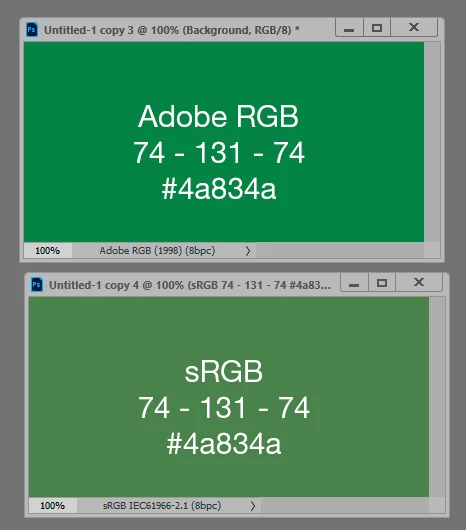
Hex is just base 16 notation for ordinary RGB numbers, and numbers are color space specific. Any given set of numbers will produce different visual colors in different color spaces. Any given color will yield different numbers in different color spaces.


In fact, that's what a color space is: a definition of numbers as colors and vice versa.


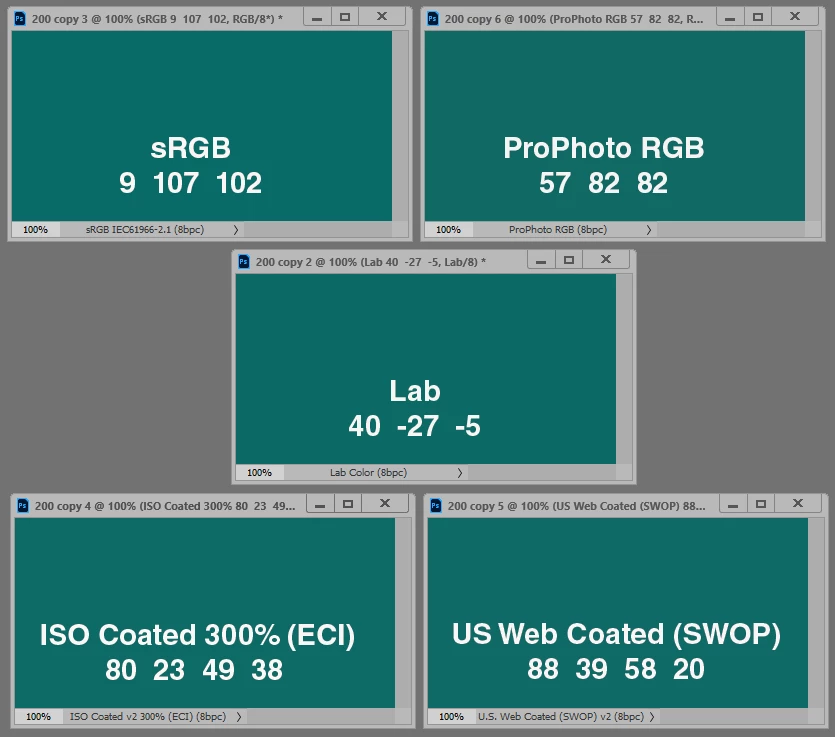
The common reference is Lab.


Same numbers > different colors:


Same color > different numbers:

3 replies

ElizabethOOOG
Known Participant
May 27, 2023

Go by number if you're swatching. Use Lab values. Every other gamut is arbitrary. Go through all preferences for consistency. Monitor and all. Check your dropper sample size. Or... Define your color choices in PMS for color management across apps. That color system doesn't change much. Don't worry.


Okay
ElizabethOOOG
Known Participant
May 27, 2023

Adobe's apps will change weekly.  Don't use their profiles. They have been too inconsistent.

Okay
TheDigitalDog
Inspiring
May 27, 2023
quote

Adobe's apps will change weekly.  Don't use their profiles. 


By @ElizabethOOOG

What profiles would those be? 

quote

Every other gamut is arbitrary.


By @ElizabethOOOG

What does that mean? There's nothing arbitrary about a color gamut; it just is. 

Author “Color Management for Photographers" & "Photoshop CC Color Management/pluralsight"
D Fosse
Community Expert
D FosseCommunity ExpertCorrect answer
Community Expert
May 15, 2023

Hex is just base 16 notation for ordinary RGB numbers, and numbers are color space specific. Any given set of numbers will produce different visual colors in different color spaces. Any given color will yield different numbers in different color spaces.


In fact, that's what a color space is: a definition of numbers as colors and vice versa.


The common reference is Lab.


Same numbers > different colors:


Same color > different numbers:

Bob_Hallam
Legend
May 29, 2023

As D Fosse has noted, color management bases it's colors in CIELab color space.  Color numbers are there to denote a color in a color system.  

To make a single set of numbers match across all systems, convert it to 16 bit CIELab.  (Make an image in Photoshop) then only convert it once to each color space.  Remember hexadecimal colors are only in sRGB and  are fore websites.  


ICC programmer and developer, Photographer, artist and color management expert, Print standards and process expert.
kglad
Community Expert
Community Expert
May 15, 2023

<moved from enterprise & teams>