Wildmiaow
Participant
November 3, 2017
Question

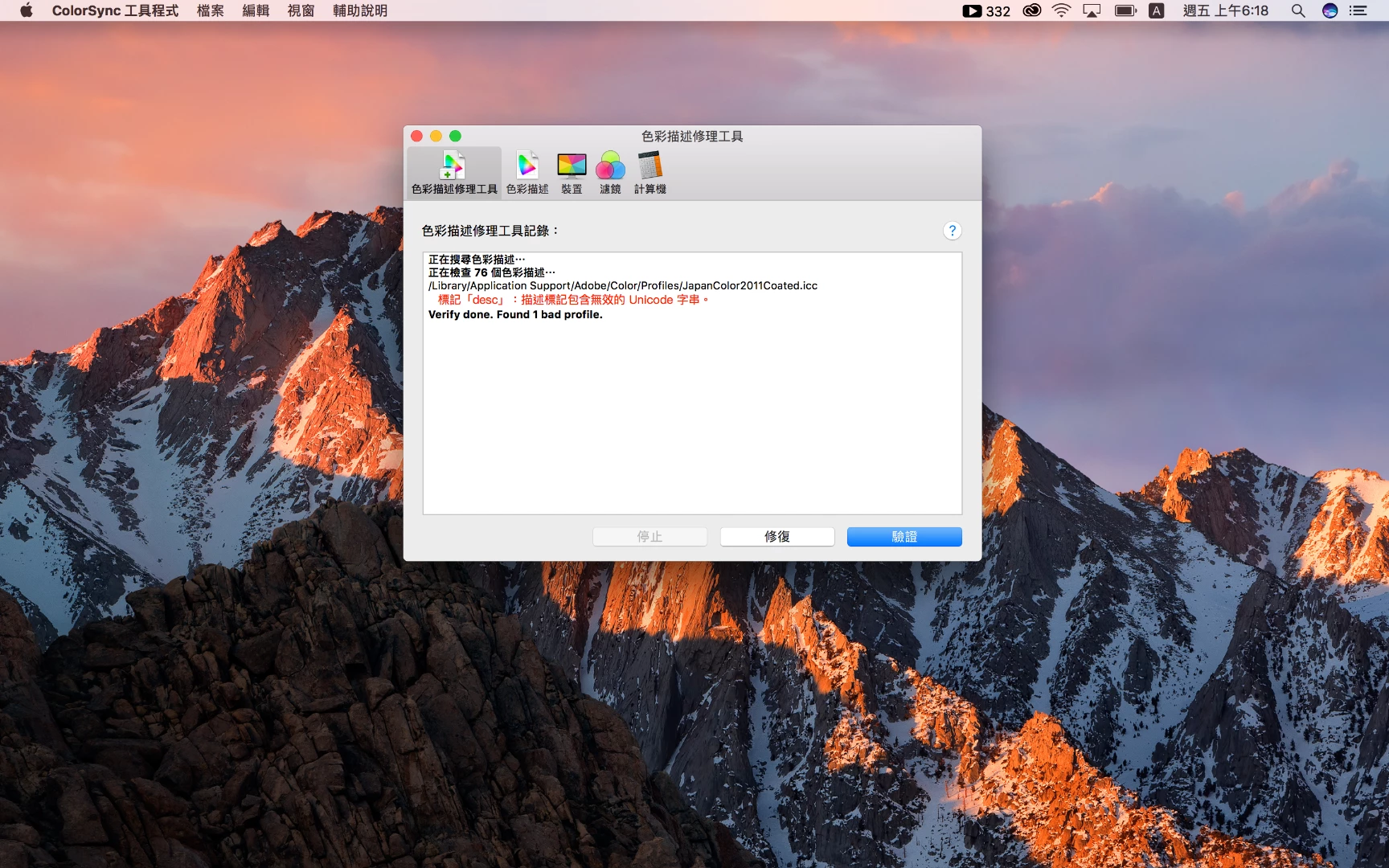
MY MAC BOOK PRO COLORSYNC FOUND THIS PROBLEM.

  • November 3, 2017
  • 2 replies
  • 788 views

    This topic has been closed for replies.

    2 replies

    NB, colourmanagement
    Community Expert
    Community Expert
    November 4, 2017

    Hi Wildmiaow

    This is really a question for Apple.

    I'll try help you though, I've been told before that the Apple Colorsync utility (which is what you are using here, I think) can often notify with spurious [non existent] profile issues. I suggest you delete then reinstall the profile that apparently has an issue and run again.

    If that doesn’t solve it read this link and maybe try that: How to address ColorSync profile errors in OS X - CNET

    I hope this helps

    if so, please do mark my reply as "helpful" and if you're OK now, please mark it as "correct" below, so others who have similar issues can see the solution


    thanks

    neil barstow, colourmanagement

    kglad
    Community Expert
    Community Expert
    November 3, 2017

    i don't know if anyone in this forum understands what you're trying to convey but, if not, explain more clearly the problem.

    [moved from Adobe Creative Cloud to Color management]