

Participant
October 23, 2019
Question

No Colorsync Folder

  • October 23, 2019
  • 1 reply
  • 3598 views

I'm trying to add ICC profiles for my Canon Pixma Pro 100, but I don't have a ColorSync folder.

How do I add this? Or am I missing something?
 

    This topic has been closed for replies.

    1 reply

    Peru Bob
    Community Expert
    Community Expert
    October 23, 2019

    This is the poorly named Community Help forum (which is the forum for issues using the forums).

    Please tell us what Adobe software you are using so that this can be moved to the proper forum for help.

    NB, colourmanagement
    Community Expert
    Community Expert
    October 24, 2019

    Hi

    I would have expected the Pixma installer to install some for you, for standard canon papers.


    Here goes:  I hope this makes sense - 

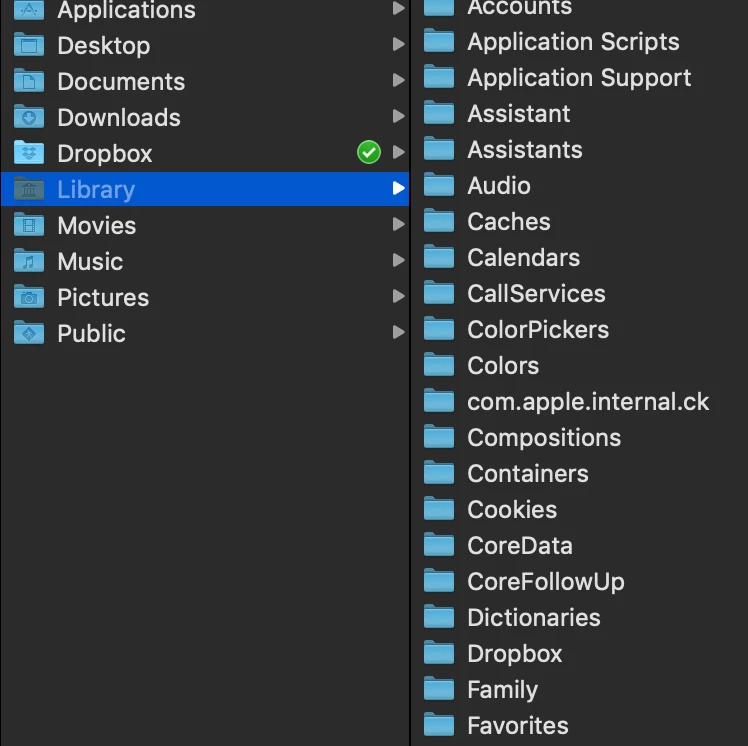
    On a Mac there should be colorsync folders in both the system library and user library.

    I prefer to put my profiles in the user library as that gets backed up


    this is the "system library" where you can see my colorsync folder

    To access the user library (if its not visible) please use google to find instructions dependent on your version of OSX. On some versions its hidden.

    this is my user library, gain there's the folder:


    Can you see those screenshots well enough


    I hope this helps

    if so, please "like" my reply and if you're OK now, please mark it as "correct", so that others who have similar issues can see the solution

    thanks

    neil barstow, colourmanagement
