


Participant
August 7, 2013
Question

Pantone color looks different after upgrading Illustrator...?

  • August 7, 2013
  • 6 replies
  • 36586 views

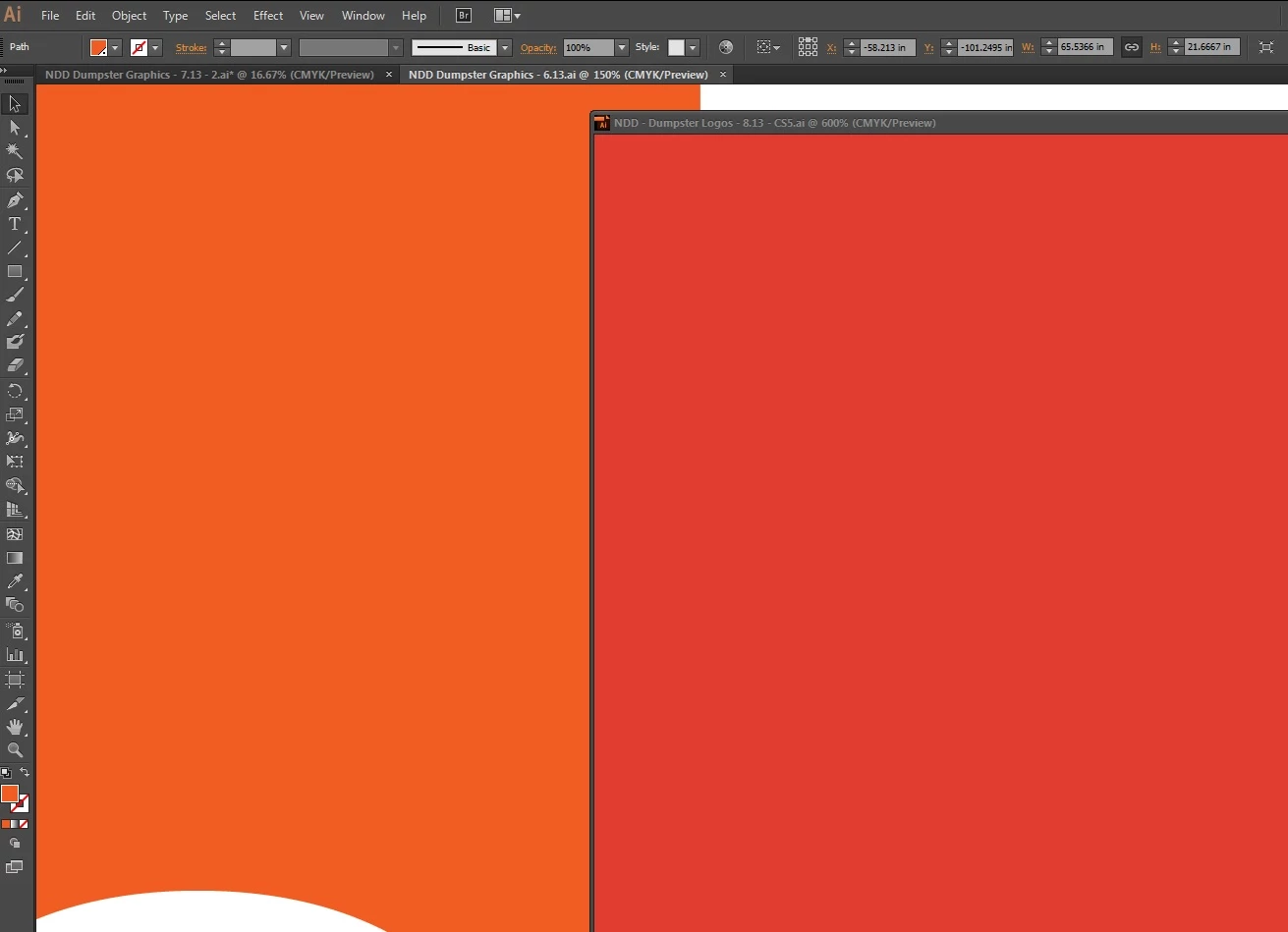
I just upgraded from Illustrator CS5 to Illustrator CC.  I just noticed that the pantone colors look different - and print different.  I opened on old file from Illustrator CS5 that had this pantone color (Pantone 179), and I opened a new file that was created in CC that has the exact same pantone color.  Illustrator CC is showing them differently on the screen, and when I send them to print (I work for a large format printing company that needs pantones to be accurate), the colors look different.

See the image I attached below - both of those colors are set at Pantone 179.  When I print them, they look exactly like they appear on the screen - one of them much more red than the other.  The one on the left is how it is supposed to appear, and that file was set up in Illustrator CS5.  The one on the right was cut and paste from the file on the left into a new file and saved in Illustrator CC.  Nothing else was changed.

Please help me get this problem resolved - this is going to cause a lot of problems for me if I can't get this fixed.

Thank you

UPDATE: I just tried converting the pantones to CMYK to see what happens.  The original file (the one on the left in the photo attached) converted Pantone 179 to C: 0, M: 79, Y: 100, K: 0.  However, the CC file (the one on the right in the attached photo) converted the same Pantone to C: 0, M: 90.56, Y: 82.8, K: 0.

Josh
6 replies

Magpie Marketing UK
Participating Frequently
September 5, 2015

I agree Josh, what the hell are Adobe doing to correct this major issue. The main problem here is when older files are broought into new CC files and the Pantone colour is split to CMYK for 4 colour printing. This changes the colour totally. In fact the only way to get a colour match is to convert the older truer (client approved) spot colours and convert these to CMYK. This keeps the colour true to what clients have had before. Also why are not all of the Pantone Plus Series (coated and uncoated) swatches not in the Creative Suite colour books. This has been an error since CS6. Come on Adobed, it is designers who buy your applications, we need you to fix this MAJOR issue!

rob day
Community Expert
Community Expert
September 5, 2015

The main problem here is when older files are broought into new CC files and the Pantone colour is split to CMYK for 4 colour printing

For legacy files, where a Pantone spot color is defined as CMYK, a solution would be to set the Color Type of the Pantone swatch to Process. In that case the legacy swatch CMYK values will be output assuming there's no profile conflict when it is placed in ID.

Also why are not all of the Pantone Plus Series (coated and uncoated) swatches not in the Creative Suite colour books. This has been an error since CS6. Come on Adobed, it is designers who buy your applications, we need you to fix this MAJOR issue!

The Pantone libraries are a third party plugin, the color definitions and swatches are provided by Pantone not Adobe, so the missing colors are a Pantone decision—you can get them from Pantone. I doubt that there will be a move back to CMYK definitions for spot colors. If you want single CMYK process simulations of the solid ink spot colors you'll have to start using the Bridge Libraries.

Magpie Marketing UK
Participating Frequently
September 5, 2015

But why change something that has worked so well for so many years. Example, client meeting, they select a Pantone colour. You are showing this on screen, it's not there, this is a massive fail for Adobe I am afraid! As per my original comment. Adobe applications are bought in large by us designers, this is a massive oversight. Pantone colours are Pantone colours, that's the whole point that what we show from book and calibrated mac screens, which are then set via litho impression for client consistency. It's a bit like trying to reinvent the wheel! Why?, is the question. I know Pantone have made a complete cock up with the new Pantone + Series, now we have to use an index at the back of the book to find colours. What is wrong with chronological numbering. I guess European interference may have something to do with this. They have broken something that worked perfectly before.

Participant
October 30, 2014

I have been having similar issues, and it is causing HUGE problems, and entire job runs are being rejected by the customer. I am not located near the print house, so I do not see the jobs I send to print. Been doing this process for over a decade without issue, now - disaster. Trying to find a solution is quite aggravating, Adobe is not in the least bit helpful, and the only way to get any information is from other users. I used to love Adobe, but over the last several years I have developed a hatred for them that was usually reserved for Microsoft.

rob day
Community Expert
Community Expert
October 30, 2014

Trying to find a solution is quite aggravating, Adobe is not in the least bit helpful, and the only way to get any information is from other users.

Pantone has clarified the distinction between a solid ink spot color and a CMYK process simulation of a solid ink by introducing the Pantone Color Bridge libraries (CP and UP suffix). If your workflow is to spec CMYK color from the solid ink libraries you now have the option to choose Pantone's recommended CMYK simulation via Color Bridge.

The conversion to process via Pantone + Solid is color managed and the best results depend on the correct profile and rendering intent being chosen. If your job is all process and you don't like color managed conversions, start using the Color Bridge CMYK builds.

and entire job runs are being rejected by the customer

No proof?

Participating Frequently
January 27, 2015

No proof? Please tell me what proof accurately represents ink on paper --  other than a press proof --  and who does those any more? Proofs are now electronic pdfs or digital prints, neither are particularly accurate for the many reasons noted in this thread.

Color management is a huge issue and neither Pantone nor Adobe has been forthcoming or helpful. Pantone wants to continue pushng out new colors and products that generate income, and Adobe is simply not cutover-focused. Look at the self-serving subscription model they have adopted that holds users hostage to monthly fees if they want to access their own files. But that's another thread. I agree with damiendg.

Participant
September 9, 2014

I am a designer and have been having horrific problems with the adobe suite since cs6. Colors between programs are off where they were not before and overall all colors seem muted.

Can someone explain why if I look at a PMS color from a real paper pantone book and then choose the exact same PMS color on screen the colors are horribly off.

And yes I do have my monitors calibrated.

Why are we having so much trouble with color. I would assume AI comes already setup to handle PMS colors right?

How am I supposed to save out a .jpg flat of a design and send it to a client if it looks completely off?

Participant
July 2, 2014

Can anyone tell me why the the same pms color in CC Indesign and CC Illustrator look completely different?

rob day
Community Expert
Community Expert
July 3, 2014

Can anyone tell me why the the same pms color in CC Indesign and CC Illustrator look completely different?

Are the colors from the new Pantone + Solid books—when you double-click the swatch in Swatches panel is it a Lab definition?

If you are converting to process via Ink Manager are ID's and AI's document CMYK profiles the same?

Participating Frequently
August 12, 2013

Beginning with Adobe CS6, the PANTONE PLUS SERIES libraries are stored in L*a*b* color space.  L*a*b* is the base color space used in color-management workflow, and should provide far more accurate onscreen simulation, as well as consistency in output using a color-managed workflow.

Prior to CS6, the PANTONE spot color libraries were stored in CMYK color space, which tended to make the onscreen display of colors quite muted and lifeless. 

Wherever possible, you should consider updating your legacy files with swatches taken from the updated PANTONE PLUS SERIES colors, for most accurate color reproduction.

Best regards,

John Stanzione

Manager - Technical Support

Pantone, LLC

August 12, 2013

I have to admit, after pulling out one of my printed Pantone Solid Coated swatch books and holding it up to the post's screen shot, the LAB version of 179 looks more accurate on screen. I wonder if this exposes a new trend in abandoning official hardcopy proofs in favor of consumerish on-screen softproofing.  I keep reading where users are finding differences in their print proofs in addition to on-screen differences in appearance(s).  I do not feel any more assured, each time you post into ( John Stanzione ) these forums with your explanations of a total shift in just about everyone's workflow(s).  I mean, justifying a huge swing in color reproduction, because color in CMYK is "muted and lifeless" ( last time I checked, CMYK or any other color for that matter has no life, does not have a pulse, and does not walk down the street on their own ).  But, you have to admit, each color is going to appear slightly different on each monitor, calibrated or not.  And, therefore, should never be relied on in critical color decisions.  When you have an accurate color in LAB on screen, but prints radically different, you've bounced the problem from one color space to another.  Couple that with legacy files that printed accurately in the previous workflow, but now does not, you've contributed to a major failure in the color reproduction process.  I've read where other users are trying to re-establish their older CMYK by dumping the + Series in favor of older CMYK swatch libraries because they are unable to find a successful workaround.  You might want to take another look at the logistics behind your decision(s).  At a minimum, users are asking for a solid workflow scenario from you and, to date, I have not seen one.  Perhaps you could release a white paper on the many, many issues surrounding the + Series approach and how it works in older, as well as newer workstations and software.  If you have that document in the Pantone library, please send us a link so we can read it.

September 5, 2013

I second John Danek's request.

August 8, 2013

So, you are sending a Spot color file to what, a standard print driver or are you using a RIP+Print solution?  What exactly are you using as a large format printer?  I am guessing you are using a RIP that does the conversion from Spot 179 to CMYK.  Alot of how color is displayed depends on your calibration and color settings.  However, Pantone has recently reformulated many of the spot colors and has also decided to display color as LAB formulations.  This is creating a stir in the industry where many users like yourself are getting mixed results.  Here is what I would do.  Create a duplicate file and also create a new swatch in CMYK that equals the previous CMYK eqivalents: C=0%, M=  79%, Y=100%, K=0%.  Assign that color to your previous Spot elements on all new files.