


Known Participant
April 28, 2020
Question

Pantone colours CC Libraries

  • April 28, 2020
  • 2 replies
  • 1742 views
Hi
I have problems with the pantone colors in between the Adobe programs. They do not talk together in the latest version.
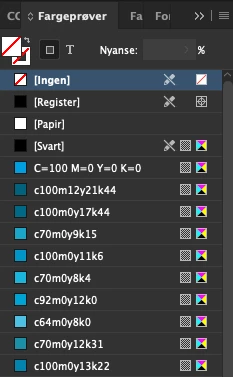
When I choose a Pantone Color Brigde CP color in illustrator it turns into a pure cmyk color in Indesign. What is wrong. This has worked just fine in all years.
 
I have also posted Pantone Color Brigde CP in Libaries in indesign and everything is correct when
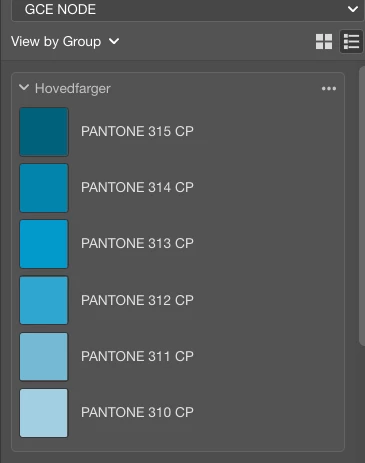
I work in indesign. It is then a process color as it should be. But when I use the color in illustrators and get it from Libaries, it is turned into spot color.


    This topic has been closed for replies.

    2 replies

    rob day
    Community Expert
    Community Expert
    April 28, 2020

    The PANTONE+ Bridge libraries are not Spot colors, they are defined as device dependent CMYK process color simulations of the solid inks (CP suffix). The PANTONE + Bridge color’s Color Type icon shows as Process color in the InDesign Swatches panel.


    The PANTONE + Solid colors are defined as Lab with the Color Type set as Spot (C suffix). Library Spot color swatches will cross between ID and AI as named swatches, but process colors don’t—if you want to share named process color swatches between the apps, you would have to save and load them as .ase files.


    If you want Bridge swatches to share as named swatches via a Library, you could set their Color Type to Spot before adding them to your Library, and then set them back to Process from Swatch Options or use Ink Manger to define them as process:


    Here I have left PANTONE 315 CP as process:


    PANTONE 310 CP set as Spot:


    JFUAuthor
    Known Participant
    April 28, 2020

    The problem is that the illustrator turns the PMS color into pure cmyk values. It does not display the PMS color as a PMS color so we can change the percentage of the color. 


    Bob_Hallam
    Legend
    April 28, 2020

    Ahh, easy to solve: Pantone colors are defined as follows. 


    • C = coated. It is solid ink on coated paper.
    • CP = coated, process. It's a mix of screens of CYMK, little dots that appear mixed when viewed with the eye.
    • U = uncoated solid.
    • UP = uncoated process.

    So essentially you are choosing CMYK colors when using CP libraries.  Try C for coated PMS colors


    ICC programmer and developer, Photographer, artist and color management expert, Print standards and process expert.
    Bob_Hallam
    Legend
    April 28, 2020

    Make sure Spot to process is not selected in InDesign and the Illustrator file.   Reset InDesign preferences 

    https://helpx.adobe.com/indesign/using/setting-preferences.html

    ICC programmer and developer, Photographer, artist and color management expert, Print standards and process expert.
    JFUAuthor
    Known Participant
    April 28, 2020

    Indesign works fine. Its illustrator that turns the PMS color into only cmyk values. See pictures
    Must have it so that illustrator also shows the PMS color in color as indesign does.