


saurabhp5927337
Participant
September 1, 2018
Answered

Photos look different on my phone compared to photos on the computer.

  • September 1, 2018
  • 12 replies
  • 138461 views

Hi Guys,

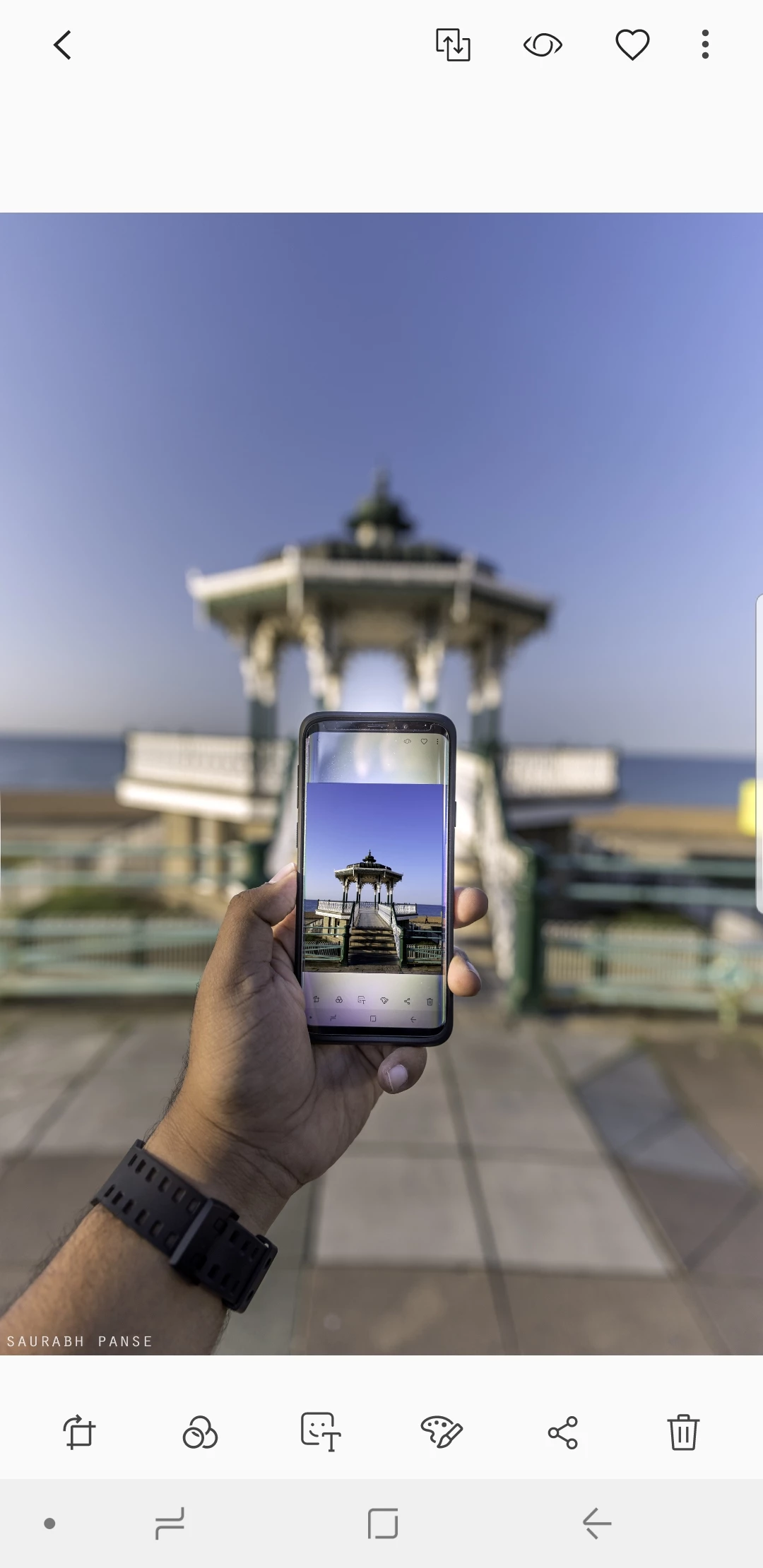
I edit my photos in either Lightroom or Photoshop. The photos look vibrant and colourful on my PC, as per the editing I had done. But when I save these photos in my S9-Plus, they look colourless and weird.

Can someone please help me here? Do I have to save the files differently once I edit the photo in Photoshop or Lightroom?

Example 1 -

The photo on PC -

Photo/Screenshot from my Samsung S9Plus -

---------------------------------------------------------------------------------------------------------------------------------------------------------------------------

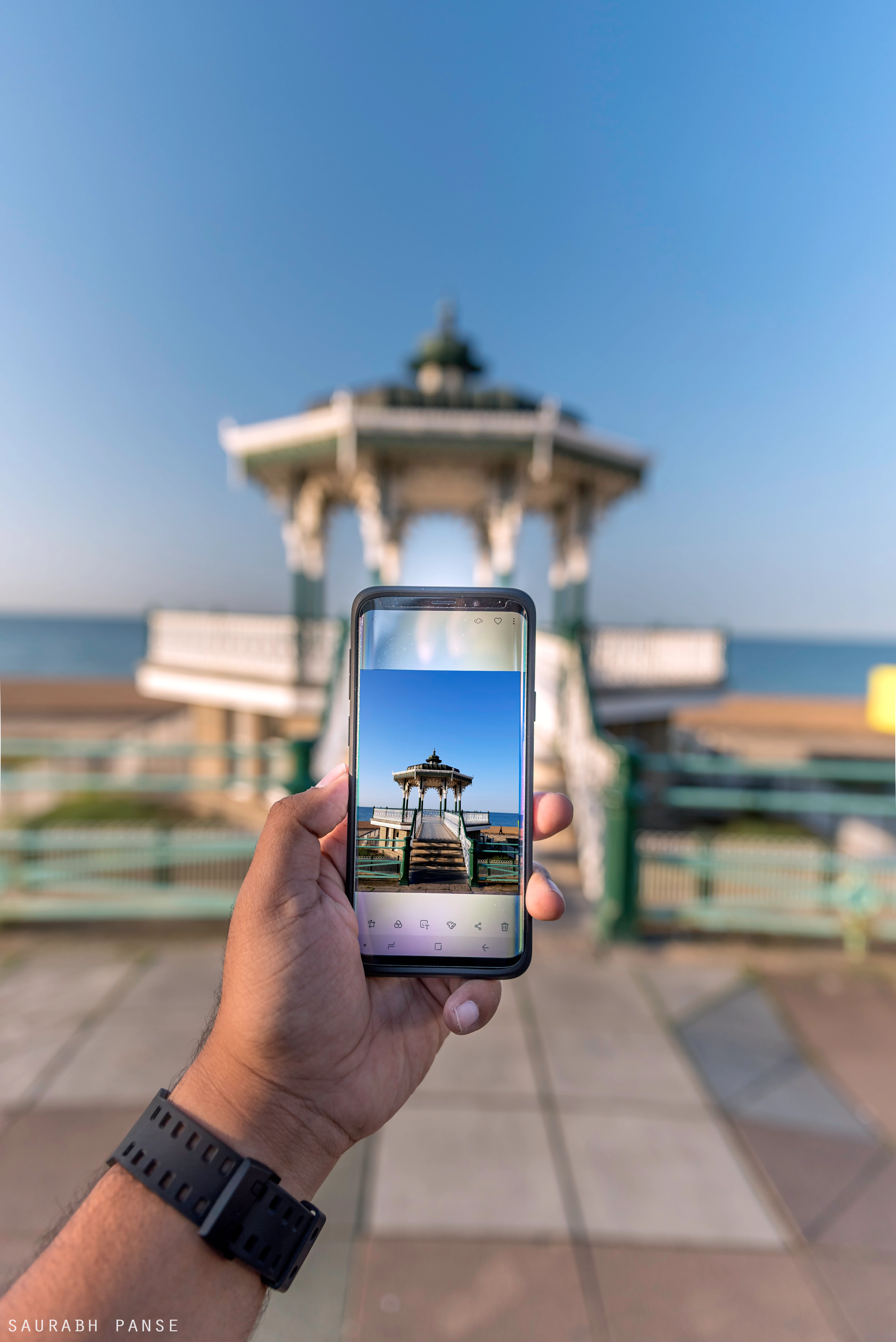
Example 2 -

The photo on my PC -
Screenshot from my Samsung S9Plus-
This topic has been closed for replies.
Correct answer davescm

Hi

The explanation is in the way colours are stored in the image. Each pixel stores the colour as three numbers representing Red, Blue and Green. However what actual colour is represented by each number depends on the colour profile. Your original document is using a profile called ProPhoto.

Photoshop is colour managed. It uses the color profile embedded in the document to tell it how to use the RGB numbers that make up each pixel and correctly display it on your monitor (using the monitor color profile stored in your system).

Many applications (including phones) are not colour managed and just send the raw numbers to the display.

To be safe when sending an image to the web (or to an unknown device) , Export a copy of your image using "Save for Web (Legacy)" and ensure that both  "Convert to sRGB" and "Embed Color Profile" are checked. That way if the other device is colour managed it will use the profile. If it is not , then sRGB will display close to correct on many devices.

Dave

12 replies

D Fosse
Community Expert
Community Expert
September 1, 2018

Another example of why having ProPhoto as default for Lightroom's "Edit In Photoshop" is a monumentally bad idea. Why can't it be sRGB, so that newcomers don't get into this trouble time and time again?

Those who need or want ProPhoto will know how to get it. They are experienced users who waste no time in changing most of the default settings anyway.

John344785627jva
Participant
January 7, 2024

The default setting of ProPhoto for Lightroom's "Edit In Photoshop" has proven to be a problematic choice, exemplifying the challenges that newcomers often face. It would be more practical to have sRGB as the default, minimizing issues for those less experienced with the intricacies of color spaces. Users who specifically require ProPhoto are typically seasoned and adept at adjusting settings according to their needs, making it unnecessary for ProPhoto to be the default setting. Choosing sRGB as the default would promote a smoother workflow for beginners and reduce the likelihood of recurring problems.

davescm
Community Expert
davescmCommunity ExpertCorrect answer
Community Expert
September 1, 2018

Hi

The explanation is in the way colours are stored in the image. Each pixel stores the colour as three numbers representing Red, Blue and Green. However what actual colour is represented by each number depends on the colour profile. Your original document is using a profile called ProPhoto.

Photoshop is colour managed. It uses the color profile embedded in the document to tell it how to use the RGB numbers that make up each pixel and correctly display it on your monitor (using the monitor color profile stored in your system).

Many applications (including phones) are not colour managed and just send the raw numbers to the display.

To be safe when sending an image to the web (or to an unknown device) , Export a copy of your image using "Save for Web (Legacy)" and ensure that both  "Convert to sRGB" and "Embed Color Profile" are checked. That way if the other device is colour managed it will use the profile. If it is not , then sRGB will display close to correct on many devices.

Dave

saurabhp5927337
Participant
September 1, 2018

Thanks, davescm, that worked

davescm
Community Expert
Community Expert
September 1, 2018

You're welcome

Dave
