Participant
June 10, 2020
質問

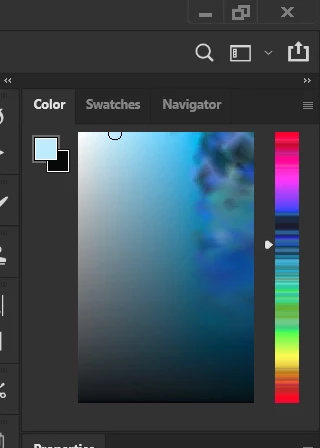
Photoshop colors are broken

  • June 10, 2020
  • 返信数 4.
  • 1112 ビュー

This is what it looks like, I don't know what happened and don't know how to fix it. It's been difficult color grading my works because of this glitch. Please Help.

このトピックへの返信は締め切られました。

返信数 4

Bob_Hallam
Legend
June 11, 2020

As was suggested this looks like a monitor profile or driver issue.  
How was the monitor profile created?  What software and measurement device and what settings?   Mac or PC?     

ICC programmer and developer, Photographer, artist and color management expert, Print standards and process expert.
NB, colourmanagement
Community Expert
Community Expert
June 11, 2020

Try this:

Display profile issues 

At least once a week on this forum we read about this, or very similar issues of appearance differing between applications.

Unfortunately, with Microsoft hardware: Windows updates, Graphics Card updates and Display manufacturers have a frustratingly growing reputation for installing useless (corrupted) monitor display profiles.

I CAN happen with Macs but with far less likelyhood, it seems.


The issue can affect different applications in different ways, some not at all, some very badly.


The poor monitor display profile issue is hidden by some applications, specifically those that do not use colour management, such as Microsoft Windows "Photos".


Photoshop is correct, it’s the industry standard for viewing images, in my experience it's revealing an issue with the Monitor Display profile rather that causing it. Whatever you do, don't ignore it. As the issue isn’t caused by Photoshop, don’t change your Photoshop ‘color settings’ to try fix it. 


If you want to rule out pretty much the only issue we ever see with Photoshop, you can reset preferences, I never read of a preferences issue causing this problem though:

To reset the preferences in Photoshop: 

https://helpx.adobe.com/photoshop/using/preferences.html


Note: Make sure that you back up all your custom presets, brushes & actions before restoring Photoshop's preferences. Migrate presets, actions, and settings


To find out if this is the issue, I recommend you to try setting the monitor profile for your own monitor display under “Device” in your Windows ‘color management’ control panel to sRGB. You can ADD sRGB if its not already listed. 

And be sure to check “Use my settings for this device”.


(OR, if you have a wide gamut monitor display (check the spec online) it’s better to try Adobe RGB instead).

Quit and relaunch Photoshop after the control panel change, to ensure the new settings are applied.


If this change fixes the issue, it is recommended that you should now calibrate and profile the monitor properly using a calibration sensor like i1display pro, which will create and install it's own custom monitor profile. The software should install it’s profile correctly so there should be no need to manual set the control panel once you are doing this right. 


Depending on the characteristics of your monitor display and your requirements, using sRGB or Adobe RGB here may be good enough - but custom calibration is a superior approach.


I hope this helps

if so, please "like" my reply and if you're OK now, please mark it as "correct", so that others who have similar issues can see the solution

thanks

neil barstow, colourmanagement.net :: adobe forum volunteer

[please do not use the reply button on a message in the thread, only use the one at the top of the page, to maintain chronological order]


D Fosse
Community Expert
Community Expert
June 10, 2020

Either a seriously broken video driver, or a seriously broken monitor profile.


First try to update or roll back the video driver. Turning off GPU will indicate if that's the problem.


If that doesn't do it, replace your current monitor profile with sRGB IEC61966-2.1. The proper way to deal with it is to use a calibrator to make a new profile, but if you don't have a calibrator, sRGB is usually close enough for non-critical use. Relaunch Photoshop when done, it needs to load the profile at startup:


c.pfaffenbichler
Community Expert
Community Expert
June 10, 2020

Does turning off »Use Graphics Processor« in the Performance Preferences (Photoshop > Preferences > Performance > Graphic Processor Settings) and restarting Photoshop have any bearing on the issue? 


Please read this (in particular the section titled "Supply pertinent information for quicker answers"):

https://community.adobe.com/t5/Community-Help/Guidelines-Tips-for-the-Adobe-Forums/td-p/4788157