Participating Frequently
January 21, 2020
Answered

printer profiles missing for Epson SC-P800

  • January 21, 2020
  • 14 replies
  • 15925 views

The basic printer profiles seem to be missing when I am trying to print to the Epson SC-p800. I selected Photoshop controls printing. Only a few paper profiles show up. The basic ones such as Premium Luster, Glossy, etc. don't show up only 3 for legacy papers. The luster one was there only a few weeks ago (before the holidays - I used it). Last night I uninstalled the printer and reinstalled the driver software but that did not fix the problem.

Correct answer NB, colourmanagement

Hi

Did you select Photoshop controls color?

this should provide you with a list of all the ICC printer profiles on your system

Epson puts them in some hidden folders, but normally Photoshop can "see" them.

You may be able to find the profiles 

Are you on Mac or PC?

If PC, sounds like you may need help from Epson's support team


Here's some Mac tips, just in case photoshop can't find the Epson profiles:


Missing Epson profiles in Photoshop on Mac


I had to search for these myself on a client site once, took me quite a while, but, hey, means I now know how to find them


basically they are in the 

hard disk/library/ printers/EPSON/InkjetPrinter2/ICCProfiles/ [inside a “package”]

Not the username/library/ 
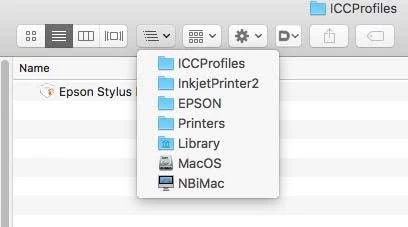
in ICCProfiles (see above) is a folder, e.g:  Epson Stylus Pro 4900_4910.profiles


you right click on it [or control click] and select "show package contents"


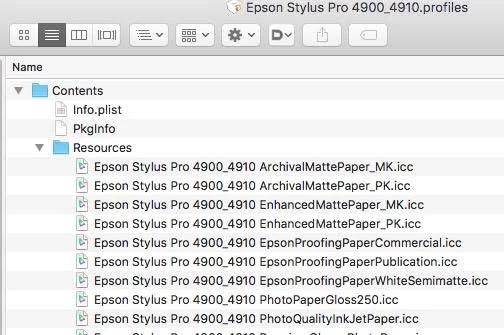
A contents folder appears

Now look inside that in  the ”resources" folder. 


see screen shot below


they are the icc profiles used in the Epson driver [driver colourmanagement], 

SO don't move them 

but you can copy them to your normal ICC profiles folder which is in the system library

[ computer name/hard disk name/Library/Colorsync/Profiles ]


I hope this helps

if so, please "like" my reply and if you're OK now, please mark it as "correct", so that others who have similar issues can see the solution

thanks

neil barstow, colourmanagement.net

[please do not use the reply button on a message in the thread, only use the one at the top of the page, to maintain chronological order]


14 replies

Participant
October 15, 2025

Thanks very much!  This solved my problem on my Epson R3000 printer with LR Classic 14.5.1.  Cheers!  //Spud

Participating Frequently
November 5, 2022

Thank you so much! As you can see, this is STILL a problem in late 2022 even with all the current versions of Photoshop and Mac OS (or possible because of those latest versions). I spent hours trying to find those profiles, including numerous full searches online and on the hard drive and in TimeMachine, but spotlight search couldn't see them at all until I copied them out of that resources folder. Bless you!

NB, colourmanagement
Community Expert
Community Expert
November 7, 2022

I'm so pleased that solution is working, to solve what's quite a frustrating issue.


I hope this helps
neil barstow, colourmanagement net :: adobe forum volunteer:: co-author: 'getting colour right'
google me "neil barstow colourmanagement" for lots of free articles on colour management

Participating Frequently
September 18, 2021

This worked for me. All the profiles except one show up in my printer's list now. Sadly, the one that doesn't show up is the main one I use for everything. 

Bob_Hallam
Legend
September 18, 2021

Download ColorThink and run profile repair, that may solve the visibility problem.  

ICC programmer and developer, Photographer, artist and color management expert, Print standards and process expert.
Participating Frequently
September 19, 2021

Thanks, but I'm not paying $400 to fix something that, up until now, has never been an issue and shouldn't be an issue anyway. Adobe and Epson should sort this crap out since I've already paid ( and continue to pay) them plenty of money over the years. . 

Participant
August 10, 2021

neil barstow, excellent answer about copying the profiles to the correct location!


NB, colourmanagement
Community Expert
Community Expert
August 11, 2021

Thanks, great to have your appreciation,

it took me a while to work that one out so wanted to share it.


I hope this helps
neil barstow, colourmanagement net :: adobe forum volunteer
google me "neil barstow colourmanagement" for lots of free articles on colour management
[please only use the blue reply button at the top of the page, this maintains the original thread title and chronological order of posts]


donellisartist
Participant
January 13, 2021

Excellent - clearly written help - thanks

NB, colourmanagement
Community Expert
Community Expert
January 14, 2021

thx, good to know that we could help


neil barstow, colourmanagement net :: adobe forum volunteer
google me "neil barstow colourmanagement" for lots of free articles on colour management
[please only use the blue reply button at the top of the page, this maintains the original thread title and chronological order of posts]

Participant
November 17, 2020

This worked for me, thanks so much for the easy to follow instructions!

NB, colourmanagement
Community Expert
Community Expert
November 18, 2020

Thanks for the thanks, nice to know it's helping


neil barstow, colourmanagement.net :: adobe forum volunteer
[please do not use the reply button on a message within the thread, only use the blue reply button at the top of the page, this maintains the original thread title and chronological order of posts]

Known Participant
July 14, 2020

Thank you soooooo much. I was pulling my hair out and could never have traced this. It works like a charm once Lightroom Classic CC is restarted.  Epson's support page was no help at all, and when I tried reinstalling their driver package, it crashed.

Participating Frequently
June 24, 2020

Thank you for this.  This issue drives me crazy!!!  I lose my profiles then have to download the Epson setup software and reinstall every time I update LR or PS.  All fixed now...have the profiles in Colrsync.  Permanent fix!

NB, colourmanagement
Community Expert
Community Expert
June 12, 2020

Hi Moonphoto

whe the printer driver is installed Epson's profiles are placed as I described above, you can copy them to the "normal" icc profiles folder so Photoshop can see them, but please do NOT move them

more on that here

https://www.colourmanagement.net/advice/where-are-my-icc-profiles/


I hope this helps

if so, please "like" my reply

thanks

neil barstow, colourmanagement.net :: adobe forum volunteer

[please do not use the reply button on a message within the thread, only use the blue reply button at the top of the page, this maintains chronological order]


Participant
August 25, 2020

Hi,

I've been dealing with the same problem, but I haven't found the profiles for the SC P800. I followed your directions, but the files you mention are in my Library folder, not in the HD Library. I'm on a MAC running Catalina. I had to switch to "Printer Manages Color" in PS and turn on "Epson Color Controls" in order to get the color I exspected.

Participant
June 12, 2020

Thank you, very helpful. I tried to download profiles from Epson, but they only offer a few legacy papers, etc.  I had no idea where to find them. I still have some hair left. Thanks much!