



Bob Ulius
Known Participant
September 27, 2024
Question

Specific Color Management Question in Windows 10

  • September 27, 2024
  • 5 replies
  • 1632 views

Posting here as no more generic place to post in these forums and hoping Adobe folks will have a "correct" answer.  I have googled until fingers bled and seems no one know for sure THIS answer. Split maybe 50/50.


Please do not guess or if you must, mark your answer as a guess.


In color manging Windows 10, I want to know:

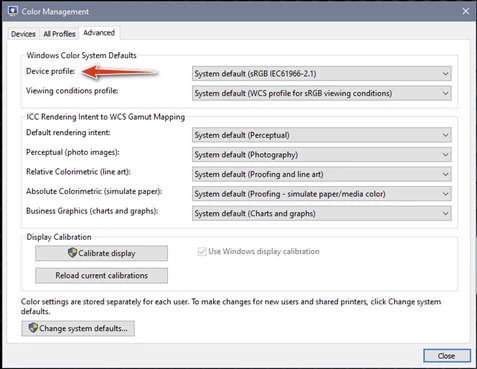
1. What does this setting do?

2. What should it be selected to?

   a. The default sRGB, or...

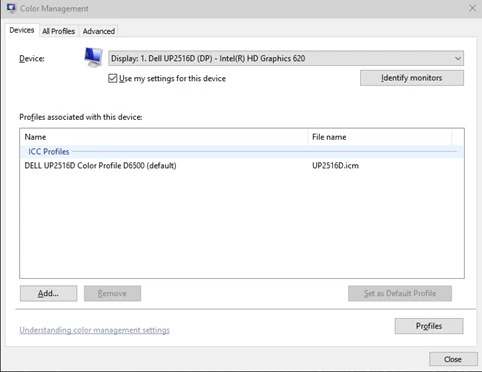
   b. The same as the selected ICM on the first page - for the monitor profile.
From the first page of settings:
 

Thanks!

5 replies

Known Participant
February 15, 2025

I share your frustration.  I find it impossible to get accurate informed answers to anything to do with CM, mostly the world seems to be a mix of regurgitations of standard explanations of various topics that first hit the web in Egyptian times, plus explanations from quite a few people who really do know a lot about CM, but have come to different conclusions or understandings of the finer points, so their responses often don't line up with each other. 


As to your question, and this is a guess , isn't the item you point to just what it says -- the *default* profile i.e a fallback profile that WCS will  assume when there's no embedded profile (as do browsers), or not enough information provided, or when CM settings are changed that might affect gamut but no gamut is specified?  If so there is no need to consider it except  in undefined situations, which you won't have since you are setting up a comprehensive CMS.

Bob Ulius
Bob UliusAuthor
Known Participant
February 15, 2025

As good a guess as any 🙂


This one was and remains one of the more difficult to get a definitive answer.

NB, colourmanagement
Community Expert
Community Expert
September 30, 2024

@Bob Ulius I've moved your post to 'Color Management Discussions' where I hope some Windows-savvy CM guys will pitch in.@D Fosse perhaps?

NB, colourmanagement
Community Expert
Community Expert
September 30, 2024

@Bob Ulius some info from Microsofts own forums here and here, its not been mentioned since 2012 it seems

also: here a bit more recent: 2017 

good luck, I'd just go with @Per Berntsen's recommendations


I hope this helps neil barstow, colourmanagement net - adobe forum volunteer - co-author: 'getting colour right' google me "neil barstow colourmanagement" for lots of free articles on colour management Help others by clicking "Correct Answer" if the question is answered. Found the answer elsewhere? Share it here. "Upvote" is for useful posts.


Per Berntsen
Community Expert
Community Expert
September 29, 2024

I think all the experts on color management on the Photoshop forum visit this forum frequently.

And double posts lead to confusion and misunderstandings, and should be avoided.

NB, colourmanagement
Community Expert
Community Expert
October 1, 2024

@Per Berntsen as I moved it, it should only be in Color management now. Not repeated elsewhere.

Do you have any ideas for @Bob Ulius ?


neil barstow, colourmanagement net - adobe forum volunteer - co-author: 'getting colour right'

Derek Cross
Community Expert
Community Expert
September 29, 2024

I suggest you also post in the Photoshop forum, there are some world-class experts there.

NB, colourmanagement
Community Expert
Community Expert
September 30, 2024

@Derek Cross I moved it to Color Management Discussions

ATB
NeilB 

Per Berntsen
Community Expert
Community Expert
September 28, 2024

The settings in the Advanced tab don't affect color management. I have no idea what they do, just leave them alone.

(I suspect that these are legacy settings from before proper color management was introduced. Somebody once wrote on this forum that not even Microsoft engineers can explain what they do.)


The monitor profile (Devices tab) is the basis of color management – it is a description of your monitor's color response.

When you open an image in LrC, Photoshop, or any other color managed application, the colors are converted from the document profile (for instance sRGB or Adobe RGB) to the monitor profile, so that correct colors are displayed.


For this to happen, the monitor profile has to be sound and correct.

I see you're using a Dell profile, and profiles from monitor manufacturers are often defective out of the box. Dell has a particularly bad reputation. (these profiles are often installed with Windows updates)


If you're concerned about correct colors, use a hardware calibrator to calibrate your monitor.

This will also create and install a custom monitor profile that contains an accurate description of your monitor's color response.

Bob Ulius
Bob UliusAuthor
Known Participant
September 28, 2024

Thanks, but not the question. As I alluded, half of the "opinions" on that specific field say leave at sRGB system default and half to match the chosen monitor ICM. As you say, you have no idea what they do, yet state leave them alone. Not my question.


What DOES it do and what to choose and perhaps why.


Well familiar with color calibration, etc. Another question and another answer, but not this one. And I am the master of my Windows updates, not M'soft. And again, a different question. But thanks for replying.

Per Berntsen
Community Expert
Community Expert
September 28, 2024

If you want me to, I can ask a moderator to move this thread to the Color Management forum which is where it belongs.

You're not likely to get many more replies on this busy forum, where threads move to page 2 and beyond quite quickly.