



AntonioLCorreia
Participating Frequently
December 19, 2021
Question

Where is the Colorsync in Monterey ?

  • December 19, 2021
  • 2 replies
  • 2345 views

Where is Colorsync in Monteray ?
In other words:
Where do I install color profiles in Monteray ?

Everywhere I read Colorsync folder is under Library/Colorsync/Profiles Folder

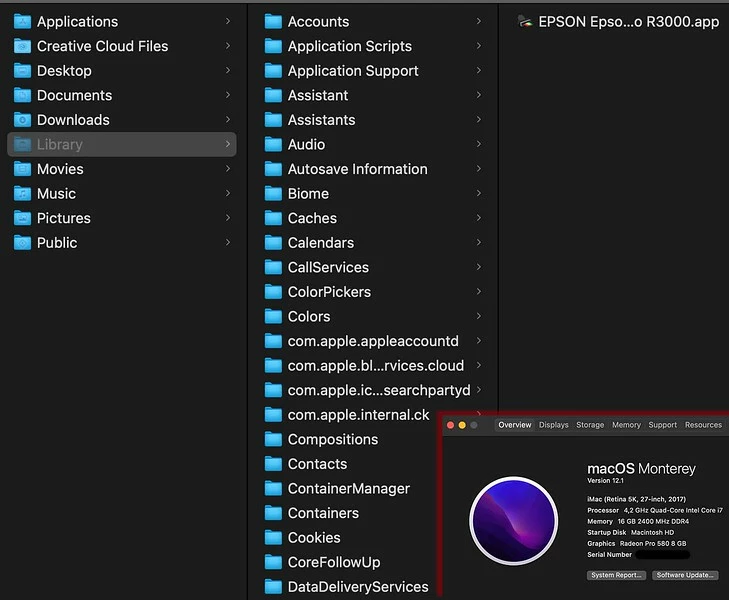
In the iMac the folder Colorsync is absent however, in the MacBook it is there ! Both machines are updated.
Any help would be appreciated !
This topic has been closed for replies.

2 replies

TheDigitalDog
Inspiring
July 27, 2022

Nothing in terms of ColorSync or where profiles reside have changed in 12.x (a few more bugs...). 

You can find the location of nearly all profiles using the ColorSync Utility which is an application provided by Apple. 

One of the more common path's for profiles (there are a few): 

/Users/~/Library/ColorSync/Profiles

Place them there, you're good to go. But also see: 

https://helpx.adobe.com/x-productkb/global/access-hidden-user-library-files.html


Author “Color Management for Photographers" & "Photoshop CC Color Management/pluralsight"
Brad @ Roaring Mouse
Community Expert
Community Expert
December 20, 2021

There's a few places: There SHOULD be a Colorsync Folder in the Computer's root Library (not sure why you don't see it), as well as one in each homefolder <user>/Library, and even one in the System/Library/

What could help is to open ColorSync Utility and click on any profile and on the right, above the gamut map, will be the path to the file.

russkeyuk
Inspiring
July 21, 2022

Fantastic! This helped out and solved the isue for me. You could say that I got to the "Root" of the problem.   


I've started adding tags and colour flags to the folders I strugggle to find or have lengthy paths. this has helped me loads.