


1)link colors not conforming to CSS controls. 2) ?site content definitions outdated?
Problems on one of my pages and questions about the first lines of code that describe the document and contents.
As several of you know I am a do it yourselfer/ artist who is trying to revise my website and in the weeks since I was last here I have learned a lot and removed many problems. My most challenging pages now are completely red source code free and more recent revised pages are less cluttered via the use of the page properties and a clearer knowledge of how the code works and the areas of are more neatly arranged and separated. I have plenty more to learn, but I think I can do what I want to do with some help.
IMMEDIATE ISSUE ( some of my links are purple rather than the CSS assigned color. Purple is hard to read on my dark backgrounds .
1)This problem is with links . In 1 out of 3 pages where I have put in a header and used page properties to get the text I want, I also used page properties in the links screen to set a color for unvisited links text, and a color for rollover, in this case within the header. The header is positioned with a numbered apDiv.
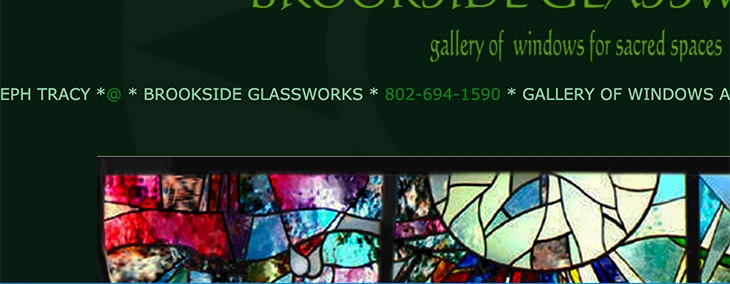
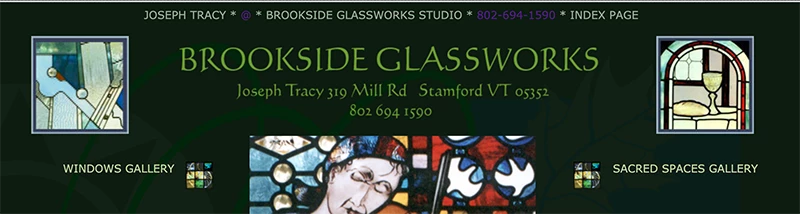
And on one page everything works according to those css parameters. HOWEVER, on the other 2 pages of concern most header links turned purple, and in a single table with links ( this links table is used with different colors on every page except the index page) the link text is also a dark purple . I cannot seem to locate where this instruction is coming from.
2)Other possibly related issues: What is basic.css? Could it trace back to Go Live. I am not using it as far as I know and actually deleted it from my site folder? I am only using the Page properties CSS or direct line by line font parameters to set style code so far.
3)Should I adjust the first few lines of code containing the page content?
Here is a screenshot of the page that works:
And the one that doesn’t
Code line for working page:
<div id= "apDiv3">
<h1>JOSEPH TRACY *<a href="mailto:brook7@sover.net">@</a> * BROOKSIDE GLASSWORKS *<a href="tel:18026941590"> 802-694-1590</a> * GALLERY OF WINDOWS AND DESIGNS FOR SACRED SPACES * PAGE 1</h1></div>
Code line for the page that is not working:
<div id="apDiv2"><h1>
<div align="center">JOSEPH TRACY * <a href="mailto:brook7@sover.net">@</a> * BROOKSIDE GLASSWORKS STUDIO * <a href="tel:18026941590">802-694-1590</a> * INDEX PAGE</div></h1></div>
They look the same to me so I assume it is not these lines but something else.
In both cases the links settings in page properties are the same. In the problem page the link text is correct in design view and goes purple in live view or in browser.
Here are the first 7 lines of code. The only thing I have changed is that the content= Adobe Go Live I changed to Adobe Dreamweaver, but 1999 is a ways back . The main features I hope to keep are my background graphics, and the ability to have floating boxes of different dimensions and positioned intuitively. I do want the page as a whole to either conform to the screen or center itself in the screen which it does on my browsers but I have not tested it on a larger variety of browsers and screens. I am removing tiling.
<!DOCTYPE html PUBLIC "-//W3C//DTD XHTML 1.0 Transitional//EN" "http://www.w3.org/TR/xhtml1/DTD/xhtml1-transitional.dtd">
<html xmlns="http://www.w3.org/1999/xhtml"><head>
<meta name="verify-v1" content="d6fCdynY0eGNuUWI34HGlfgPprdDEX/B9uFJleaM+R8=" />
<meta http-equiv="Content-Type" content="text/html; charset=UTF-8" />
<meta name="generator" content="Adobe Dreamweaver" />
<title>index</title>
I apologize for getting defensive last time. It is true, however, that I am still not ready to abandon the basic look and design of my current website though I will if I cannot correct what I see as the major problems: centering pages ( still not understanding page width), over-use of font tag( have cut it way back with CSS but not eliminated it). enlarging the text (easy), headers ( working on it) and easier flow via links and page arrrangement.
 AdChoices