


damonf39045681
Participant
February 3, 2017
Answered

2017 Version Replace Image

  • February 3, 2017
  • 3 replies
  • 303 views

I just upgraded to 2017 and now, when I double-click to replace and image, nothing happens!

What can I do to get this feature back? Otherwise, I'd like to revert to 2015. This is a thing I use a hundred times/day building emails.

This topic has been closed for replies.
Correct answer Nancy OShea

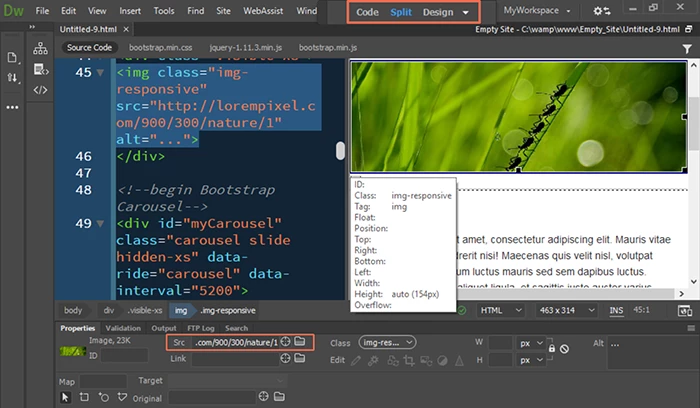
Switch to Design View.  It's on your Document Toolbar.  See screenshot.

3 replies

Jon Fritz
Community Expert
Community Expert
February 3, 2017

Are you in Live View by chance?

It works  in Design View. In Live View you can click the image, then the small hamburger menu that comes up to access a browse button.

Installing CC2015 (or any/all other versions back to CS6 Cloud) is pretty simple, here are the instructions through the CC Desktop App: How to Find and Install Previous Version of Adobe Apps in CC 2015 | Adobe Customer Care Team

Nancy OShea
Community Expert
Nancy OSheaCommunity ExpertCorrect answer
Community Expert
February 3, 2017

Switch to Design View.  It's on your Document Toolbar.  See screenshot.

Nancy O'Shea— Product User & Community Expert
Community Expert
February 3, 2017

That doesn't sound right.  I am using 2017 (Mac) and can confirm this is still working.  Have you tried re-installing?