
Known Participant
August 6, 2020
Question

33 years in Adobe products, 30 minutes ever in Dreamweaver question (don't laugh too hard)

  • August 6, 2020
  • 2 replies
  • 479 views

After decades telling clients I don't/won't do html (I'm Illustrator/Photoshop/InDesign).. I have to do html. Today I downloaded Dreamweaver and opened a template a client provided. No problem changing out images, adding header, changing text (just started dumming it in)... but when I get the cursor blink just beyond the last text in the paragraph and add an IMG - the whole layout shifts. 


I know seasoned pros are probably hating this thread already, and even beginners are laughing. I get it. I only got this request 75 minutes ago so no time to watch tutorials yet (weekends for that), car business is hurry hurry hurry, and once I gety one done it will be "now do these other 25".


How can I force the layout back to two columns so I can insert the logo you see on the right example (or do I need to create it's own block)? The logo should be floating just below the text block. Thanks in advance. 
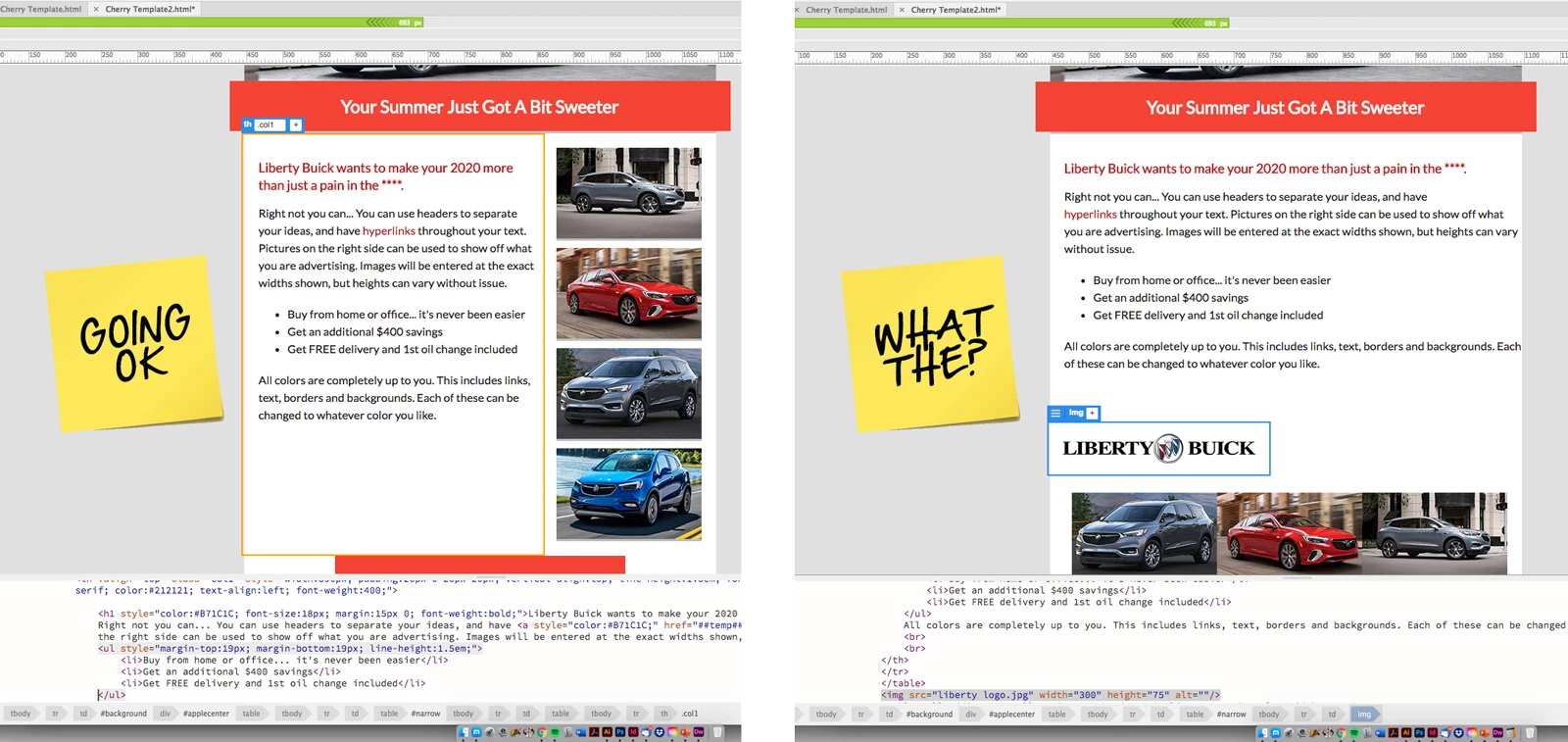
 

[Moderator added the image to replace the link]

This topic has been closed for replies.

2 replies

Nancy OShea
Community Expert
Community Expert
August 6, 2020

DW assumes you have basic coding skills.

When things break it's almost always caused by code errors like orphaned opening or closing tags.


<p> This is good. </p>


<p>this is broken


Go to Window > Results > Validation to check your code for errors.


Nancy O'Shea— Product User & Community Expert
BenPleysier
Community Expert
Community Expert
August 6, 2020

To add an image, you need to stay within the containing element, which in this case would be downstream elements of the html-table element.


Please keep in mind that Dreamweaver is not a drag and drop type of program.


Edit: You may do well following this tutorial https://www.w3schools.com/html/

Wappler is the DMXzone-made Dreamweaver replacement and includes the best of their powerful extensions, as well as much more!
Known Participant
August 7, 2020

Thanks. Going to start on tutorials today. I wish Adobe would make a WYSWYG version of Illustrator then I'd be an instant web master )

Nancy OShea
Community Expert
Community Expert
August 7, 2020

"I wish Adobe would make a WYSWYG version of Illustrator then I'd be an instant web master "

I don't think that's what you meant.  Illustrator is already WYSIWYG because it's a graphics editor.


Just so you understand, there is no tool in the world that can make you an instant web developer anymore than there is a tool that can make you an instant electrician or plumber.  What you don't know would fill volumes of books and at least a 4 year college degree program to explain.  Dreamweaver is a good tool but tools don't build websites, people do. 


If you're really serious about doing this professionally, start studying UX/UI theory, HTML and its relationship to CSS, responsive layouts, client-side & server-side programming, safe practices, web accessibility, privacy regulations, the usage of frameworks, search engine optimization and much, much more... 


Related links:


Good luck!


Nancy O'Shea— Product User & Community Expert