Cecil108
Known Participant
February 12, 2018
Answered

404 Broken links

  • February 12, 2018
  • 2 replies
  • 877 views

Hi,

I'm wondering if anyone could help me, I have built my site in WordPress, it looks great. I'm working with a Zero $ budget and can't afford to pay get this sorted.

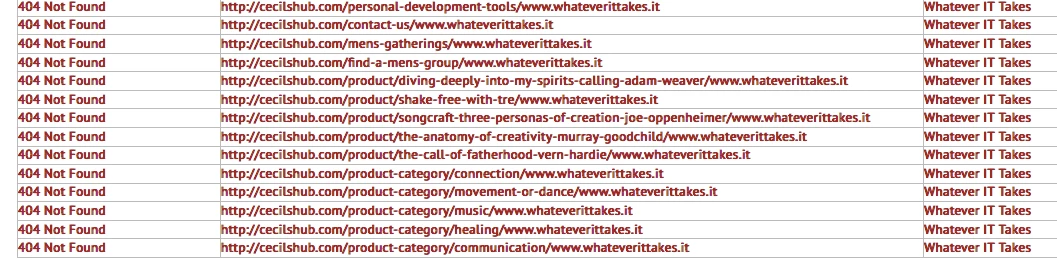
I have a 7 page site, that's showing 404's, I attach the screenshots from 3 online broken link checkers,  I can't find these in the source of my site, the only reference to whateverittakes that I can find is in the footer.

My site is cecilshub.com

Many thanks for any help that anyone can give.

Kind Regards,

Paul


This topic has been closed for replies.
Correct answer anissa_thompson

It seems like either WP or a 3rd party plugin is appending "whateverittakes.it" to the end of your links in WP's page creation... Can you temporarily disable any plugins, or test a different theme to be on the safe side?

Curious....

2 replies

anissa_thompson
Community Expert
anissa_thompsonCommunity ExpertCorrect answer
Community Expert
February 12, 2018

It seems like either WP or a 3rd party plugin is appending "whateverittakes.it" to the end of your links in WP's page creation... Can you temporarily disable any plugins, or test a different theme to be on the safe side?

Curious....

Hope this helps! Make sure to press "✔ Correct Answer" on this post if this answers your question. Happy Creating!Anissa • @anissat
Cecil108
Cecil108Author
Known Participant
February 13, 2018

Hi Annissa,

Yep, all fixed. It was a WP theme that was the culprit.

Thanks

Paul

Preran
Community Manager
Community Manager
February 12, 2018

Just to be sure, is this site exclusively created and hosted through Wordpress, or is there a workflow with Dreamweaver that I am missing?

Thanks,

Preran

Cecil108
Cecil108Author
Known Participant
February 12, 2018

Hi Preran,

This site was created with WP, it's hosted separately. I use DW to check layout etc.

Thanks

Paul