March 24, 2017
Answered

553 Could not create file

  • March 24, 2017
  • 2 replies
  • 1389 views

Trying to troubleshoot the error we are getting when trying to copy a file from local files to the remote server in Dreamweaver CS6. See below for error message. Unsure what is causing this error. All other pages on the site does not have this problem.

Error Log:

553 Could not create file. 

{file location/name.php} - error occurred - An FTP error occurred - cannot put name.php.  Dreamweaver encountered an internal data error.  Please try the operation again.

File activity incomplete. 1 file(s) or folder(s) were not completed.

Files with errors: 1

{file location/name.php}

Finished: 3/24/2017 2:13 PM

This topic has been closed for replies.
Correct answer BenPleysier

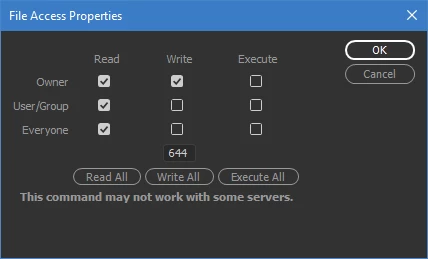
This is usually caused when a file is uploaded to a directory that does not have the right permissions, like write and execute. To correct this, right click the directory and set the appropriate permissions

2 replies

March 27, 2017

Thank you, I had suspected that this was the problem. I was working with a coworker’s connection, and couldn’t figure out why mine was working, and her connection wasn’t. Our set up are the same. It seems that our IT person didn’t set her permissions correctly.

Sidra

BenPleysier
Community Expert
BenPleysierCommunity ExpertCorrect answer
Community Expert
March 25, 2017

This is usually caused when a file is uploaded to a directory that does not have the right permissions, like write and execute. To correct this, right click the directory and set the appropriate permissions

Wappler is the DMXzone-made Dreamweaver replacement and includes the best of their powerful extensions, as well as much more!