


A new Code Formatting problem for me
I find a new but recurring situation that I want to correct. It deals with assigning a URL to a text hyperlink.
After selecting the text that's to receive the link, I paste into the Link field of the properties pane the copied URL. I then press Return.
For no apparent reason, the markup gets broken into three lines,as shown on "lines 14 through 17" in the first of two screen shots.

I must use delete to raise each entry to the appropriate line in the markup, as shown in the second screen shot.

...
This problem rears its ugly head whenever I activate "Apply Source Formatting" to an existing page that has URLs entered in the markup. For example, in my next screen shot, the formatting for the string of links looks as it should. . .
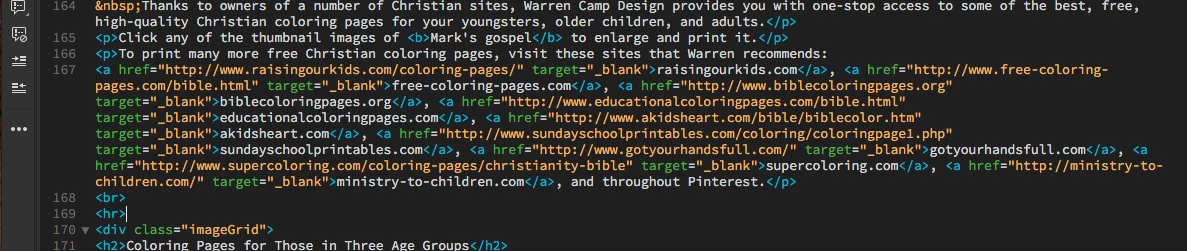
. . . but when I activate "Apply Source Formatting," each of those links gets broken into several components that drop onto the next line. See it here. . .
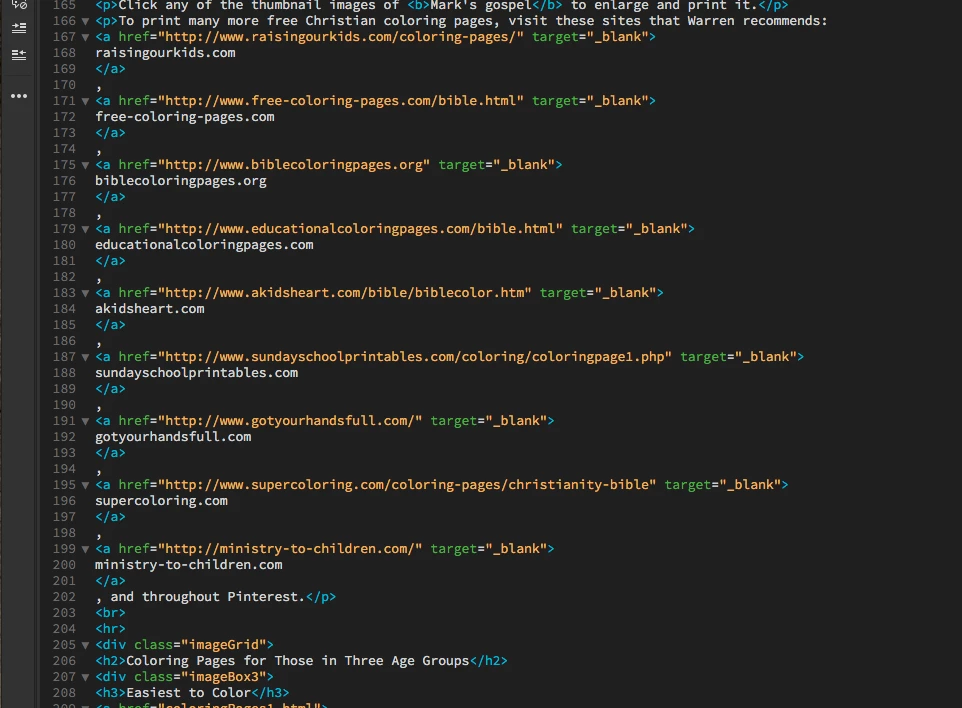
Which preference affects this formatting? How can I control it so this doesn't continue to happen?
Thanks, in advance, for your help with this.
Warren

 AdChoices