LIZZIE
Inspiring
April 19, 2019
Answered

A problem with adaptive styles on different mobile devices.

  • April 19, 2019
  • 1 reply
  • 2483 views

I have a style sheet that contains the following values...

min-width: 1000px

max-width:1000px

Beneath each one, I've specified code for the resolutions of desktop—being above 1000px—and mobile—being below 1000px—so that they will change the layout.

In my previous topic, chrome stopped scaling adaptively, but on an actual phone, it worked.

The problem now...

On my older LG phone, the website works almost perfectly.

On my somewhat newer Samsung Galaxy S5 there are several problems that are showing up that don't exist on the other phone.

Here is a link to test the website...

Pokémon - English dubbed episode 0001

on the LG, the social media buttons float to the top left with the screen and the navigation menu comes down as a list, like this.

Demonstration number 1

Demonstration number 2

Demonstration number 3

Demonstration number 4

Demonstration number 5

On the S5, they list out like this...

Demonstration number 1 Demonstration number 2 Demonstration number 3 Demonstration number 4 Demonstration number 5

...which is identical to chrome, firefox, and IE11.

Other than that, the text toward the top is extremely tiny on the S5, which, again, is not the case on the LG. I don't know why they would be so different? I don't believe the resolution is significantly different?

The S5 is probably an inch and a half bigger than the LG.

I would like them to have the same effects as the LG on all different mobile devices.

This is my current CSS...

[Excess code removed by moderator. CSS is in the online page so no need to post it twice.]

This topic has been closed for replies.
Correct answer Nancy OShea

I can't post what I worked on in dreamweaver a moment ago, because it's not uploaded online, but I started an entire website from scratch, and the result was exactly the same as what I'm getting now. I'm 99% sure that the html errors aren't directly responsible for whatever this is. I'm noticing that on the W3 article, in the CSS section, there actually doesn't seem to be anything there to style that "Menu" text, and the html for the "Menu" text isn't wrapped in a div and has no style class. That could explain the lack of style attributes there, right?

It still wouldn't explain the reason that the button isn't working, though.

EDIT: What do you mean by "duplicate ID?" Where is that on my page?

I don't have anything with spaces in the file names, though. I always use hyphens. The only thing is the header image, but I have that there broken on purpose. It shouldn't affect anything else, though.

EDIT 2:

Oh, this?

<header class="header" id="header">

</header>

It repeats because they're both coming in through ssi. The first one is in headerandnavigation.shtml and the second one is in headerandnavigationdesktop.shtml

They don't ever appear on the page together, because the first is called through a mobile display media query and the second is for desktops.

Should I get rid of them anyway?


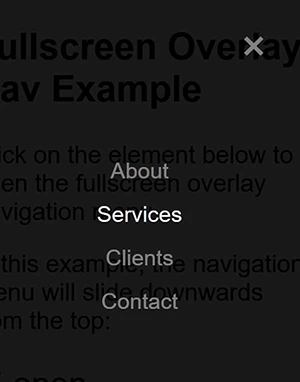
When I'm trying to get something to work, I put it in a plain vanilla page.

This code does exactly what is expected.  Nothing more, nothing less.

<!doctype html>

<html lang="en">

<head>

<meta charset="utf-8">

<title>Fullscreen Nav Demo</title>

<meta name="viewport" content="width=device-width, initial-scale=1">

<style>

body { font-family: 'Lato', sans-serif; }

.overlay {

height: 0%;

width: 100%;

position: fixed;

z-index: 1;

top: 0;

left: 0;

background-color: rgb(0,0,0);

background-color: rgba(0,0,0, 0.9);

overflow-y: hidden;

transition: 0.5s;

}

.overlay-content {

position: relative;

top: 25%;

width: 100%;

text-align: center;

margin-top: 30px;

}

.overlay a {

padding: 8px;

text-decoration: none;

font-size: 36px;

color: #818181;

display: block;

transition: 0.3s;

}

.overlay a:hover, .overlay a:focus { color: #f1f1f1; }

.overlay .closebtn {

position: absolute;

top: 20px;

right: 45px;

font-size: 60px;

}

@media screen and (max-height: 450px) {

.overlay { overflow-y: auto; }

.overlay a { font-size: 20px }

.overlay .closebtn {

font-size: 40px;

top: 15px;

right: 35px;

}

}

</style>

</head>

<body>

<div id="myNav" class="overlay"> <a href="javascript:void(0)" class="closebtn" onclick="closeNav()">&times;</a>

<div class="overlay-content"> <a href="#">About</a> <a href="#">Services</a> <a href="#">Clients</a> <a href="#">Contact</a> </div>

</div>

<h2>Fullscreen Overlay Nav Example</h2>

<p>Click on the element below to open the fullscreen overlay navigation menu.</p>

<p>In this example, the navigation menu will slide downwards from the top:</p>

<span style="font-size:30px;cursor:pointer" onclick="openNav()">&#9776; open</span>

<script>

function openNav() {

  document.getElementById("myNav").style.height = "100%";

}

function closeNav() {

  document.getElementById("myNav").style.height = "0%";

}

</script>

</body>

</html>

1 reply

Nancy OShea
Community Expert
Community Expert
April 19, 2019

When you post a link to your online page, you do not need to also post your code.  We can see all the code from your online page.

I'm seeing a number of beginner mistakes starting with poorly organized  RWD code and no viewport meta tag.

Starting on lines 1 - 54,. replace what you have now with this code.   By the way, embedded CSS code is for page specific styles only.  Sitewide styles really do belong in the external CSS file.  And one more thing, in CSS & HTML, paragraph is not a valid selector name.  Use the p instead.

<!doctype html>

<html lang="en">

<head>

<meta charset="utf-8">

<title>Pokémon - English dubbed episode 0001</title>

<meta http-equiv="X-UA-Compatible" content="IE=edge">

<meta name="viewport" content="width=device-width, initial-scale=1">

<link href="https://fonts.googleapis.com/css?family=Josefin+Sans:100,300" rel="stylesheet">

<link href="css/leeightontalksaboutpokemon.css" rel="stylesheet" type="text/css">

<style>

a { text-decoration: none }

a:link { color: #9F9F9F; }

a:visited { color: #9F9F9F; }

a:hover, a:active, a:focus {

color: #282828;

transition: color 0.7s ease-in-out;

}

h1 {

font-family: 'Josefin Sans', sans-serif;

font-weight: 100;

}

h2 {

font-family: 'Josefin Sans', sans-serif;

font-weight: 300;

}

p {

font-family: 'Josefin Sans', sans-serif;

font-weight: 300;

}

<style>

</head>

LIZZIE  wrote

I have a style sheet that contains the following values...

min-width: 1000px

max-width:1000px

Why?   When you express min-width: 1000px along with max-width: 1000px it is the exact same thing as width:1000px.  Why  over complicate things?

Also these social media icons are a usability problem for me.  They interfere with content on the page.

Nancy O'Shea— Product User & Community Expert
Nancy OShea
Community Expert
Community Expert
April 19, 2019

I''m also seeing a lot of careless code errors in your markup.  It's important to work with error free code especially with mobile browsers.

The W3C Markup Validation Service

Nancy O'Shea— Product User & Community Expert