


Participant
Aug 14, 2020 8:15 PM UTC
Answered

A simple Dreamweaver question

Hi all. I've been working in an old DW version for years. Now in the new one! Question, I am in File view looking at my local server file list. I simply cannot figure out how to sort my file list by Type, Modified, Size, etc. !!!! Shouldn't those be listed across the top beside Local Files? How do I add those, or can I? They are in my older version as soon as I open the site and select Files. Thanks for any help on this.

    This topic is closed to new replies. Start a new post to keep the conversation going.
    BenPleysier
    BenPleysierCorrect answer
    Community Expert
    Aug 15, 2020 1:10 AM UTC

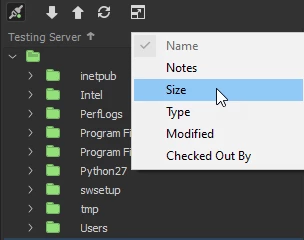
    Right click next to the server label (in my case Testing Server) and choose the columns you wish to have/sort on.


    Wappler is the DMXzone-made Dreamweaver replacement and includes the best of their powerful extensions, as well as much more!

    2 replies

    BenPleysier
    Community Expert
    BenPleysierCommunity ExpertCorrect answer
    Community Expert
    Aug 15, 2020 1:10 AM UTC

    Right click next to the server label (in my case Testing Server) and choose the columns you wish to have/sort on.


    Translate
    Wappler is the DMXzone-made Dreamweaver replacement and includes the best of their powerful extensions, as well as much more!
    Participant
    Aug 15, 2020 1:23 AM UTC

    Perfect! Thank you, Ben!

    Translate