joem29218747
Participant
July 31, 2018
Answered

Absolute URL

  • July 31, 2018
  • 2 replies
  • 1547 views

I need to use absolute image URLs in editable template regions. How can I do this?

Thank you.

    This topic has been closed for replies.
    Correct answer Nancy OShea

    Gah. I've always had it where there was one folder that held everything in subfolders (html in one, a few dozen various image folders).

    I have created a new site, moving the HTML out of images folder. I have defined the site/ linking the images folder as above. I still only receive relative to doc, or full path to image on my hard drive, not an absolute path to the image on the server.

    Thanks for the help!


    Absolute URLs must be entered manually in the Properties panel or in Code view.  DW cannot know what the full URL should be.   See screenshot.
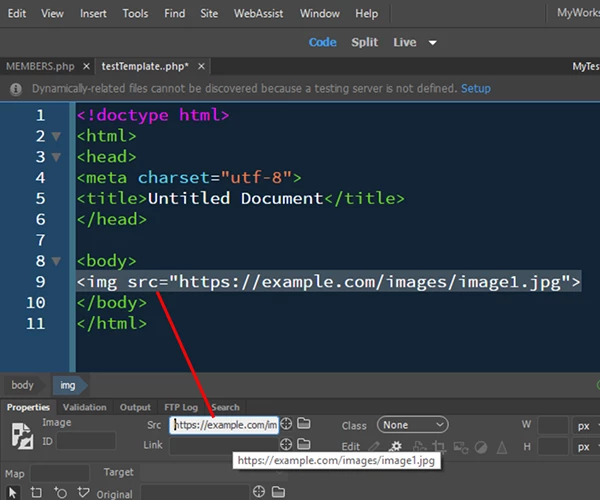
    2 replies

    BenPleysier
    Community Expert
    Community Expert
    July 31, 2018

    Have you defined your site? See for more Define a site |

    Wappler is the DMXzone-made Dreamweaver replacement and includes the best of their powerful extensions, as well as much more!
    BenPleysier
    Community Expert
    Community Expert
    July 31, 2018

    You are not giving us much information to work off.

    If the image is hosted within your website: In general, it is considered best-practice to use relative URLs, so that your website will not be bound to the base URL of where it is currently deployed. For example, it will be able to work on localhost, as well as on your public domain, without modifications. Especially handy when moving to HTTPS.

    If the image is hosted on another website: You will need to have permission to use the image.

    In either case, the format is: <img src="path-to-image/the-image.jpg" alt="image description or similar"> where the extension may change in respect to the type of image. The fact that you are working in an editable region of a template should make no difference.

    Wappler is the DMXzone-made Dreamweaver replacement and includes the best of their powerful extensions, as well as much more!
    joem29218747
    Participant
    July 31, 2018

    My images are on a subdomain, and will be used on multiple sites. All images are licensed, CC, or public domain.

    I understand the format. I want Dreamweaver to understand the format. It keeps shortening the URL (/cc2/this-image.jpg) or making the URL local (c://folder/folder/cc2/this-image.jpg)

    Nancy OShea
    Community Expert
    Community Expert
    July 31, 2018

    As Ben said, you must define your local site folder first.  For example, C:\MyTestSite

    Absolute path to images.

    <img src="https://example.com/images/img1.jpg" alt="description">

    Nancy O'Shea— Product User & Community Expert