


stephanie9809525
Participant
July 20, 2017
Answered

Add a line break without inserting a bullet point

  • July 20, 2017
  • 4 replies
  • 750 views

I am trying to add a line break without a bullet to this set of code after the [1,1]

Everytime I add a <br> it adds a line with a bullet underneath the Employee Assistance Program.

I am trying to add this because of the way that chrome is making the menu look.
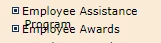
Someone please help me.

    This topic has been closed for replies.
    Correct answer osgood_

    I'm willing to bet the menus are controlled by a Javascript widget. 


    https://forums.adobe.com/people/Nancy+OShea  wrote

    I'm willing to bet the menus are controlled by a Javascript widget. 

    They are:

    <script language="JavaScript">

    create_menu('ScriptBreaker',Link,Prop);

    </script>

    4 replies

    stephanie9809525
    Participant
    July 20, 2017

    here is the css

    .level1

    {

    font-size:11px;

    margin:3px 0px 0px 0px;

    }

    .level1 a

    {

      font-family:verdana;

    color:black;

    font:bold;

    text-decoration:none;

    }

    .level2

    {

    font-size:10px;

    margin:3px 0px 0px 3px;

    }

    .level2 a

    {

      font-family:verdana;

    color:black;

    font:bold;

    text-decoration:none;

    }

    .level3

    {

    font-family:verdana;

    margin:3px 0px 0px 5px;

    }

    .level3 a

    {

    font-size:10px;

    color:black;

    text-decoration:none;

    }

    .level3 a:hover

    {

    text-decoration:none;

    }

    .level4

    {

    font-family:verdana;

    margin:3px 0px 0px 5px;

    }

    .level4 a

    {

    font-size:10px;

    color:black;

    text-decoration:none;

    }

    .level4 a:hover

    {

    text-decoration:none;

    }

    Nancy OShea
    Community Expert
    Community Expert
    July 20, 2017

    This looks like a really old web site.   The code -- if you can call it that -- is very poorly written with APDiv Layers, mystery meat selector names and excessive inline styles.  If this is supposed to be a business web site, it's a nightmare.   You might want to tell the powers that be it's time to build a new web site.

    Nancy

    Nancy O'Shea— Product User & Community Expert
    Legend
    July 20, 2017

    https://forums.adobe.com/people/Nancy+OShea  wrote

    This looks like a really old web site.   The code -- if you can call it that

    I'll skip that tutorial, then.

    stephanie9809525
    Participant
    July 20, 2017

    here is the HTML

    <html>

    <head>

    <title>southern</title>

    <meta http-equiv="Content-Type" content="text/html; charset=iso-8859-1">

    <script language="JavaScript">

    <!--

    function MM_reloadPage(init) {  //reloads the window if Nav4 resized

      if (init==true) with (navigator) {if ((appName=="Netscape")&&(parseInt(appVersion)==4)) {

        document.MM_pgW=innerWidth; document.MM_pgH=innerHeight; onresize=MM_reloadPage; }}

      else if (innerWidth!=document.MM_pgW || innerHeight!=document.MM_pgH) location.reload();

    }

    MM_reloadPage(true);

    // -->

    </script>

    <style type="text/css">

    #apDiv1 {

    position:absolute;

    width:113px;

    height:22px;

    z-index:5;

    left: 210px;

    top: 529px;

    }

    #apDiv1 a {

    font-size: medium;

    font-weight: bold;

    font-family: Verdana, Geneva, sans-serif;

    }

    a:link {

    text-decoration: none;

    }

    a:visited {

    text-decoration: none;

    }

    a:hover {

    text-decoration: none;

    }

    a:active {

    text-decoration: none;

    }

    #apDiv2 {

    position:absolute;

    width:210px;

    height:55px;

    z-index:5;

    left: 341px;

    top: 574px;

    }

    </style>

    </head>

    <link rel="stylesheet" href="southern.css">

    <title>ScriptBreaker.com :: 3 level click menu</title>

    <script language="JavaScript" src="southern_items.js"></script>

    <script language="JavaScript" src="southern_menu.js"></script>

    <body bgcolor="#FFFFFF" text="#000000" background="../images/redback.gif" link="#000000" vlink="#000000" alink="#000000">

    <p>     <a href="../index.htm"><img src="../images/Gatered.gif" width="100" height="99" border="2"></a></p>

    <div id="Layer1" style="position:absolute; width:200px; height:115px; z-index:1; left: 265px; top: 145px"><img src="../images/gatetruck.jpg" width="300" height="190"></div>

    <div id="Layer2" style="position:absolute; width:200px; height:115px; z-index:2; left: 421px; top: 334px"><img src="../images/store.jpg" width="300" height="133"></div>

    <div id="Layer3" style="position:absolute; width:280px; height:38px; z-index:3; left: 191px; top: 49px"><font size="7" face="Verdana, Arial, Helvetica, sans-serif" color="#FF0000"><b><font size="6">S</font></b></font><font size="5"><b><font face="Verdana, Arial, Helvetica, sans-serif">outhern

      Division</font></b></font><font size="4"><b><font face="Verdana, Arial, Helvetica, sans-serif">

      </font></b></font></div>

    <div id="Layer4" style="position:absolute; width:239px; height:19px; z-index:4; left: 237px; top: 495px"><a href="https://www.hrapply.com/gatepetro/Setup.ats"><img src="../images/sd_ATS.jpg" width="241" height="21" border="0"></a></div>

    <div id="apDiv2"><a href="http:\\dovedata.com\"><img src="DoveData.JPG" width="348" height="53" border="0" longdesc="DoveData.JPG"></a></div>

    <p>

      <script language="JavaScript">

    create_menu('ScriptBreaker',Link,Prop);

    </script>

    </p>

    </body>

    </html>

    stephanie9809525
    Participant
    July 20, 2017
    Please download the attached file to view this post
    Jon Fritz
    Community Expert
    Community Expert
    July 20, 2017

    I'm sorry, I meant the html and css code of the page.

    You have something in your html or css that is determining the height or positioning of your menu. It's not part of the code you have posted. Usually css settings would be what causes an overlap like you have shown, if they don't allow your menu item to expand and/or push the next item down.

    Jon Fritz
    Community Expert
    Community Expert
    July 20, 2017

    It looks to me like you might be using absolute positioning or a fixed pixel height on your menu items. Either one could cause the overlap you're seeing.

    Could you please post a link to your work in progress so we can see exactly what's happening with your code in our browsers?

    A distant second would be to post the entire code of the page to the forum. Don't reply via email if you do that, the code won't come through.