


Participant
February 12, 2018
Answered

Add a server options missing

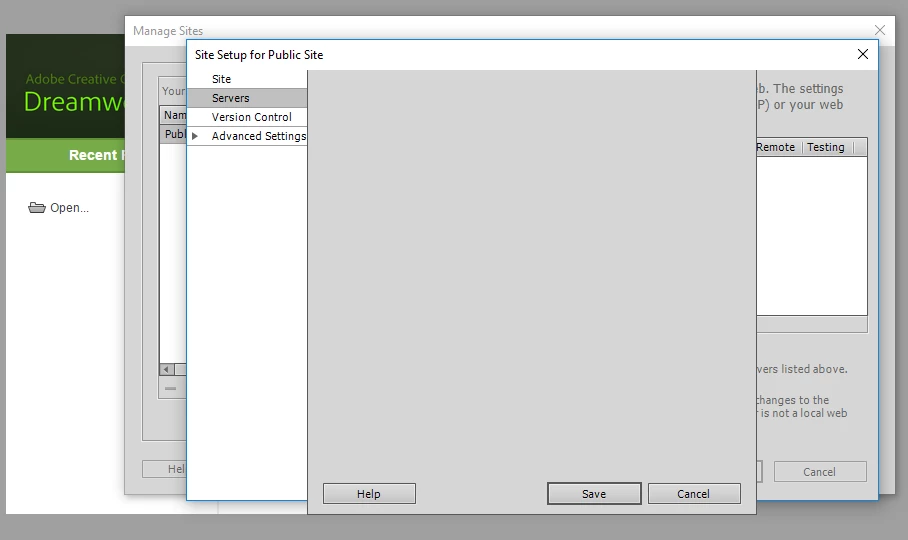
After click New Site or Manage Sites and then selecting Add new server, we get a grey box with 3 buttons but no configuration options.  Anyone seen this before?  Occurs on three separate computers where Dreamweaver was installed.
This topic is closed to new replies. Start a new post to keep the conversation going.
Nancy OShea
Nancy OSheaCorrect answer
Community Expert
February 12, 2018

Forgot to mention that another odd behavior is that About Dreamweaver does not come up.  Not sure if it is somehow related.  Sometimes you can quickly see something flash up on the screen for a split second but most times not.


This sounds like an incomplete installation.

  • I would wipe DW off the systems with CC Cleaner Tool (see #3 in Jon's reply) 
  • Reinstall with Admin level permissions.
  • Restart computers.
Nancy O'Shea— Product User & Community Expert

8 replies

Jon Fritz
Community Expert
Community Expert
February 12, 2018

Have you tried any of the standard troubleshooting steps...

1. Clear the program cache: Deleting a corrupted cache file
2. Restore Preferences: Unusual behavior in Dreamweaver? Try restoring preferences.
3. Cleaner Tool Reinstall: Use the Creative Cloud Cleaner Tool to solve installation problems

Translate
Participant
February 12, 2018

We have not as these are 3 brand new installs and adding the server is the first thing we have attempted to do upon first opening the software.  The third install was actually completed earlier this afternoon.

Translate
Participant
February 12, 2018

Forgot to mention that another odd behavior is that About Dreamweaver does not come up.  Not sure if it is somehow related.  Sometimes you can quickly see something flash up on the screen for a split second but most times not.

Translate
