


Inspiring
Mar 8, 2021 11:52 PM UTC
Question

Add Mailchimp Subscribe Now HTML CSS to my own button
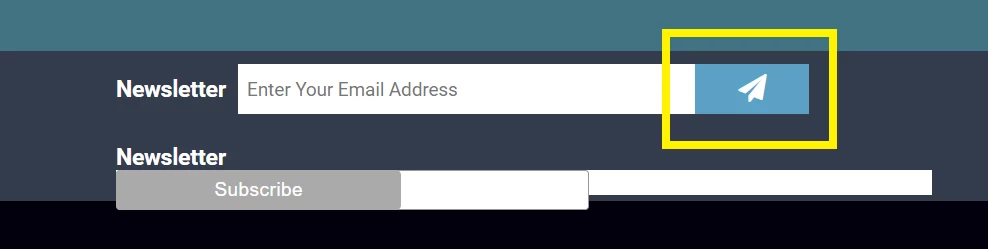
I want to add the code to make the button in yellow functional. Alternatively, make the subscribe button on the button look  like the above.


Here is my button:


<form>
<p>
<input type="email" name="newsletter" placeholder="Enter Your Email Address" id="newsletter" >
<button type="submit" ><i class="fa fa-send"></i></button>
</p>
</form>


Here is the code mailchimp spit out: 


<!-- Begin Mailchimp Signup Form -->
<link href="//cdn-images.mailchimp.com/embedcode/slim-10_7.css" rel="stylesheet" type="text/css">
<style type="text/css">
#mc_embed_signup{background:#fff; clear:left; font:14px Helvetica,Arial,sans-serif; }
/* Add your own Mailchimp form style overrides in your site stylesheet or in this style block.
We recommend moving this block and the preceding CSS link to the HEAD of your HTML file. */
</style>
<div id="mc_embed_signup">
<form action="https://touch-the-universe.us17.list-manage.com/subscribe/post?u=17254369a831ab340dcc39d21&amp;id=2769e73a04" method="post" id="mc-embedded-subscribe-form" name="mc-embedded-subscribe-form" class="validate" target="_blank" novalidate>
<div id="mc_embed_signup_scroll">

<input type="email" value="" name="EMAIL" class="email" id="mce-EMAIL" placeholder="email address" required>
<!-- real people should not fill this in and expect good things - do not remove this or risk form bot signups-->
<div style="position: absolute; left: -5000px;" aria-hidden="true"><input type="text" name="b_17254369a831ab340dcc39d21_2769e73a04" tabindex="-1" value=""></div>
<div class="clear"><input type="submit" value="Subscribe" name="subscribe" id="mc-embedded-subscribe" class="button"></div>
</div>
</form>
</div>

<!--End mc_embed_signup-->


Any advice would be greatly appreciated. Cheers.

    This topic is closed to new replies. Start a new post to keep the conversation going.

    5 replies

    Nancy OShea
    Community Expert
    Community Expert
    Mar 9, 2021 8:38 PM UTC

    If you're embedding a MailChimp sign-up form into your document, follow MailChimp's instructions to the letter. 

    1. Create the sign-up form on MailChimp's website.

    2. Copy and paste THEIR code into your document.

    3. Upload document to your server to test it.


    Put MailChimp's CSS code into the <head> of your document.

    Put MailChimp's <form> code into the <body> of your document.

    It should look like this:


    If you want the form styled differently, you'll need to do that manually in the CSS code.  But DO NOT tamper with the <form> code otherwise you'll break it.  


    Good luck with your project!


    Translate
    Nancy O'Shea— Product User & Community Expert
    Inspiring
    Mar 9, 2021 12:26 AM UTC

    I bassically want the button button and imput field, that is all garbled and out of place, to look like the above styled one that is not functional. 


    Translate
    BenPleysier
    Community Expert
    Community Expert
    Mar 9, 2021 1:16 AM UTC

    What is the function that you want to apply to the submitted form? Have you got the code for that? Has the site got a mail server? What is the serverside coding language? 

    Translate
    Wappler is the DMXzone-made Dreamweaver replacement and includes the best of their powerful extensions, as well as much more!
    Community Expert
    Mar 9, 2021 12:04 AM UTC

    If you want to make a button on the end of an input you could use Bootstrap has a class to do this: https://getbootstrap.com/docs/4.1/components/input-group/#button-addons  .  Otherwise you just need to style a button and input so that you remove their inherit margins to move the objects closer to one another.

    Translate
    Inspiring
    Mar 9, 2021 12:19 AM UTC

    Thanks, both of these look hard to do. I'm a total newbie. Can someone do this for me. I can paypal 5-10 dollars, assuming it takes just a few minutes.

    Translate