


June 27, 2017
Answered

Add product dimension tags

  • June 27, 2017
  • 3 replies
  • 4097 views

Hi,

I am new to Creative Cloud apps. I need to add dimension tags to the picture of my product. Something like on the picture below:
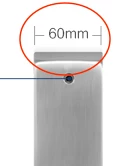
Is there an app/tool that I can use for that? Or if someone knows a trick how to do it easily I would vary appreciate it if you share

This topic has been closed for replies.
Correct answer BenPleysier

In a past life I used a CAD program to draw and dimension products. This is probably an overkill for your application.

The only way I can think of is by using Photoshop or Illustrator to add the lines and the dimension(s).

Incidentally, this is not a Dreamweaver question, but since you were unwillingly sent here, I felt compelled to reply.

3 replies

Participant
July 5, 2017

Hi. If you are still watching, this plug-in for drawing dimensions might help.

BPT-Pro4 - CAD plugin for Illustrator | Baby Universe

July 5, 2017

Thank you! This looks very helpful!

pziecina
Legend
June 27, 2017

Your question has been moved to the Dreamweaver forum, but in order to help better it would be necessary to know if the images are to be used for the web and if you wish the image and the dimensions to be to scale or not.

You can include an image to scale on the web, but there is a very big limitation and that is screen size, as it is obviously impossible to display a 5 inch wide image on a 3 inch wide display.

June 29, 2017

Hi pziecina,

Thank you for your reply!

I am going to use the images in the document about specifications of the product (it's a door lock). So I was wondering if there is a special tool that I can use to add the measurement marks (measure from one point to another) and then add a measure (for example, "60mm") in between. For some reasons I assumed that this would be a common task to do

BenPleysier
Community Expert
BenPleysierCommunity ExpertCorrect answer
Community Expert
June 29, 2017

In a past life I used a CAD program to draw and dimension products. This is probably an overkill for your application.

The only way I can think of is by using Photoshop or Illustrator to add the lines and the dimension(s).

Incidentally, this is not a Dreamweaver question, but since you were unwillingly sent here, I felt compelled to reply.

Wappler is the DMXzone-made Dreamweaver replacement and includes the best of their powerful extensions, as well as much more!
Kanikas
Legend
June 27, 2017
