carolyn@10541
Known Participant
March 21, 2018
Answered

Adding an email link to a button

  • March 21, 2018
  • 2 replies
  • 1973 views

Hi, I hope everyone is well. I have been trying to link a button to my email address in Bootstrap and everything I try does not work. Does anyone have a solution?

Thank you.

Carolyn

This topic has been closed for replies.
Correct answer BenPleysier

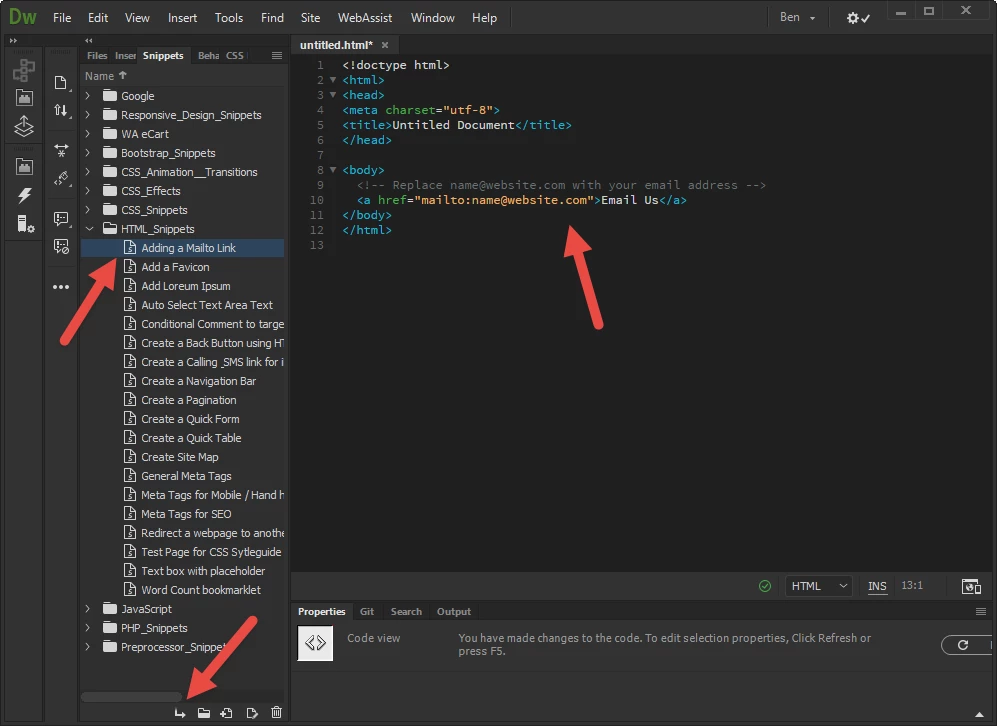
Place the cursor where you want the link and in the Snippets panel got to HTML_Snippets > Adding a Mailto Link. Click the Insert button at the bottom of the panel.

Then wrap the 'Email Us' text in a button as per

<a href="mailto:name@website.com"><button>Email Us</button</a>

2 replies

Nancy OShea
Community Expert
Community Expert
March 21, 2018

Posting an email link online is like erecting a big neon sign that screams "spam me."  Robot harvesters have no trouble finding email links.   Before long your email address will be in the hands of every spammer worldwide.   Do you really want that?

A secure contact form is better for everyone.

Nancy O'Shea— Product User & Community Expert
BenPleysier
Community Expert
BenPleysierCommunity ExpertCorrect answer
Community Expert
March 21, 2018

Place the cursor where you want the link and in the Snippets panel got to HTML_Snippets > Adding a Mailto Link. Click the Insert button at the bottom of the panel.

Then wrap the 'Email Us' text in a button as per

<a href="mailto:name@website.com"><button>Email Us</button</a>

Wappler is the DMXzone-made Dreamweaver replacement and includes the best of their powerful extensions, as well as much more!
carolyn@10541
Known Participant
March 21, 2018

Thank Ben.

Carolyn