Participant
June 17, 2017
Answered

Adding drop down menu in Dreamweaver CC17 for Mac

  • June 17, 2017
  • 1 reply
  • 973 views

I made a HUGE jump from Dreamweaver CS6 to CC17, and needless to say, it's really overwhelming. Everything has changed and i'm trying to work my way through some web updates for a client, and have hit a wall. I'm working on an existing website and need to add a page through a drop down menu. There is currently a single navigation box in a bar, and there is a sub-page to go under it that needs to appear when you hover over with the cursor. I've tried to copy/paste the code from another drop down menu on the same page [different category], then changing the code to reflect the new page with no luck. I'm sure this is an easy thing, but i'm totally stumped. Are there any tutorials for this specifically, or an easier way to do this?

This topic has been closed for replies.
Correct answer Nancy OShea

Hover  does nothing on touch screen devices because there is no mouse.   These days menus must be finger tap and mouse click  friendly as well as responsive in all devices.

You can do this pretty easily with Bootstrap Layouts and the Bootstrap Navbar Component.
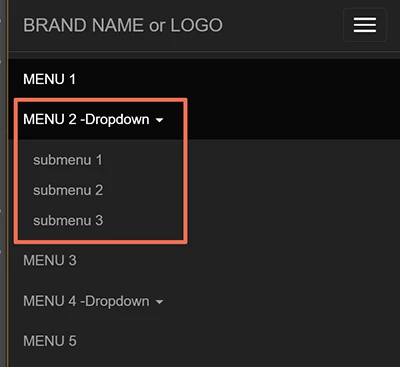
<!doctype html>

<html lang="en">

<head>

<meta charset="utf-8">

<title>Bootstrap 3.3.7 Starter</title>

<meta name="viewport" content="width=device-width, initial-scale=1">

<meta http-equiv="X-UA-Compatible" content="IE=edge">

<!-- Latest compiled and minified Bootstrap CSS-->

<link rel="stylesheet" href="https://maxcdn.bootstrapcdn.com/bootstrap/3.3.7/css/bootstrap.min.css" integrity="sha384-BVYiiSIFeK1dGmJRAkycuHAHRg32OmUcww7on3RYdg4Va+PmSTsz/K68vbdEjh4u" crossorigin="anonymous">

</head>

<body>

<!--begin top nav bar-->

<nav class="navbar navbar-inverse navbar-fixed-top" role="navigation">

<div class="container-fluid">

<div class="navbar-header"> <a class="navbar-brand" href="#"> BRAND NAME or LOGO </a>

<button type="button" class="navbar-toggle" data-toggle="collapse" data-target="#myNavbar">

<span class="icon-bar"></span> <span class="icon-bar"></span> <span class="icon-bar"></span>

</button>

</div>

<div class="collapse navbar-collapse" id="myNavbar">

<ul class="nav navbar-nav navbar-right">

<li class="active"><a href="#">MENU 1</a></li>

<li class="dropdown"> <a class="dropdown-toggle" data-toggle="dropdown" href="#">MENU 2-Dropdown <span class="caret"></span></a>

<ul class="dropdown-menu">

<li><a href="#">submenu 1</a></li>

<li><a href="#">submenu 2</a></li>

<li><a href="#">submenu 3</a></li>

</ul>

</li>

<li><a href="#">MENU 3</a></li>

<li class="dropdown"> <a class="dropdown-toggle" data-toggle="dropdown" href="#">MENU 4-Dropdown <span class="caret"></span></a>

<ul class="dropdown-menu">

<li><a href="#">submenu 1</a></li>

<li><a href="#">submenu 2</a></li>

<li><a href="#">submenu 3</a></li>

</ul>

</li>

<li><a href="#">MENU 5</a> </li>

</ul>

</div>

</div>

<!--end top nav--> </nav>

<div class="container">

<div class="row">

PAGE CONTENT GOES HERE....

</div>

</div>

<!--Compiled & minified jQuery-->

<script src="https://code.jquery.com/jquery-1.12.2.min.js" integrity="sha256-lZFHibXzMHo3GGeehn1hudTAP3Sc0uKXBXAzHX1sjtk=" crossorigin="anonymous">

</script>

<!--Compiled & minified Bootstrap-->

<script src="https://maxcdn.bootstrapcdn.com/bootstrap/3.3.7/js/bootstrap.min.js" integrity="sha384-Tc5IQib027qvyjSMfHjOMaLkfuWVxZxUPnCJA7l2mCWNIpG9mGCD8wGNIcPD7Txa" crossorigin="anonymous"></script>

</body>

</html>

1 reply

Nancy OShea
Community Expert
Nancy OSheaCommunity ExpertCorrect answer
Community Expert
June 17, 2017

Hover  does nothing on touch screen devices because there is no mouse.   These days menus must be finger tap and mouse click  friendly as well as responsive in all devices.

You can do this pretty easily with Bootstrap Layouts and the Bootstrap Navbar Component.

<!doctype html>

<html lang="en">

<head>

<meta charset="utf-8">

<title>Bootstrap 3.3.7 Starter</title>

<meta name="viewport" content="width=device-width, initial-scale=1">

<meta http-equiv="X-UA-Compatible" content="IE=edge">

<!-- Latest compiled and minified Bootstrap CSS-->

<link rel="stylesheet" href="https://maxcdn.bootstrapcdn.com/bootstrap/3.3.7/css/bootstrap.min.css" integrity="sha384-BVYiiSIFeK1dGmJRAkycuHAHRg32OmUcww7on3RYdg4Va+PmSTsz/K68vbdEjh4u" crossorigin="anonymous">

</head>

<body>

<!--begin top nav bar-->

<nav class="navbar navbar-inverse navbar-fixed-top" role="navigation">

<div class="container-fluid">

<div class="navbar-header"> <a class="navbar-brand" href="#"> BRAND NAME or LOGO </a>

<button type="button" class="navbar-toggle" data-toggle="collapse" data-target="#myNavbar">

<span class="icon-bar"></span> <span class="icon-bar"></span> <span class="icon-bar"></span>

</button>

</div>

<div class="collapse navbar-collapse" id="myNavbar">

<ul class="nav navbar-nav navbar-right">

<li class="active"><a href="#">MENU 1</a></li>

<li class="dropdown"> <a class="dropdown-toggle" data-toggle="dropdown" href="#">MENU 2-Dropdown <span class="caret"></span></a>

<ul class="dropdown-menu">

<li><a href="#">submenu 1</a></li>

<li><a href="#">submenu 2</a></li>

<li><a href="#">submenu 3</a></li>

</ul>

</li>

<li><a href="#">MENU 3</a></li>

<li class="dropdown"> <a class="dropdown-toggle" data-toggle="dropdown" href="#">MENU 4-Dropdown <span class="caret"></span></a>

<ul class="dropdown-menu">

<li><a href="#">submenu 1</a></li>

<li><a href="#">submenu 2</a></li>

<li><a href="#">submenu 3</a></li>

</ul>

</li>

<li><a href="#">MENU 5</a> </li>

</ul>

</div>

</div>

<!--end top nav--> </nav>

<div class="container">

<div class="row">

PAGE CONTENT GOES HERE....

</div>

</div>

<!--Compiled & minified jQuery-->

<script src="https://code.jquery.com/jquery-1.12.2.min.js" integrity="sha256-lZFHibXzMHo3GGeehn1hudTAP3Sc0uKXBXAzHX1sjtk=" crossorigin="anonymous">

</script>

<!--Compiled & minified Bootstrap-->

<script src="https://maxcdn.bootstrapcdn.com/bootstrap/3.3.7/js/bootstrap.min.js" integrity="sha384-Tc5IQib027qvyjSMfHjOMaLkfuWVxZxUPnCJA7l2mCWNIpG9mGCD8wGNIcPD7Txa" crossorigin="anonymous"></script>

</body>

</html>

Nancy O'Shea— Product User & Community Expert

