Thanks for reply.
My OS version is:Windows 10 Education 1803 64 bit,Internal OS version:17134.48
As for the dump file,it seems that there has some problems.I follow your instructions to get a dump file but my operate system seems could not create one.After I edited the registry.I can received every program's dump file but Dreamweaver.I don't know why.But every time,windows would tell me it had sent report to Microsoft.So I opened my Task Manager when Dreamweaver shut down,hope this will be help.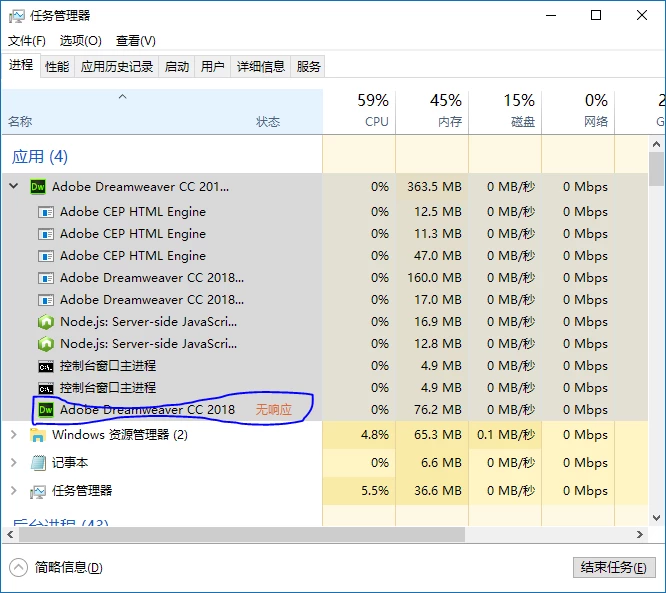
You can see,there are 10 processes of Dreamweaver,and only "Adobe Dreamweaver CC 2018.exe"has no respond.And every time this happened,if I don't end this program manually,it will continuously no respond,and would not close.
This is all I got.Looking forward your next reply.
Hi,
Thanks for your response.
Can you please check if you have created the registry key as shown in below screenshot. Once this is created all Dreamweaver crash reports will be created in %LOCALAPPDATA%\CrashDumps
You will find a *.dmp file created in this path after Dreamweaver crashes. Kindly share the same with us.
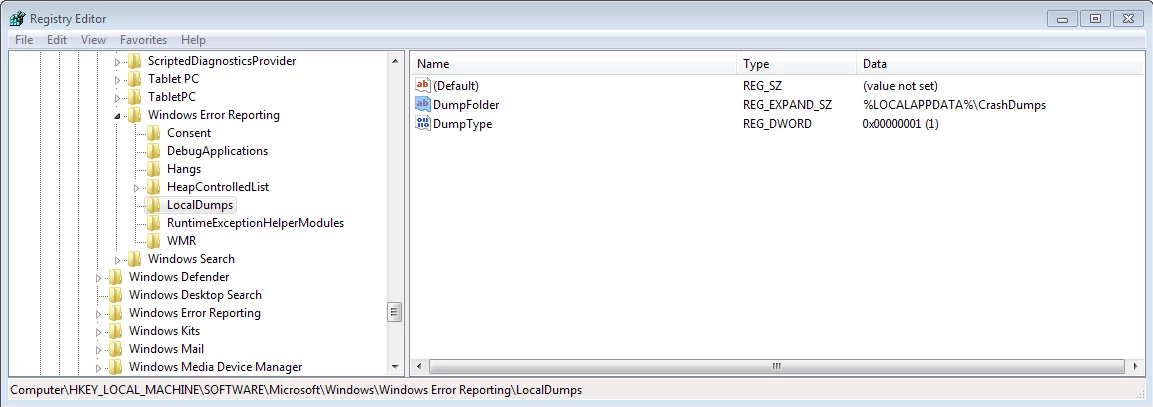
Please check if you followed below steps:
- Go to run, type regedit and enter. This will open Registry Editor.
- Go to HKEY_LOCAL_MACHINE\SOFTWARE\Microsoft\Windows\Windows Error Reporting->Right Click->New->Key. New key named "New Key #1" will be created. Rename it to LocalDumps.
- Add two entries inside LocalDumps
- Right click on LocalDumps->New->Expandable String Value (REZ_EXPAND_SZ). Double click on the entry created and add value name : DumpFolder and value data : %LOCALAPPDATA%\CrashDumps.
- Right click on LocalDumps->New->DWORD (32 bit) Value(REG_DWORD). Double click on the value created and add value name : DumpType and value data :1
Next time when the application crashes you will find the crash dump at C:\Users[UserName]\AppData\Local\CrashDumps. Dumps will be created only in case of crash and not hang.
Also when Dreamweaver process goes to not responding state, we can create a dump file in not responding state
Steps- open task manager , select Dreamweaver process, right click on it and click on "create dump file".
Please share the dump files at kragarwaatadobedotcom
Regards
Kratika




 AdChoices