
Participating Frequently
December 29, 2019
Answered

Adobe Dreamweaver CC 2020 is missing icon to upload files to remote server

  • December 29, 2019
  • 1 reply
  • 1452 views

Adobe Dreamweaver 2020 CC is missing the icon required to connect to remote server to upload files. I am having Adobe Dreamweaver for about six months. Adobe upgraded dreamweaver for 2020 CC in November 2019. Before November 2019 I was successfully able to connect and upload files to remote server as when I hit the "files" on the right side next to CC libraries, I was getting the option to upload files to remote server and this option is missing in Dreamweaver 2020 CC. Any suggestions or advice will be appreciated. 
This topic has been closed for replies.
Correct answer Nancy OShea

Go to Site > Manage Sites. Did you define your site and enter the server's FTP credentials?

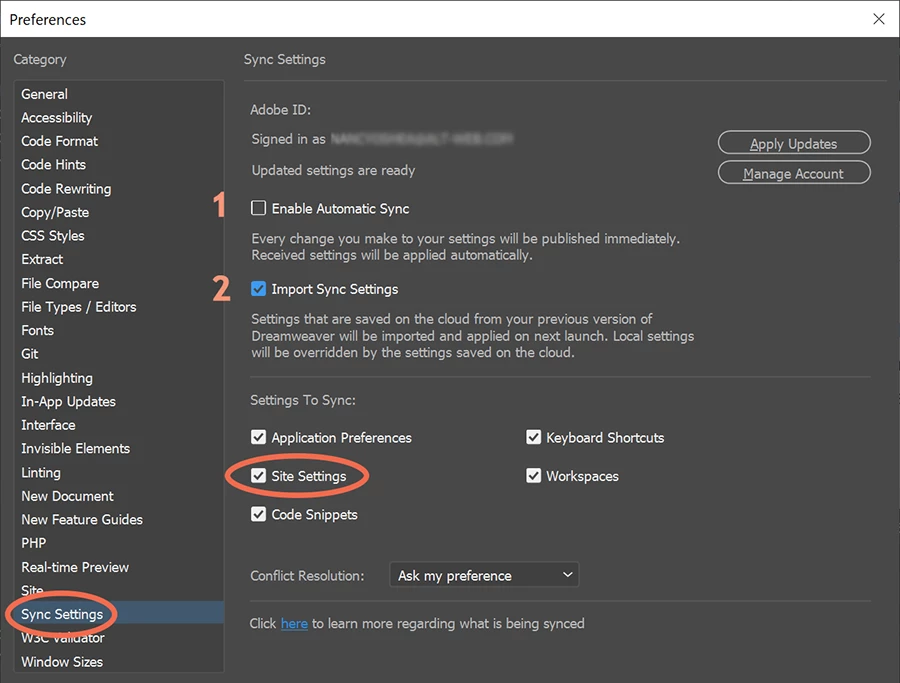
If you automatically synced settings to the cloud from your previous version, you should be able to import them into DW 2020 from your Preferences panel.  See screenshot.


1 reply

Nancy OShea
Community Expert
Nancy OSheaCommunity ExpertCorrect answer
Community Expert
December 29, 2019

Go to Site > Manage Sites. Did you define your site and enter the server's FTP credentials?

If you automatically synced settings to the cloud from your previous version, you should be able to import them into DW 2020 from your Preferences panel.  See screenshot.


Nancy O'Shea— Product User & Community Expert
Participating Frequently
December 30, 2019

Thank you. That was helpful.