
Inspiring
April 9, 2021
Question

Adobe Dreamweaver CS6 Property Inspector Panel drop down panel is empty

  • April 9, 2021
  • 5 replies
  • 455 views

Hi there,


Working on my first website with Dreamweaver CS6 and wish to create an image map with hotspots. I'm in Design mode and yet when I highlight an image to draw a hotspot area with the polygon tool I'm confronted with an empty grey box.
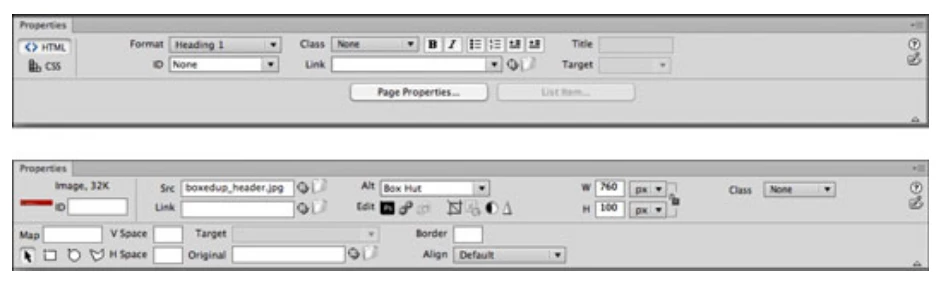
 Presumably the above with polygon and other tools bottom left is what I should see however all that I see is this >

 Any help would be greatly appreciated.


Kind regards, Garry.

    This topic has been closed for replies.

    5 replies

    Inspiring
    April 14, 2021

    Many thanks to all who have responded - your help and support is greatly appreciated. Regards, Garry.

    B i r n o u
    Legend
    April 12, 2021

    I agree with everything that has been said about the relationship between image map and background image, however thanks to css you can get around this problem ... look at this example, well the example is from a decade ago, but it shows the idea ...
    by hovering over the regions there is a first visual interaction, and by hovering over the small dots that appear (and that materialize the capital) a second interaction occurs


    https://www.puce-et-media.com/wp-content/uploads/utilisation-de-base-des-sprites-css/sprites/carte.html

    Jon Fritz
    Community Expert
    Community Expert
    April 12, 2021

    Image Maps can't be added to background images of a <div> tag. Even if your <div> has an image background, whether in css or html, you won't be presented with the Image Map options in the Properties window.

    As Ben mentioned, you must have an <img> selected.

    I'll add a +1 for avoiding their use all together.

    Nancy OShea
    Community Expert
    Community Expert
    April 11, 2021

    Your first website, that's very exciting!  Unfortunately, outdated web authoring software won't help you much.  CS6 hasn't been updated since 2012.  Meanwhile, the web has changed a lot in 9 years. 😉


    Put your best foot forward.  Start with HTML5, CSS and JavaScript code.  And don't use old fashioned images maps for  navigation.  It will never work right on mobile devices which is what most people use now.


    Read chapters, do code exercises and take quizzes at the end.
    - https://www.w3schools.com/html/
    - https://www.w3schools.com/css/
    - https://www.w3schools.com/js/
    - https://www.w3schools.com/bootstrap4/

    You can try DW CC 2021 free for 7 days.

    Adobe Dreamweaver CC - https://www.adobe.com/products/dreamweaver.html


    Nancy O'Shea— Product User & Community Expert
    Community Expert
    April 9, 2021

    First, image maps are not natively responsive so it's really not recommended to use them.  There is a reference to options for this using javascript or svg images as a replacement that can be found here: https://stackoverflow.com/questions/7844399/responsive-image-map .


    To your specific images though, the second shows the image map option that you should see in your version of DW.  The first image shows the image map options that you should see. The second shows that you are pointed at a div and not at your image. This could be due to the code of your site and how your page is setup that is causing the div to be selected and not the image. If you are having trouble selecting the image no matter how you click, you may need to validate your code for errors ( https://validator.w3.org ).