davido61985735
Participant
December 27, 2016
Answered

Adobe Dreamweaver- Question regarding how to change FONT size

I have the latest version of Adobe Dreamweaver which just replaced my much older version. I use it to manage my website. However, I cannot determine how to adjust the FONT SIZE.

Can anyone help with this?

Thanks,

D a v e

This topic is closed to new replies. Start a new post to keep the conversation going.
BenPleysier
BenPleysierCorrect answer
Community Expert
December 27, 2016

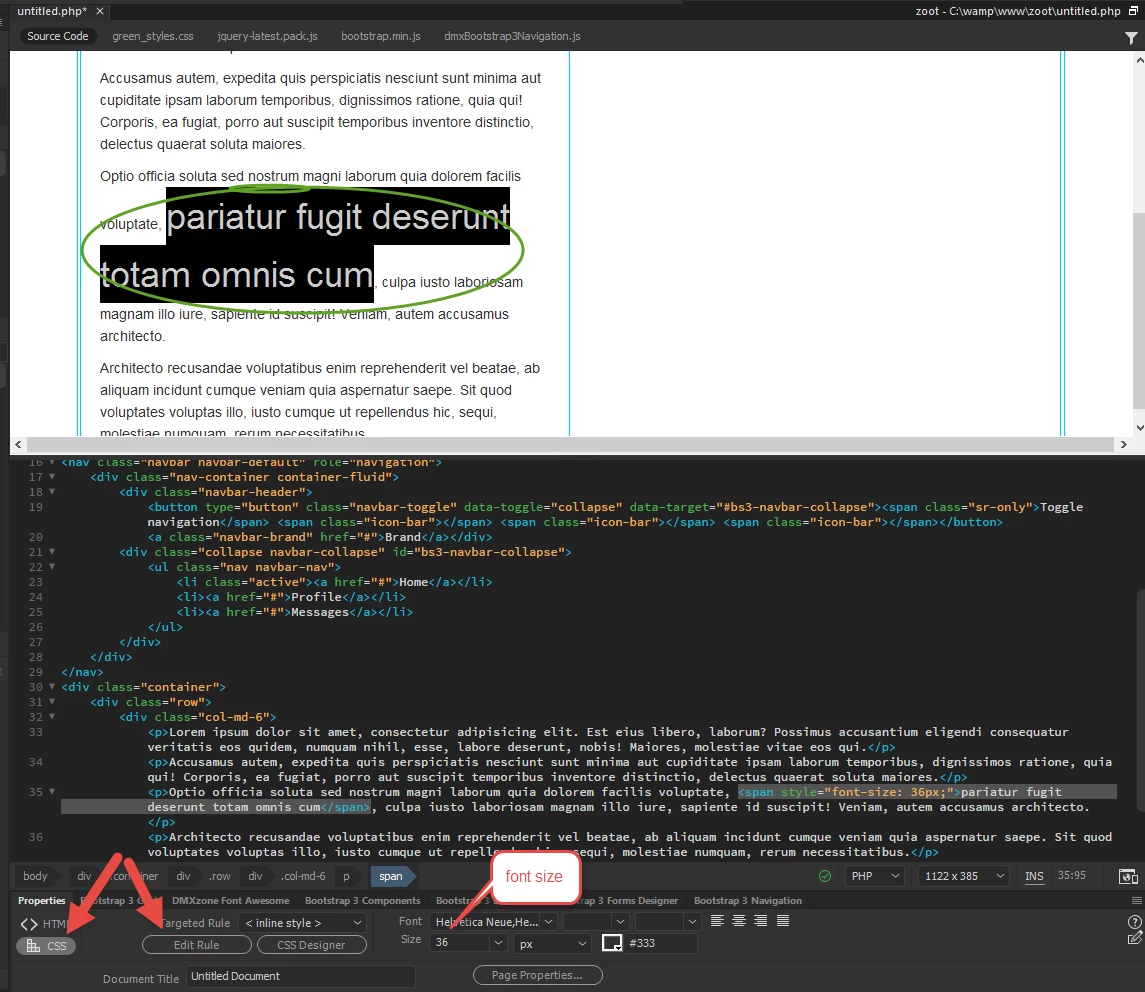
Highlight the text that you want to change, click on Edit Rule and select the font Size as in

Wappler is the DMXzone-made Dreamweaver replacement and includes the best of their powerful extensions, as well as much more!

9 replies

Rob Hecker2
Legend
December 27, 2016

Are you trying to change the font size for a particular tag, such as the <p> tag, globally?

Do you have an external style sheet where your font sizes are defined? If, so you may see definitions like this:

h1 {
    font-size: 3.7vw;
    font-weight:300;
    text-align:center;
}
h2 {
    font-size: 2.9vw;
    font-weight:300;
    text-align:center;
}

p {
    font-size: 1.6vw;
    font-weight:400;
    text-align:left;
}

The unit of measurement for fonts can be pixels (14px), ems, rems, viewport widths (as in the example above), as well as other units.

Translate
davido61985735
Participant
December 27, 2016

On my "old" Dreamweaver all I had to do was highlight the word I wanted to change the size of, drop down a font size menu, and click the new size.

Thank you,

Dave

Translate
Rob Hecker2
Legend
December 27, 2016

OK. You have just provided more information that can help someone give you an answer.

You have now told us that you are looking for a solution within the design view and that you want to make an inline change to a specific text, not a global change.

I am not familiar with design view, but someone here will have a solution for you.

Translate