Ukie princess
Participating Frequently
May 12, 2018
Answered

Adobe Dreamweaver Resize Bounding Box

  • May 12, 2018
  • 1 reply
  • 718 views

I am trying to place a logo in the header of my website (centred).

I resized the image in Dreamweaver, however the bounding box is still keeping to the original size of my imported logo image.

This is causing a problem because my logo also acts as a link back to my home page and is interfering with my other elements on the page.

Also because of the bounding box being way too large, the link can be clicked on to the various side of the logo rather than just on the logo.

Does anyone know how I can resize the bounding box to be just around the logo itself?

Thanks!

This topic has been closed for replies.
Correct answer Nancy OShea

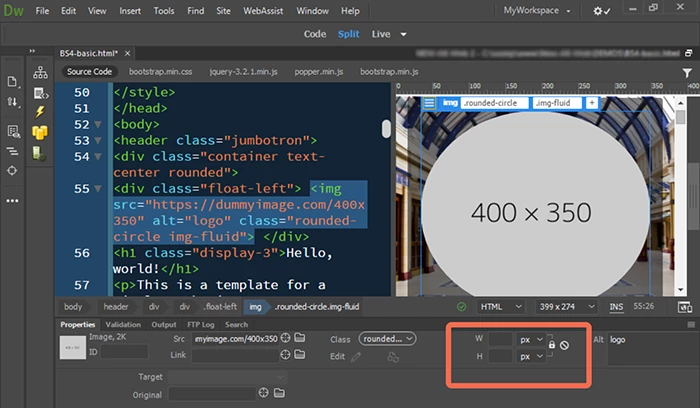
I don't know what you mean by bounding box.   See my screenshot below.  Open your Properties panel (Ctrl+F3).  What are the image dimensions?   In responsive web design, height & width should be blank because CSS takes care of it.

1 reply

Nancy OShea
Community Expert
Nancy OSheaCommunity ExpertCorrect answer
Community Expert
May 12, 2018

I don't know what you mean by bounding box.   See my screenshot below.  Open your Properties panel (Ctrl+F3).  What are the image dimensions?   In responsive web design, height & width should be blank because CSS takes care of it.

Nancy O'Shea— Product User & Community Expert