


Participating Frequently
December 9, 2017
Question

Aligning responsive textcontent in a row

  • December 9, 2017
  • 4 replies
  • 1480 views

I wonder if anyone could help me to solve a problem in Dreamweaver CC? The problem is that I can't align some textcontent with a colored background in the bottom with other content in a row. The sketch illustrates what I mean. I have tried with 100vh but that doesn't work, and I've tried with grid-containers, but though I have a margin on the right side the content flows outside it. What shall I do? I'm not using pixelheight because I want it to flow when resizing browswers.

Any suggestion how to code this right?
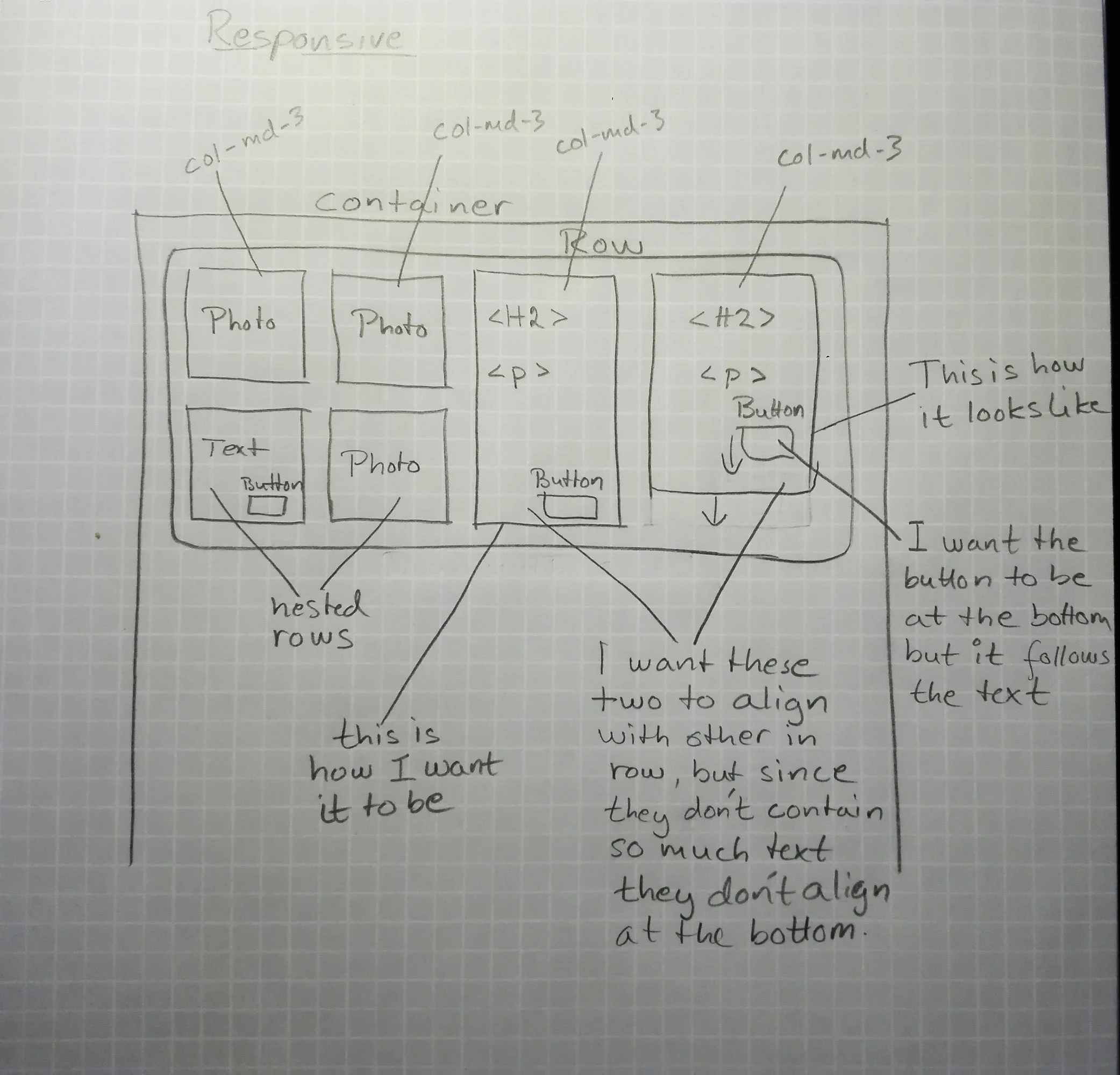
This topic has been closed for replies.

4 replies

Legend
December 10, 2017

mia@design4u2.se  wrote

What shall I do?

Give up - that layout is in no way achievable for a webpage in any shape or form, using any method unless you are prepared to use backgound images which will grow and reduce according to the amount of text you pile into the 3 text boxes, so your carefully crafted dtp 'square image' box layout approach will fail.

Part of the job of a web-developer is to quickly access a situation and be aware of what will work and what won't work. That is perhaps why you find that nearly all websites look similar in construction because I believe we have arrived at a point where an optimum layout has been discovered, which is now being deployed by millions of web-developers..

Legend
December 10, 2017

The problem with the layout as l see it is the 2 images in column 2 will govern what the equal height columns will be so they along with the image in column 1 will have to be background images otherwise that layout is impossible using any method.

Once the OP accepts that we can debate which method is best to use.

Nancy OShea
Community Expert
Community Expert
December 9, 2017

You would need to manually upgrade to Bootstrap 4 beta because it's not included in DW yet.   Bootstrap 4 uses newer Flexbox layouts  but Bootstrap 3x does not.

Flexbox allows you to vertically align inline and inline table elements to top, middle, bottom or baseline.

https://v4-alpha.getbootstrap.com/utilities/vertical-align/

It also supports equal height columns

Equal Height Columns Example for Bootstrap

To start using Bootstrap 4 in your projects, replace the Bootstrap 3 scripts with the following hosted on CDNs.

<!--Latest Bootstrap 4 CSS-->

<link href="https://maxcdn.bootstrapcdn.com/bootstrap/4.0.0-beta/css/bootstrap.min.css" rel="stylesheet" integrity="sha384-/Y6pD6FV/Vv2HJnA6t+vslU6fwYXjCFtcEpHbNJ0lyAFsXTsjBbfaDjzALeQsN6M" crossorigin="anonymous">

<!--First jQuery then Popper then Bootstrap-->

<script src="https://code.jquery.com/jquery-3.2.1.min.js" integrity="sha256-hwg4gsxgFZhOsEEamdOYGBf13FyQuiTwlAQgxVSNgt4=" crossorigin="anonymous"></script>

<!--Popper JS-->

<script src="https://cdnjs.cloudflare.com/ajax/libs/popper.js/1.11.0/umd/popper.min.js" integrity="sha384-b/U6ypiBEHpOf/4+1nzFpr53nxSS+GLCkfwBdFNTxtclqqenISfwAzpKaMNFNmj4" crossorigin="anonymous"></script>

<!--Latest Bootstrap 4 JS-->

<script src="https://maxcdn.bootstrapcdn.com/bootstrap/4.0.0-beta/js/bootstrap.min.js" integrity="sha384-h0AbiXch4ZDo7tp9hKZ4TsHbi047NrKGLO3SEJAg45jXxnGIfYzk4Si90RDIqNm1" crossorigin="anonymous"></script>

Nancy

Nancy O'Shea— Product User & Community Expert
pziecina
Legend
December 9, 2017

I was hoping for someone to suggest a none flexbox/grid method

LOL

Nancy OShea
Community Expert
Community Expert
December 9, 2017

pziecina  wrote

I was hoping for someone to suggest a none flexbox/grid method

LOL

Switch to InDesign and export to PDF.

Nancy O'Shea— Product User & Community Expert
pziecina
Legend
December 9, 2017

I can think of two methods to do this, css flexbox and css grid layouts.

Looking at your layout grid notes for the code, it looks like you are using, (or wish to use) bootstrap, so I will wait for another forum member to suggest a bootstrap method before proceeding further with my suggestion, as Dreamweaver does not support the requirerments for using flexbox or css grid layouts without making you 'jump through hoop' unnecessarily.