Hosun
Inspiring
July 8, 2019
Answered

alignment [flexbox]

  • July 8, 2019
  • 1 reply
  • 623 views

Hi,

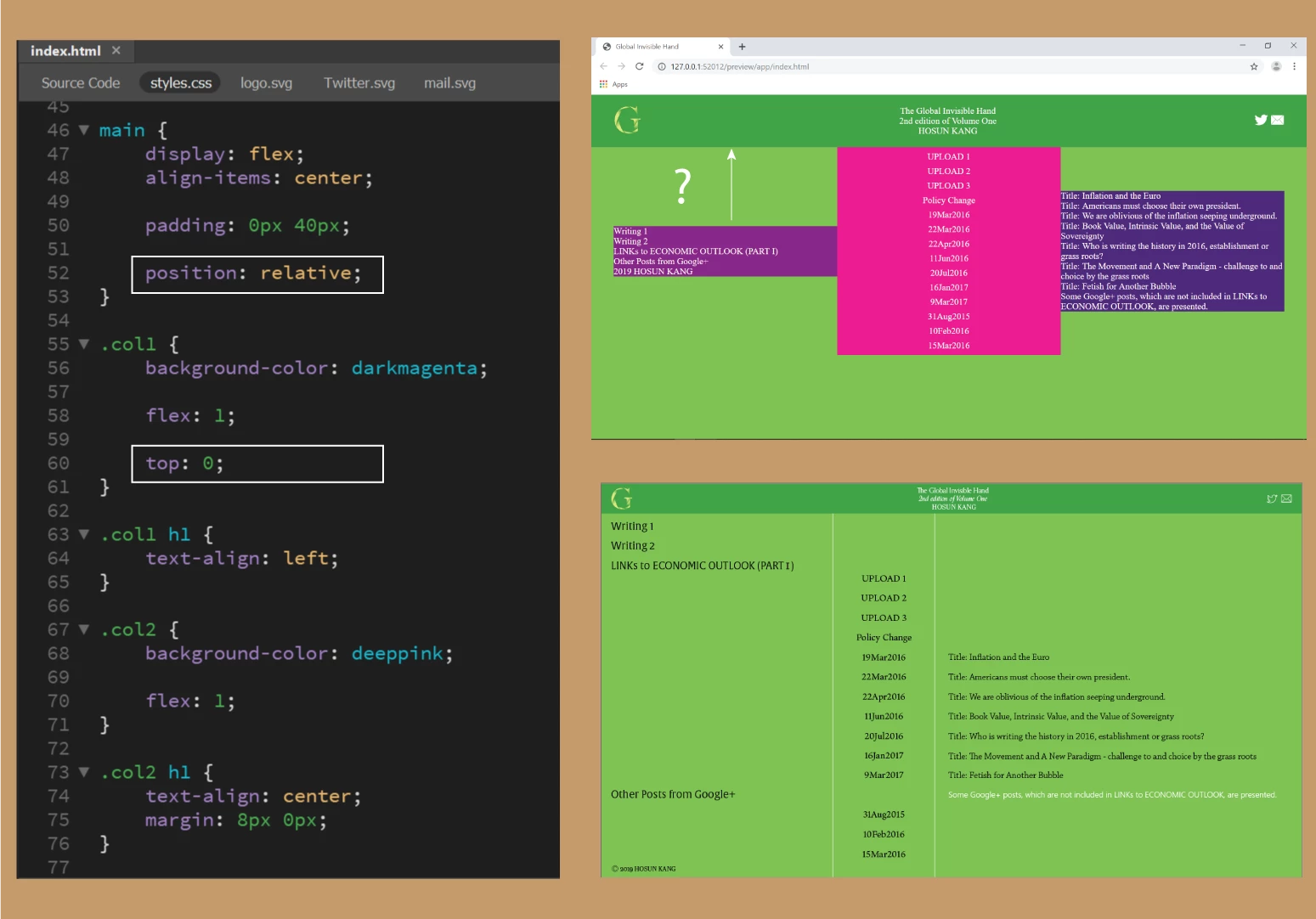
To realize the prototype, I started from moving ".col1" to the top of "main".

I wrote,

main {

            position: relative;

}

.col 1 {

             top: 0;

}

But it doesn't work.

How would I do?

Global Invisible Hand

Hosun Kang

This topic has been closed for replies.
Correct answer osgood_

That's because you are aligning the columns to be vertically centered in the 'main' div - align-items: center;

main {

display: flex;

align-items: center;

padding: 0px 40px;

position: relative;

}

It looks as though your prototype column widths are all different, so use flex-basis as the width rather than flex: 1;

Col 1:

flex-basis: 30%;

Col 2:

flex-basis 20%;

Col 3:

flex-basis: 50%

1 reply

osgood_Correct answer
Legend
July 8, 2019

That's because you are aligning the columns to be vertically centered in the 'main' div - align-items: center;

main {

display: flex;

align-items: center;

padding: 0px 40px;

position: relative;

}

It looks as though your prototype column widths are all different, so use flex-basis as the width rather than flex: 1;

Col 1:

flex-basis: 30%;

Col 2:

flex-basis 20%;

Col 3:

flex-basis: 50%

Hosun
HosunAuthor
Inspiring
July 9, 2019

Hi,

Thank you very much for your reply.

If you look at the grey rectangle, there is a gap between the white lines and the bottom of the browser.

(The white lines come from border-left and border-right in ".col2".)

How can I stretch the two white lines to the bottom of the browser?

(All that I can think of is adding some margin.

I just wonder if there is any better way.)

Global Invisible Hand

Hosun Kang

Legend
July 9, 2019

Wrap your existing code, which is within the <body></body> tags, in another <div> named page-wrapper:

<div class="page-wrapper">

'HEADER' AND 'MAIN' HTML CODE GOES HERE

</div>

Add to the css styles:

.page-wrapper {

display: flex;

flex-direction: column;

height: 100vh;

}

Plus add flex: 1; to the main css style:

main {

display: flex;

flex: 1;

padding: 0px 40px;

position: relative;

}