
Inspiring
December 19, 2018
Question

ALT+click in live view does not show css properties in php files.

  • December 19, 2018
  • 15 replies
  • 2538 views

Is there a way to use 'ALT+click" to show css properties in php files?

When I ALT+left click an element, on a php file with include(...) I only see:
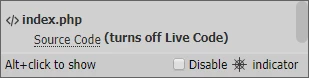
Is this one of the limitations of working with php files?

This topic has been closed for replies.

15 replies

karpiyonAuthor
Inspiring
December 20, 2018

Yes i  am aware of this and this is what i stated - the problem is only locally.

Still, it was mentioned here that it should be possible to use  the "/" even on the local site.

What I am trying to achieve is:

  1. Not to alter any of my code when i upload to the webserver.
  2. Be able to use live view options in DW & inspect locally on a browser
  3. Still use root related paths to for style (css) files. The reason is that is I use a php code to generate the site root the css property inspector does not work in DW (ALT+cilck on the element)
BenPleysier
Community Expert
Community Expert
December 20, 2018
Wappler is the DMXzone-made Dreamweaver replacement and includes the best of their powerful extensions, as well as much more!
karpiyonAuthor
Inspiring
December 20, 2018

and this is the error in chrome when i user the "/" infront of teh css file

B i r n o u
Legend
December 20, 2018

did you manually change the HTTP port ?... from 80 to 55648...

karpiyonAuthor
Inspiring
December 20, 2018
  • the path of the local site on your (physical) hard disk
    c:\My Doc\Google Drive\DnD\Bootstrap_4\
  • the screenshot of your test server settings made in DW
  • the screenshot of the DW file panels
  • the browser and URL address used to view the page
  • copy of the HTML code to manage links and includes....
    I am opening the file under /_templates/page.php so teh root is one directory above
    <link href="../css/main.css" rel="stylesheet" type="text/css">  this IS working
    <link href="/css/main.css" rel="stylesheet" type="text/css">  this is NOT working

THANKS

BenPleysier
Community Expert
Community Expert
December 20, 2018

karpiyon  wrote

  • copy of the HTML code to manage links and includes....
    I am opening the file under /_templates/page.php so teh root is one directory above
    <link href="../css/main.css" rel="stylesheet" type="text/css">  this IS working
    <link href="/css/main.css" rel="stylesheet" type="text/css">  this is NOT working

The reason is quite simple

../ goes up one directory

/ goes to the root directory

Going up one directory will work in every ambient. The root directory in a local XAMPP server is www (localhost) and not your site, while on the remote it will be the www/httpdocs/etc part which is your site.

Edit: I just noticed  that php - Root Directory of Website (using Xampp) - Stack Overflow has not been of much use to you. But the location of the XAMPP root directory is the cause of your problem. The problem disappears when you go remote.

Wappler is the DMXzone-made Dreamweaver replacement and includes the best of their powerful extensions, as well as much more!
B i r n o u
Legend
December 20, 2018

BenPleysier  a écrit

Edit: I just noticed  that php - Root Directory of Website (using Xampp) - Stack Overflow has not been of much use to you. But the location of the XAMPP root directory is the cause of your problem. The problem disappears when you go remote.

that's why I was using aliases that directly point on the website root folder and not on the xampp root folder

karpiyonAuthor
Inspiring
December 20, 2018

Thanks,

I have tried using / before the path but the file is not found.

When i try to  "view in browser" and then use the "inspect" option in chrome. i see that:

"http://localhost/main.css" cannot be found. i guess this is because the root of the server is "c:/xampp/htdocs" and not "c:/xampp/htdocs/DnD_B4"

On the actual website "/" in front will work but i need it to work on my local testing server as well without any script to find the root.

How do I configure aliases?

B i r n o u
Legend
December 20, 2018

well, to avoid any confusion and any untimely headache....

as a starting point, could you please tell me the following points:

  • the path of the local site on your (physical) hard disk
  • the screenshot of your test server settings made in DW
  • the screenshot of the DW file panels
  • the browser and URL address used to view the page
  • copy of the HTML code to manage links and includes....

thanks

Jon Fritz
Community Expert
Community Expert
December 19, 2018

It works as expected for me, but my .css links are standard html links.

I'd wager DW is having issues with php script in your css file paths, like it does with the Visual Media Queries Bar.

Nancy OShea
Community Expert
Community Expert
December 19, 2018

I have no problem seeing the properties in PHP files or the media queries bar if I turn it on.

The <head> of my php page comes from a server-side include file.

<?php include("includes/head.html"); ?>

The include file contains ordinary  links to external CSS files, some hosted locally and some on CDNs.   The local file paths are relative to my parent document which is at site root level.

<link rel="stylesheet" type="text/css" href="styles/style.css">

Nancy O'Shea— Product User & Community Expert
karpiyonAuthor
Inspiring
December 20, 2018

I guess than that it not the "include", it is the actual link i use.

To make sure I always get the right path I use:

<link href="<?php echo siteRoot()?>/css/bootstrap.rtl.css" rel="stylesheet" type="text/css">

How can i set the css relative to my site root?

When I try this:

<link href="<?php echo siteRoot()?>/css/main.css" rel="stylesheet" type="text/css">

The styles are respected but I can't see the properties.

When is use this:

<link href="/css/main.css" rel="stylesheet" type="text/css">

The properties are not respected and there are no styles to my page (same for "css/main.css").

Now the strange thing it that when I use both:

<link href="<?php echo siteRoot()?>/css/main.css" rel="stylesheet" type="text/css">

<link href="/css/main.css" rel="stylesheet" type="text/css">

The styles are respected andi can see the properties.

Can you explain this?

Perhaps it has to do with the fact your site is under the root of the testing server?