Inspiring
October 18, 2019
Question

Annoying Popups

  • October 18, 2019
  • 2 replies
  • 739 views

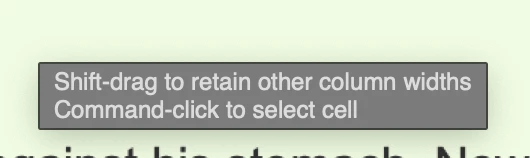
For some reason all of a sudden, I'm getting an annoying popup. Anyone know how to stop it?

Thanks

Alan

This topic has been closed for replies.

2 replies

Nancy OShea
Community Expert
Community Expert
October 18, 2019

Try this mobile first layout. It's crude but the basic structure is there.  Of course I don't have the code for your form so this one doesn't do anything.


<!doctype html>
<html lang="en">
<head>
<meta charset="utf-8">
<title>Unique Page Title</title>
<meta http-equiv="X-UA-Compatible" content="IE=edge">
<meta name="viewport" content="width=device-width, initial-scale=1">
<style>
body {
margin: 0;
background: #f1fce2;
font-family: Avant Garde, Avantgarde, Century Gothic, CenturyGothic, AppleGothic, sans-serif;
font-size: 20px;
}
header > * {
margin: 0;
padding: 0;
}
header {
background: #b9e182 url(https://dummyimage.com/200x200;)no-repeat left top;
min-height: 200px;
text-align: center;
}
header h1 {
padding-top: 5%;
color: darkgreen
}
header h2 {
color: #973100;
font-family: script, fantasy, cursive, serif;
}
nav {
background: #99cc66;
text-align: center;
border: 1px solid #000;
border-left: none;
border-right: none;
line-height: 2;
}
nav a {
text-decoration: none;
color: #000;
font-weight: bold;
padding: 1%;
}
nav a:hover, nav a:active, nav a:focus {
text-decoration: underline;
color: #FFF;
background: darkgreen;
}
main {
width: 98%;
margin: 3rem auto 0 auto;
}

/* Special Rules for desktops */
@media only screen and (min-width: 999px) {
main {width: 75%;}
}
main h3 {
color: #973100;
letter-spacing: 3px;
}
footer { border-top: 2px solid silver }

/**Contact Form**/
.container {
background-color: antiquewhite;
list-style-type: none;
padding: 0;
border-radius: 3px;
}
.form-row {
display: flex;
justify-content: flex-end;
padding: .5em;
}
.form-row > label {
padding: .5em 1em .5em 0;
flex: 1;
}
.form-row > input, .form-row > textarea, .form-row > button {
padding: .5em;
flex: 2;
}
.form-row > button {
background: darkred;
color: white;
}
/**Misc classes**/
.center { text-align: center }
.red {
color: #f51201;
font-weight: bold
}
.small { font-size: 14px; }
</style>
</head>

<body>
<header>
<h1>Story Title</h1>
<h2>Some pithy slogan...</h2>
</header>
<p class="snall center"><span class="red">STANDARD DISCLAIMER:</span> Lorem ipsum dolor sit amet, consectetur adipisicing elit. Hic.</p>
<nav> <a href="#">HOME</a> | <a href="#">CONTACT ME</a></nav>
<main>
<p class="small">Word Count:</p>
<p class="small">Published: mm/dd/yyyy </p>
<hr>
<p>Story goes here...</p>
<hr>
<h3>CONTACT THE AUTHOR</h3>
<p>Lorem ipsum dolor sit amet, consectetur adipisicing elit. Minima deleniti quidem nobis sit voluptates facilis ab accusamus pariatur praesentium corrupti magni delectus veniam harum a, maiores quia ea itaque, libero.</p>

<!--begin contact form-->
<form  action="form_processing_script.php" accept-charset="utf-8" method="post">
<fieldset>
<legend>Contact Form</legend>
<ul class="container">
<li class="form-row">
<label for="username">Name:</label>
<input type="text" id="username" placeholder="optional">
</li>
<li class="form-row">
<label for="email">Email Address:</label>
<input type="email" id="email" placeholder="optional">
</li>
<li class="form-row">
<label for="story">Story Ttile:</label>
<input type="text" id="story" placeholder="required" required>
</li>
<li class="form-row">
<label for="remarks">Remarks:</label>
<textarea id="remarks" 
required placeholder=" required">
</textarea>
</li>
<li class="form-row">
<button type="submit">Submit</button>
</li>
</ul>
</fieldset>
<!--/contact form-->
</form>
<!--/main--> 
</main>
<footer>
<p class="small center">Footer text....</p>
</footer>
</body>
</html>


Nancy O'Shea— Product User & Community Expert
Inspiring
October 19, 2019

Thanks Nancy

I'll play around with it and see what I can come up with.

Alan

Jon Fritz
Community Expert
Community Expert
October 18, 2019

That's just how it works when you use the old table layout method in DW's Design View. Unfortunately, there's no way to turn that particular pop-up off, aside from moving to a more modern layout approach using CSS.

Inspiring
October 18, 2019

Jon

I think I'm to far into using tables to learn CSS. Could you recomend a website to show me how it's done in CSS?

Thanks

Alan


PS As an alternative, is there anyone who could take my existing template that used tables and create it using CSS.

Thanks

Alan

Nancy OShea
Community Expert
Community Expert
October 18, 2019

Post some images showing us what the layout should look like on desktops, tablets and smartphones.


Nancy O'Shea— Product User & Community Expert