
Inspiring
June 5, 2020
Question

Applying Styling to lines of text ( CC-2018 )

  • June 5, 2020
  • 2 replies
  • 353 views

Hello Friends.....
I knew how to do this on Dreamweaver CS6 but now that
I am testing CC-2018, I can’t find the way to do it.
The question is how I apply a test style to THE SELECTED Text.
I remember I could select the text and apply the style to the selected

Text on CS6, but can’t figure out how to do it now on CC-2018
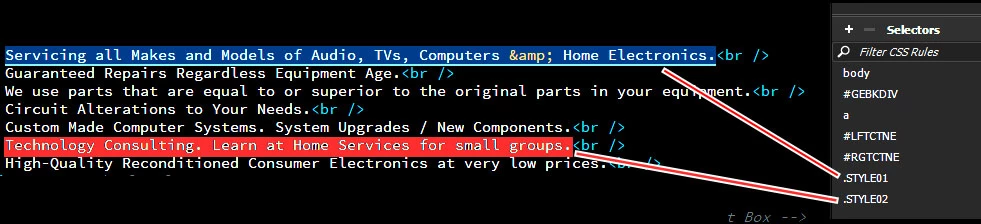
Thanks.

    This topic has been closed for replies.

    2 replies

    Nancy OShea
    Community Expert
    Community Expert
    June 5, 2020

    Is there some reason you're unable to use 2019 or 2020?


    1. Open the Properties panel (Alt+F3).

    2. Click HTML.

    3. Click on Class. See screenshot.


    Nancy O'Shea— Product User & Community Expert
    Jon Fritz
    Community Expert
    Community Expert
    June 5, 2020

    You can add classes to text pretty easily...

    1. Highlight the text in Design or Code View

    2. In the Properties Window, make sure the HTML button is active
    3. Also in the Properties Window, click the Class field dropdown menu

    4. Choos one of your classes

    This will wrap the text in a pair of <span> tags (they must be wrapped in "something" in order to apply a class and <span> tags are simple enough) and add the class accordingly.