



Attach or add javascript or css style sheet (.js or .css)
Hi. In my particular case I need a javascript - but I think this would be appropriate for anyone who may want to attach (or create/insert) a new .css script as well.
I'm working with a pre-set bootstrap template and making adjustments to it. In my particular case the Google Maps wasn't working so I removed it and installing a new one. I found a site that gave me one designed just for bootstrap and it gave me the HTML (which I can put anywhere) and the javascript written SEPARATELY. So what I wonder is how create a new box and then "insert" it along the horizontal "Source Code" line? Here's a pic of the line I'm referring to:
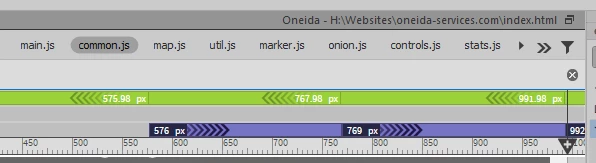
I know there is a .css "attach style sheet" located down "Tools" but the Google Map is a javascript (.js)...so in no way can be seen as an "existing .css file". Plus, copying the javescript (.js) will just be through notepad of something simple like that.
Here's the site I found all the Google Maps options which I may want to use for bootstrap:
https://mdbootstrap.com/javascript/bootstrap-google-map/#custom
I just now need to find how to sync the javescript (.js) in along with the codes like the picture above...
Thanks for any help on how to add extra .js and .css files to bootstrap scripts 

 AdChoices