


Participant
March 14, 2023
Question

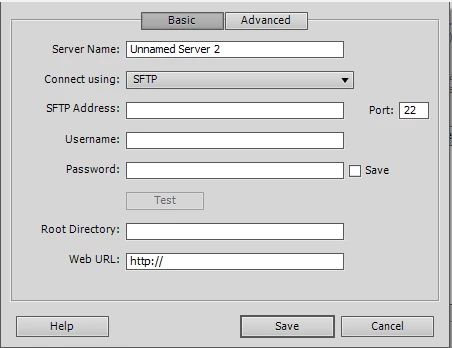
Authentication - Cannot Choose Private Key File

  • March 14, 2023
  • 1 reply
  • 225 views

Version 12.0 Build 5861

MS Windows

Refernce: How to set up connection between Dreamweaver and the publishing server (adobe.com)


Our server enviroment requires either two factor authentication or Public/Private Key.   After creating a new server or editing an existing server I do not have an option to choose Authentication Type.   How do I enable this choice or Public/Private Key? 


This topic has been closed for replies.

1 reply

Nancy OShea
Community Expert
Community Expert
March 14, 2023

You're using grossly outdated software from 2012.  Frankly, that doesn't bode well for you.


Meanwhile, security threats have necessitated higher standards in server connection protocols.  If you don't upgrade to modern web authoring software (highly recommended), at the very least, use a more secure S/FTP client like free FileZilla, Cyberduck or Transmit by Panic to connect with your server.


Adobe Dreamweaver CC - https://www.adobe.com/products/dreamweaver.html  (free 7 day trial available).

Screenshots from Dreamweaver CC -

Connection options.


If private Key file is selected, use OpenSSH .pem key file.


OTHER CODE EDITORS:
-- Codespaces (free, browser-based) - https://github.com/features/codespaces
-- Nova (Mac only, formerly called Coda) - https://nova.app/
-- Pinegrow - https://pinegrow.com/
-- Sublime Text - http://www.sublimetext.com/
-- Visual Studio Code (free) - https://code.visualstudio.com/
-- Wappler ~ Visual Web App Builder - https://wappler.io/

Hope that helps.


Nancy O'Shea— Product User & Community Expert