
Inspiring
August 7, 2017
Answered

Background File Activity Window Truncating

  • August 7, 2017
  • 3 replies
  • 2580 views

Windows 10 DW 2017.5 Build 9878

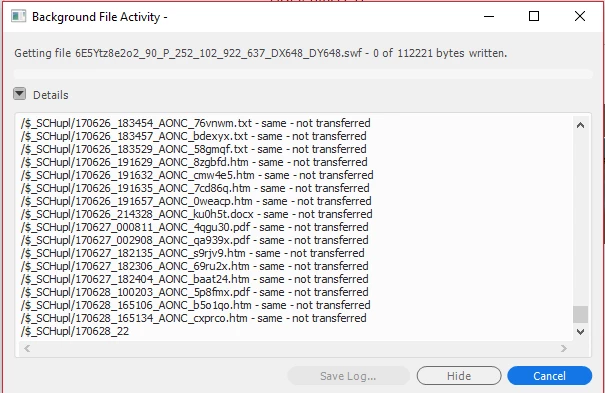
Apparently at some point the Window stops writing file information and truncates the last line.

The Sync completes but there is no further information in the window.

It also truncates the log at the same point.

Does anyone have any ideas???
This topic has been closed for replies.
Correct answer ricrat

From DW Tech Support
We are able to reproduce this issue at our
end and a bug DW-4146599 has been logged for the same. I am sure this will be fixed in the future releases of Dreamweaver.
As of now you can either use Dreamweaver CC 2015 on windows or you can install DW CC 2017.5 on a MAC machine as this bug is Windows specific.
  Regards
Vivek

3 replies

ricratAuthor
Inspiring
August 12, 2017

WIndows 10

Yes

>2000 files >100 folders

FTP Passive Using FTP optimization

Occurs on two different development machines

Already have a support case

0189181895

Can we move discussion there???

Preran
Community Manager
Community Manager
August 14, 2017

Thank you. I see that your case is still being investigated. Do update this post when your issue is resolved.

The support team has the required tools to investigate your issue. Please continue the discussion using your case number with the team.

Thanks,

Preran

Community Manager
August 9, 2017

Hi,

Are you using Hi resolution display with scaling higher than 100%?

If yes, then I would suggest to switch back to 100% scaling as DW 17.5 is not yet Hi DPI aware.

Thanks,

Lalita

ricratAuthor
Inspiring
August 9, 2017

Nope. 

Strike 2

LOL.

100% now and always.

I am using a Hi resolution screen 3440 x 1440 but scaling is 100% and has never changed

Preran
Community Manager
Community Manager
August 8, 2017

Can you check out the following post and see if it is related to your issue?

Background File Activity Window

If you still need help, contact the support team using this link Contact Customer Care Update this post after your issue has been resolved.

Thanks,

Preran

ricratAuthor
Inspiring
August 8, 2017

Not even close!!!

Checked it before chat.

NO weird files or sub-directories

No FTP errors - Just a truncated window output and log file.

Preran
Community Manager
Community Manager
August 9, 2017

Thank you for letting us know. Before you contact support, can you try resetting preferences? It's a shot in the dark, but would be worth trying I think

Unusual behavior in Dreamweaver? Try restoring preferences.

If that doesn't work, try contacting Adobe Support. They should be able to investigate it from here.

Also, have you updated all drivers on your computer?

Thanks,

Preran