

Ranksto
Participant
August 28, 2026
Answered

Best way to optimize high-quality photography images in a Dreamweaver website?

  • August 28, 2026
  • 4 replies
  • 69 views

I’m working on a photography-focused website in Dreamweaver and I’m trying to find the right balance between image quality and website performance.

Photography websites often need large, high-resolution images for portfolios, weddings, events, and galleries, but using too many large files can make pages load slowly.

I’d be interested to know how other Dreamweaver users handle this. Do you usually resize and compress images before uploading them, use WebP, or rely on another workflow?

I came across this photography website while looking at different examples of image-heavy sites:

properpix.com

The gallery looks quite image-focused, so it made me wonder what the best approach is for keeping this type of website visually strong without sacrificing loading speed.

Would appreciate any recommendations for image optimization and responsive image handling in Dreamweaver.
    Correct answer Nancy OShea

    Do you usually resize and compress images before uploading them,

    ==========

    Absolutely yes. 

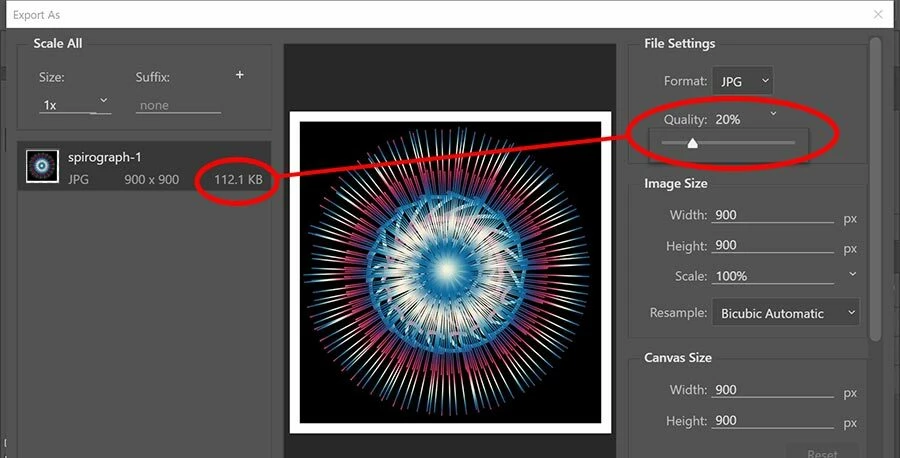
    Use Photoshop’s File > Export > Export As panel.


    1. Adjust the quality slider to reduce bandwidth. As long as your picture contains enough pixels, you’ll have no noticeable quality issues on the web. 
    2. Also check the box to export as sRGB color, the web color standard. This helps ensure consistent X browser color rendering. 

    Optimized JPEGs work fine for me but you can SaveAs WebP if you think you need to.

    Run your page through a Speed Checker. Images are not the only reason for poor page performance.

    https://gtmetrix.com/


    4 replies

    Nancy OShea
    Community Expert
    Community Expert
    September 3, 2026

    According to usage stats, WebP is used by less than 22% of websites.

    https://w3techs.com/technologies/details/im-webp

    And AVIF, which offers better quality & compression, is used by fewer than 2% of websites.  

    https://w3techs.com/technologies/details/im-avif


    Most sites use SVG (vectors) or JPEG, PNG (rasters) due to their widespread browser support.


    Nancy O'Shea— Product User & Community Expert
    adaptable_Beefe96
    Participant
    September 1, 2026

    For a photography-focused website, I’d recommend optimizing the images before uploading them rather than relying on the website to handle everything.

    A few things that can help:

    • Resize images to the maximum dimensions they actually need on the page.
    • Use WebP where possible to reduce file size while maintaining good visual quality.
    • Compress JPEG/PNG files before uploading them.
    • Use responsive images (srcset / appropriate image sizes) so mobile devices don't download unnecessarily large files.
    • Keep the original high-resolution files separately and use optimized versions for the website.
    • Check the finished pages with a performance tool such as Google PageSpeed Insights or GTmetrix to identify other bottlenecks.

    For portfolio and photography sites, finding the right balance between image quality and file size is usually more important than simply using the highest possible resolution.

    Ranksto
    RankstoAuthor
    Participant
    September 1, 2026

    Thanks alot for your kind and to the point reply…...

    Nancy OShea
    Community Expert
    Nancy OSheaCommunity ExpertCorrect answer
    Community Expert
    August 30, 2026

    Do you usually resize and compress images before uploading them,

    ==========

    Absolutely yes. 

    Use Photoshop’s File > Export > Export As panel.


    1. Adjust the quality slider to reduce bandwidth. As long as your picture contains enough pixels, you’ll have no noticeable quality issues on the web. 
    2. Also check the box to export as sRGB color, the web color standard. This helps ensure consistent X browser color rendering. 

    Optimized JPEGs work fine for me but you can SaveAs WebP if you think you need to.

    Run your page through a Speed Checker. Images are not the only reason for poor page performance.

    https://gtmetrix.com/


    Nancy O'Shea— Product User & Community Expert